
It is 7:40am and your phone buzzes while you are backing the truck down a client’s driveway. It is the homeowner from the job across town, the one whose kitchen you demoed Tuesday. “Hey, just checking in, any update on timing? Haven’t heard anything since last week.” You have heard this same message, from this same person, four times in three weeks. The work is actually going fine. The framing inspection passed yesterday. But they do not know that, because nobody told them, so they fill the silence with worry and they fill the worry with a text to you. You fire back “all good, framing passed, more soon,” and get on with your day. Nothing is wrong on the job. Something is very wrong with how they find out about it.
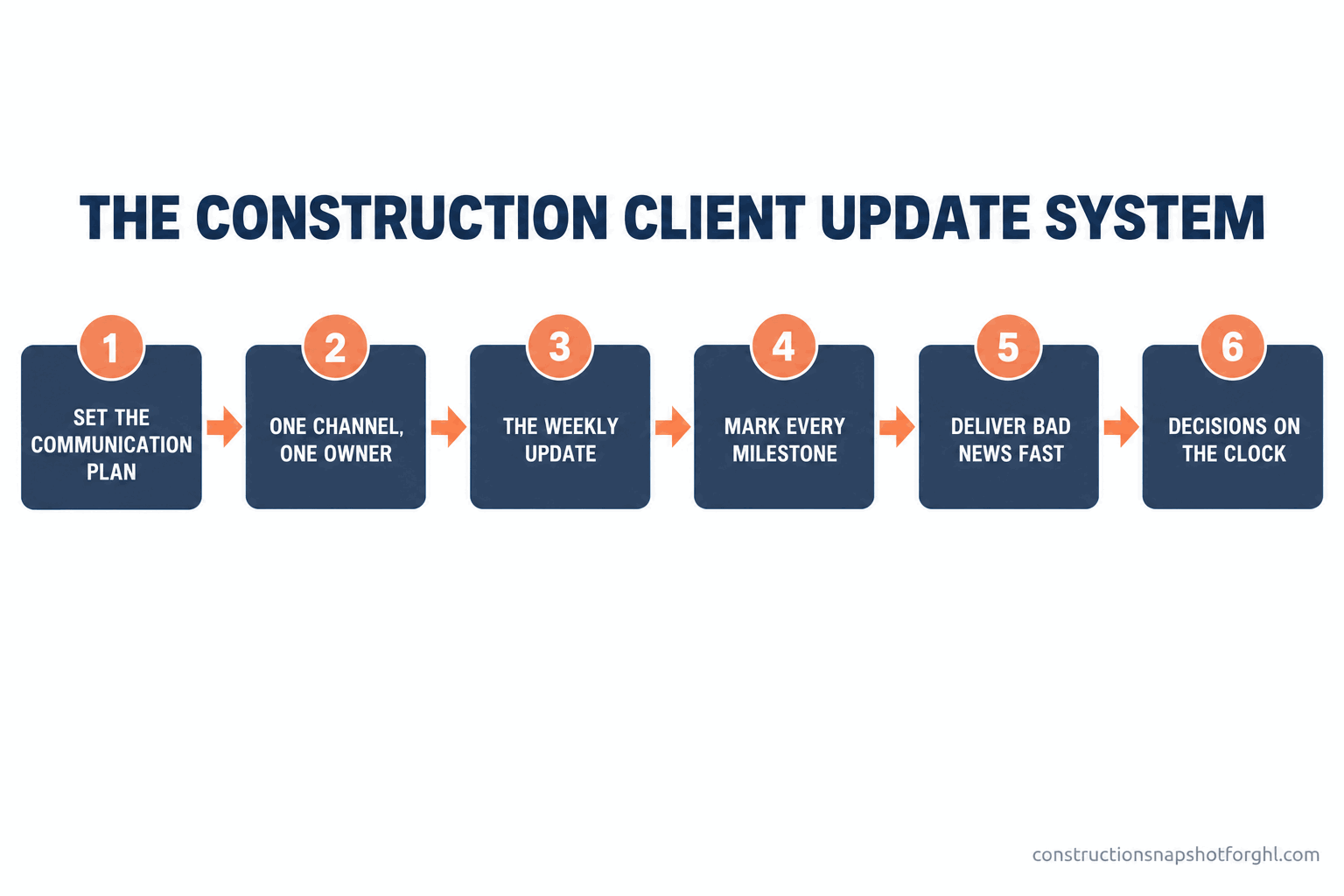
Here is the short version. Clients who call you constantly for updates are not difficult, they are uninformed, and the silence is your fault, not theirs. When a homeowner has no idea what is happening on their largest-ever purchase, they do the only thing they can: they chase you. The fix is not better willpower or a nicer attitude, it is a repeatable update system. Set the communication plan before day one, pick one channel and one owner so nothing scatters across six text threads, send a short weekly update on the same day every week whether there is news or not, mark every milestone the moment it happens, deliver bad news fast and first, and keep every decision on a visible clock. Run it the same way on every job and the “any update?” calls stop, because the answer arrives before the question does.
In this post
- Why clients call you for updates
- What the “any update?” call actually costs
- The fix is a system, not more willpower
- Stage 1: Set the communication plan before the first swing
- Stage 2: One channel, one owner, one place
- Stage 3: The weekly heartbeat update
- Stage 4: Mark every milestone the moment it happens
- Stage 5: How to deliver bad news fast
- Stage 6: Keep decisions and approvals on the clock
- Steal this: the five updates that run the whole build
- Three ways this plays out by shop size
- The legal part: texting clients, consent, and in-home sales
- Common objections
- Where to start this week
- Frequently asked questions
- Sources
Why clients call you for updates
Put yourself on the homeowner’s side of the fence for a second. They just handed you the largest check they will write outside of buying the house itself. Their kitchen is a hole in the floor, their family is eating off a card table in the garage, and the one person who knows what happens next is a builder they talked to once this week, maybe. They cannot see the framing inspection that passed. They cannot see the cabinet order that shipped. All they can see is that it is Thursday, the house is still torn up, and nobody has said a word. So they text you. That is not neediness. That is a reasonable human being trying to get information about their own home through the only door you left open.
The data backs this up hard. In a 2025 survey of 1,000 U.S. homeowners who had recently hired a home-services contractor, communication and scheduling problems were the number-one complaint at roughly 38%, while cost ended up higher than expected came in at just 21% (FIELDBOSS, 2025). Read that again. Homeowners are nearly twice as bothered by not knowing what is going on as they are by the bill. The things they listed were late arrivals, trouble getting a straight answer on scheduling, and a lack of updates. Every one of those is a communication failure, not a workmanship failure. You can build a flawless addition and still have a client who tells everyone you were a nightmare to work with, purely because they never knew what day it was on their own project.
Top homeowner complaint about a contractor: communication problems far outweigh price. Share of 1,000 homeowners naming each as their biggest frustration. Source: FIELDBOSS 2025 homeowner survey.
This lines up with larger satisfaction research too. When GuildQuality compiled survey data from more than 100,000 homeowners across dozens of remodeling project types, the three areas most tied to whether a client would recommend their builder were problem resolution, being professional and organized, and communication (GuildQuality / Qualified Remodeler). Notice what is not on that short list: the quality of the tile work. Homeowners largely assume you can build. They grade you on whether you kept them in the loop.
What the “any update?” call actually costs
The obvious cost is your time. Every “any update?” text is an interruption you answer from a ladder, a reply you half-type and forget to send, a phone call that eats twenty minutes you did not have. Multiply that across eight active jobs and you have lost a half-day a week to questions you could have answered once, in advance, in ninety seconds.
The bigger cost is the one you cannot see on a time sheet: the referral you will never get. Remodeling is a referral business. In long-running industry surveys, referrals from past clients and repeat business together account for close to 80% of a remodeler’s leads, with referrals at about 35% and repeat work at another 32% (ProRemodeler Business Results Survey). That share is even higher for smaller shops, which lean harder on repeat clients than big firms do. So the homeowner you left in the dark is not just a bad afternoon. They are the three jobs you will not get next year, because a client who felt ignored does not send their sister-in-law your way, no matter how good the kitchen turned out. With 128,000 remodeling firms in the country competing for that work (NAHB, August 2026), the builders who win on communication are quietly taking the referral pipeline from the ones who do not.
There is a third cost that shows up at the worst time: disputes. An anxious, uninformed client turns every small bump into a fight, because they were already primed to believe you were hiding something. A delay you explained in advance is a shrug. The same delay they discover on their own is a betrayal. Silence turns normal construction friction into a lawyer’s letter.
The fix is a system, not more willpower
Here is the trap most builders fall into. They know communication matters, so they resolve to be better at it. They promise themselves they will call more. And it works for a week, until a sub no-shows and a concrete pour runs long and the whole thing falls off the truck. Communication by willpower fails the first busy week, which on a jobsite is every week.
The builders who keep clients calm are not more disciplined than you. They just run their communication on rails, so it does not depend on anyone remembering. A set day for the weekly update. A fixed list of milestones that trigger a message. One channel everything flows through. One person who owns it. The six stages below are that system. You can run them on a whiteboard, in a shared spreadsheet, or inside a CRM built for how contractors actually work that fires the routine messages for you. The tool is a choice. The system is not.
Stage 1: Set the communication plan before the first swing
The update system starts before demo day, in the pre-start meeting. Before you break ground, you tell the homeowner exactly how communication will work on their job: what you will send, how often, on which channel, and who they should contact for what. This takes five minutes and it reframes the entire relationship. Instead of a client wondering when they will hear from you, you have a client who knows a Friday update is coming every week and knows who to text if something is urgent.
Spell out four things. The cadence (“you will get a short update from me every Friday afternoon”). The channel (“it will come by text, and here is the number it comes from”). The point of contact (“for anything about the schedule or the budget, you come to me, not the crew on site”). And the response rule (“if you text me, you will hear back within one business day, usually same day”). Write it down, hand it over, and you have just pre-answered the “any update?” question for the entire project.
Where it breaks: the unspoken plan. You intend to keep them updated, but you never actually tell them what to expect, so they set their own expectation, which is usually “I should hear something every day.” Say the cadence out loud and in writing. A client who knows Friday is update day will not text you on Tuesday. A client who was told nothing will text you whenever the anxiety spikes. This is the same move that makes client onboarding in the first two weeks go smoothly, extended across the whole build.
Stage 2: One channel, one owner, one place
The single fastest way to lose control of client communication is to let it happen everywhere. The homeowner texts your cell, emails your estimator, catches the lead carpenter in the driveway, and calls the office, and now the story of the job lives in four heads and no record. Nobody knows what the client was last told, so you either repeat yourself or contradict yourself, and both make you look disorganized.
Pick one channel for the official project communication and one person who owns it. For most small builders that channel is text, because it is where homeowners actually live. The same 2025 survey found that when homeowners choose how they want scheduling and updates delivered, about 50% prefer a phone call and 24% prefer text, with app or email trailing (FIELDBOSS, 2025). The practical read: a quick text for the routine update, a phone call for anything big or bad. What matters most is that it is consistent and it leaves a record, so anyone on your side can see exactly what the client knows.
How homeowners prefer to get scheduling and status updates. Percentage choosing each channel, rounded. Source: FIELDBOSS 2025 homeowner survey.
Where it breaks: the side-channel sprawl. The crew is on site, the homeowner is friendly, and suddenly every schedule question is getting answered by whoever happens to be holding a drill. The fix is not to forbid the crew from being nice, it is to route anything about timing, money, or decisions back to the owner: “Good question, [owner] handles the schedule, I will make sure they text you today.” A missed-call text-back workflow covers the other leak, the after-hours call that would otherwise vanish into voicemail.
Stage 3: The weekly heartbeat update
This is the one stage that does more than all the others combined. Once a week, on the same day, every client with an active job gets a short update from you. Same day, every week, no exceptions, even when there is nothing new to report. Especially when there is nothing new to report. “Nothing changed this week, still on track for the [date] finish” is a complete update, and it is often the most reassuring message you will send, because it tells the homeowner the silence is not a problem.
Keep it to four lines: what got done this week, what is happening next week, anything you need from them, and the current target date. That is it. It takes ninety seconds to write and it preempts the entire week’s worth of “any update?” texts, because you answered the question before they could ask it. The magic is in the rhythm. A client who gets a reliable Friday update stops living in uncertainty, because they know the next piece of information is never more than a few days away. The anxiety that drove the chasing has nowhere to grow.
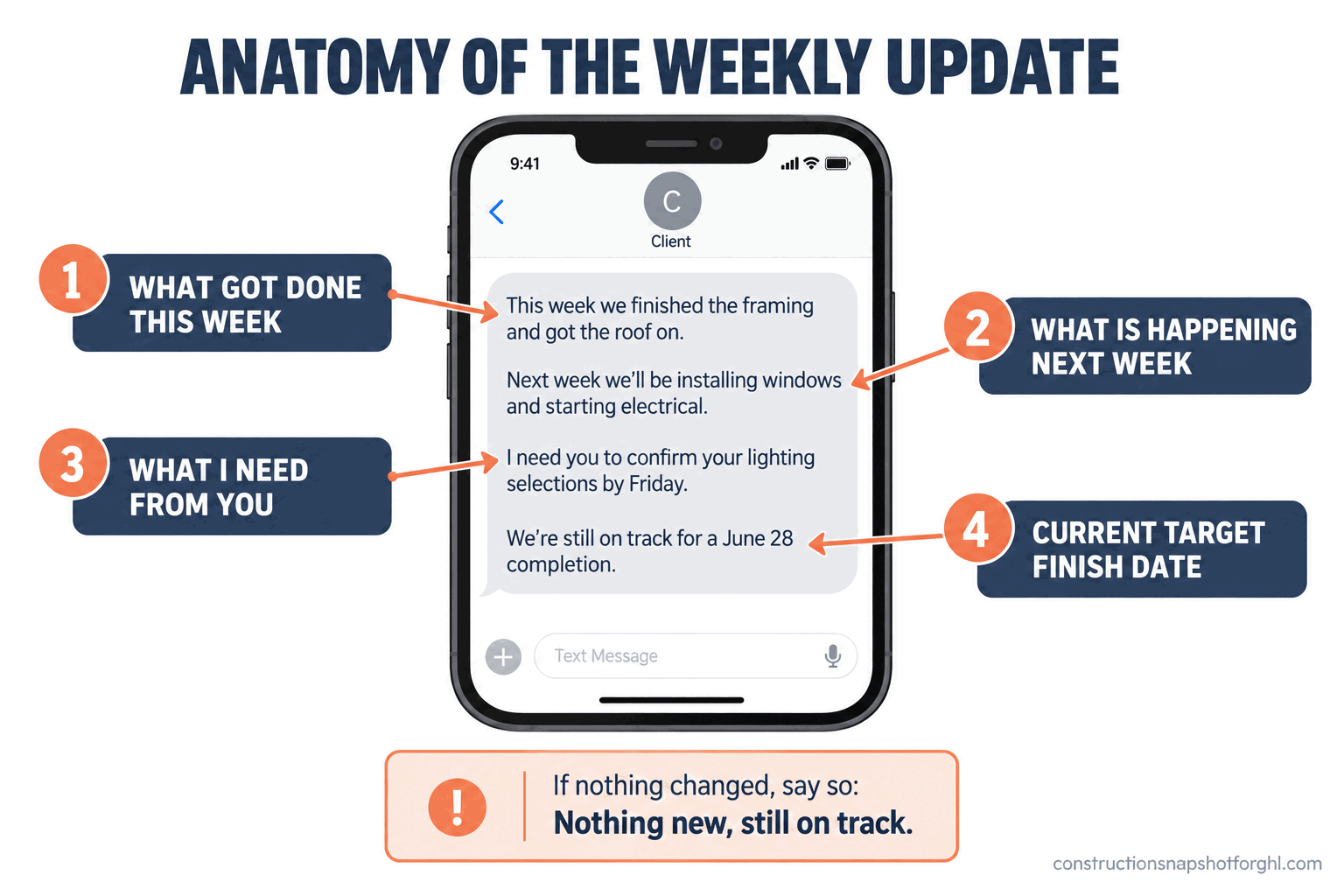
Where it breaks: the week you skip because nothing happened. That is the exact week the client panics, because the one thing more alarming than bad news is no news on the day news was promised. Send it anyway. The discipline of sending the update when there is nothing to say is the whole point, and it is why so many builders automate the reminder to themselves even when they still write the message by hand.
Stage 4: Mark every milestone the moment it happens
Between the weekly updates, there are moments that deserve their own message: the demo is done, the foundation is poured, framing is up, rough-in passed inspection, drywall is hung, cabinets are set. Each of these is visible, concrete progress, and each one is a chance to make the homeowner feel the project moving. A milestone text the same day it happens is pure deposit into the trust account, and it costs you one line and sometimes a photo.
Milestones matter because construction progress is invisible to a homeowner for long stretches. Weeks go by inside the walls where nothing looks different from the street. A milestone update translates hidden work into felt progress: “Rough-in plumbing and electrical both passed inspection today, we are cleared to insulate and close up the walls next week.” Now the client sees the job advancing, even though the house looks the same from the curb. Photos multiply the effect. A single shot of the stamped inspection card or the newly set cabinets does more for confidence than a paragraph.
Where it breaks: the builder who only reaches out when something is wrong. If the only unscheduled message a client ever gets is bad news, they learn to dread your name on their screen. Milestones balance the ledger, so that your messages are mostly good news, which makes the occasional hard one land far softer. A client who hears from you at every win trusts you at the one loss.
Two ways to run client communication on the same job
| Feature | The default (reactive) way | The update-system (proactive) way |
|---|---|---|
| How the client learns the status | They text you to ask | You told them before they wondered |
| Who starts the conversation | The anxious homeowner | You, on a schedule |
| What silence means to them | Something is going wrong | On track, update coming Friday |
| How bad news lands | Discovered late, feels hidden | Delivered first, feels handled |
| Where the job's story lives | Four phones, no record | One channel, one log |
| What it does to referrals | Quietly kills them | Earns the next three jobs |
Stage 5: How to deliver bad news fast
Every job has a bad day. A backordered window pushes the finish two weeks. A sub no-shows. You open a wall and find rot nobody could have known about. The bad news itself is rarely what wrecks the relationship. What wrecks it is how and when the client finds out. The rule is simple and it is the opposite of the instinct: deliver bad news fast and first, before the client discovers it on their own, and bring the plan with it.
The instinct is to sit on the bad news until you have it fully solved, so you can deliver the problem and the fix in one tidy package. Resist it. A client who finds out about a two-week delay from the missing window, on a day you said you would be installing it, feels deceived. The same client who got a text the moment you learned about the backorder, with a clear new date and what you are doing about it, feels taken care of. Same delay. Opposite reaction. The difference is entirely in the timing of the telling. When you call with bad news, lead with it, then immediately give the plan: “The window supplier pushed our order to the 24th. Here is what I am doing: I have the rest of the crew moving to [other task] so we lose no time elsewhere, and the new finish target is [date]. I will update you the moment the window ships.”
Where it breaks: the hopeful delay. You know Monday that the cabinets slipped, but you tell yourself it might still work out, so you wait. By the time you admit it, the client has already noticed, and now you are explaining both the delay and why you sat on it. Tell them the day you know. Delivering change orders and surprises the right way is the same muscle: fast, documented, with the path forward attached.
Stage 6: Keep decisions and approvals on the clock
A huge share of mid-build delay is not your crew, it is a decision the homeowner has not made. The tile is not picked. The paint color is still “we are thinking about it.” The change order is sitting unsigned. Every one of those is a stalled clock, and the cruel part is that the client often does not realize their indecision is what is holding up their own job. Your communication system has to make the cost of a slow decision visible, in writing, in real time.
The move is to attach a date and a consequence to every decision you are waiting on, and to put it in the weekly update so it never gets lost. “Reminder: I need your tile selection by Friday the 14th to keep the bathroom on schedule. If it lands after that, the install shifts to the following week.” That is not pushy, it is clarity, and clients are grateful for it, because most of them genuinely do not know which decisions are time-critical. This is where a tight selections process that keeps clients from stalling the build plugs directly into your update rhythm. The weekly update becomes the place where every open decision and its deadline is restated, so nothing drifts and no one is surprised when a slow “yes” costs a week.
Where it breaks: the soft ask. “Whenever you get a chance, let me know on the tile.” That gives the client no deadline, no stakes, and no reason to act today, so it sits. Give every decision a date and a plainly stated consequence. You are not being demanding, you are protecting their schedule, and they will thank you for the push.
Steal this: the five updates that run the whole build
Three ways this plays out by shop size
The six stages are the same at every size. What changes is who owns the update and how much of it you automate.
The solo operator or small remodeler (6 to 12 jobs, 1 to 3 people). You are the builder, the estimator, and the communicator, and the weekly update is one more thing competing with actual work. Your risk is not volume, it is that Friday gets away from you. Keep it brutally simple: set a recurring Friday-afternoon alarm, save the five messages above as text snippets on your phone, and send the weekly update to every active client in one sitting. Fifteen minutes total. The one piece worth automating even at your size is intake, so an after-hours call or missed text gets an instant “got your message, I will get back to you by tomorrow” instead of silence.
The mid-size design-build or remodeling firm (15 to 25 jobs, 5 to 10 people). Now you have more active jobs than one person can track in their head, and the handoff between the field and the office is where updates fall through. Assign one owner for client communication, usually a project coordinator or office manager, and give them a simple board of every active job and when each client was last updated. This is the size where automating the weekly reminder and the milestone triggers pays for itself, because the volume is high enough that manual follow-up quietly slips. A trained coordinator or GHL virtual assistant can own the entire client-update loop, freeing you to run the jobs.
The larger GC or production builder (30 to 40 jobs, 10-plus people). At this volume, client communication is a standard, not a task, and consistency across crews is the whole game. Every project manager has to send the same weekly update in the same voice on the same day, or the client experience swings wildly depending on who they drew. The answer is templated, scheduled messaging triggered off your project stages, so the milestone text fires automatically when a phase is marked complete and the PM only adds the human touch. This is also where you start tracking which jobs went quiet, because a client who stopped responding to updates is often a client with a complaint brewing. The front end of the business is where leads leak; the client-update system is where you keep the ones you won.
The legal part: texting clients, consent, and in-home sales
Running your updates by text is the right call, because it is where homeowners want them, but there are a couple of rules worth knowing so a good system does not create a problem. These vary by state, so treat this as a map, not legal advice.
First, consent for texting. The federal Telephone Consumer Protection Act governs text messages, and the clean way to stay on the right side of it is simple: get the client’s agreement to receive project texts, which you do naturally in the pre-start meeting, and keep your messages about their actual project rather than marketing. Transactional updates about a job the client hired you for are a different animal from promotional blasts, but you still want a clear yes on file and an easy way for them to opt out (FCC on robocalls and texts). Build the consent into your onboarding paperwork and you never think about it again.
Second, two rules that touch the start of the job. If you ever sign a homeowner for more than $25 in their own home, the FTC Cooling-Off Rule gives them three business days to cancel and requires you to give written notice of that right at the time of sale (FTC Cooling-Off Rule). And if you build in California, your CSLB license number has to appear in all of your advertising, including your website, trucks, and written materials, under Business and Professions Code 7030.5 (California BPC 7030.5). None of this changes how you run the update system. It just means the paperwork that sits underneath it is clean, and a quick review with a contract lawyer in your state is cheap insurance.
Common objections
“Won’t a scheduled weekly update feel robotic to clients?” Only if you write it like a robot. The cadence is the system; the words are still yours. A client does not experience “it is Friday so the automated reminder fired,” they experience “my builder reaches out every week like clockwork and I never have to chase them.” The rhythm reads as reliability, not automation, as long as the message itself sounds like a human who knows their specific job. Specificity is what keeps it warm.
“I already pay for project-management software, doesn’t it handle client updates?” Check what it actually sends. Most project-management tools have a client portal, which is a place the homeowner can go look if they remember to. That is not the same as a message that arrives on their phone whether they thought to check or not. Homeowners do not log into portals, they read texts. If your tool can push a real text update, use it. If it only offers a portal they have to visit, the proactive layer, the message that goes out and finds them, is the piece you are still missing.
“My crews are too busy building to be sending texts all day.” Good, they should be building. The weekly update is not a crew job, it is an owner or coordinator job, and it takes ninety seconds per client once a week. The milestone texts can fire automatically off your schedule. The whole point of making this a system instead of a vibe is that it does not steal hours from the people swinging hammers. If anything, it gives them hours back, because a well-updated client interrupts the jobsite far less.
“We only do a handful of jobs at a time, is this worth the setup?” It is worth more at low volume, not less, because with a handful of jobs every single client is a meaningful share of your referral pipeline. Lose one to a bad communication experience and you have lost a real chunk of next year’s work. The setup is one afternoon: write your pre-start plan, save the five messages, pick your Friday. You are not building a call center. You are making sure the four clients you have right now all become the clients who send you the next twelve.
Where to start this week
Go back to that 7:40am “any update?” text. The builders who never get it are not working harder or dodging their phones, they just answered the question before it was asked. Pick your update day today, Friday works for most. Write your pre-start communication plan on one page and read it to your next client before demo. Save the five messages above to your phone. Then send this Friday’s update to every active client in one sitting, even the jobs where nothing changed. That is the entire system, and it is the difference between clients who chase you and clients who trust you enough to hand you their neighbor’s number. The update rhythm that runs it all, on schedule and without you remembering, is the piece we build.
Frequently asked questions
How often should I update a construction client?
At minimum, once a week on the same day, every week, for the life of the job, even when there is nothing new to report. On top of that weekly heartbeat, send a short message at every visible milestone (demo done, inspection passed, cabinets set) the same day it happens. The weekly update sets the rhythm that stops clients from chasing you; the milestone messages keep the good news flowing so the occasional bad news lands softer.
What should a weekly construction update include?
Keep it to four lines: what got done this week, what is happening next week, anything you need from the client (a decision, a payment, access), and the current target completion date. That is a complete update and it takes about ninety seconds to write. If nothing changed, say exactly that: 'Nothing new this week, still on track for [date].' A no-news update is often the most reassuring one you send.
Why do my clients call me constantly for updates?
Because you have not given them another way to know what is happening on their largest-ever purchase, so they do the only thing they can and chase you. The constant calling is almost never about neediness, it is about silence. When you send a reliable weekly update and mark every milestone, the anxiety that drives the calls has nowhere to grow, and the chasing stops because the answer now arrives before the question.
Should I update clients by text, email, or a client portal?
Text for the routine updates, a phone call for anything big or bad. In a 2025 homeowner survey, about half preferred a phone call and a quarter preferred text for scheduling and status, with portals and email trailing. The key weakness of a portal is that homeowners do not log in; they read texts. A proactive message that arrives on their phone beats a portal they have to remember to visit.
How do I tell a client about a delay without losing their trust?
Tell them the day you learn it, before they discover it on their own, and bring the plan with the bad news. Lead with the problem in plain words, then immediately give the new date and what you are doing to protect the rest of the schedule. The delay itself rarely breaks the relationship; finding out late, and feeling like you hid it, is what does. Fast and first, with a path forward attached, keeps the trust intact.
Can I automate construction client updates?
Yes, and the smart split is to automate the trigger and the reminder while keeping the words human. Milestone texts can fire automatically when you mark a job phase complete, and a weekly reminder can prompt you (or a coordinator) to send the heartbeat update. A CRM or GoHighLevel setup built for contractors can run the whole cadence, so the right message goes out on the right day without anyone remembering, while you still add the specific detail that makes it feel personal.
Sources
- FIELDBOSS: HVAC Customers Care More About Communication Than Price (2025 survey of 1,000 homeowners)
- GuildQuality / Qualified Remodeler Customer Satisfaction Report
- ProRemodeler: Business Results Survey, Repeats and Referrals
- NAHB: Three states drive over 20% of remodeling activity (August 2026)
- FCC: Stop unwanted robocalls and texts (TCPA consent)
- FTC Cooling-Off Rule
- California BPC 7030.5 (license number in advertising)