
The electrician opens a wall on a Tuesday and finds knob-and-tube no inspector is going to pass. You already know what that means: a half-day of extra work, a few hundred in materials, and a conversation with a homeowner who thinks the price you quoted is the price, full stop. So you make the call most builders make. You fix it, you keep the crew moving, and you tell yourself you will “sort out the money later.” Three weeks later “later” arrives as a line on the final invoice the client never agreed to, and now you are not a builder, you are a guy trying to collect on a bill the homeowner is sure you made up. That fight was avoidable. It started the moment you did the work without the paperwork.
Here is the short version. A change order turns into a fight for one reason: the client finds out about the money after the work is done, not before. The fix is a process that catches the change the moment it shows up, prices it fast, presents it as a decision the homeowner gets to make instead of a bill they have to swallow, and gets a signature before anyone picks up a tool. Done that way, a change order is just a normal part of the job the client expected. Done the other way, it is the single fastest path to a bad review, a withheld payment, and a referral you will never get. This post gives you the six-stage approval process, the exact messages that get a fast yes, and the rules that make a signed change order hold up when the client’s memory gets selective.
In this post
- Why change orders turn into fights
- What a sloppy change order actually costs you
- The six-stage change-order approval process
- What goes on the change order itself
- Steal this: the messages that get a fast yes
- Run it three ways: solo, mid-size, and large
- The rules that make a change order hold up
- Common objections
- Frequently asked questions
- Sources
Why change orders turn into fights
Start with the thing most builders get backward. The homeowner is almost never angry about the money itself. They are angry about being surprised by it. A client who signed off on a $600 knob-and-tube fix on Tuesday morning feels like a partner who made a smart call. The same client who sees that $600 for the first time on a closeout invoice feels like they got worked. Same wall, same wire, same price. The only variable that changed is when they found out, and that variable is entirely in your control.
This is why the “I’ll add it to the final bill” habit is so expensive. It is a trust decision, not a paperwork shortcut, and it is the wrong one. You are trading a two-minute conversation now for a thousand-dollar argument later, with your money held hostage in the middle of it. The research backs this up: in the 2026 Dodge Construction Network and Clearstory study, only about one in three contractors said their change-order process actually works, and 83 percent said it hurts their cash flow (Dodge/Clearstory). That is a collection problem that started as a communication problem.
The other reason change orders blow up is that builders treat them as an interruption instead of a step. A change comes in, you are already behind, so you do the work and promise yourself you will write it up when things calm down. Things never calm down. In that same study, 97 percent of trade contractors admitted they begin work on at least some change orders before approval, which is exactly the exposure that turns into written-off revenue (Dodge/Clearstory). On a remodel with real unknowns behind the walls, the change order is not getting in the way of the job. It is the job.
What a sloppy change order actually costs you
The money is bigger than a single unpaid line. Look at the pattern across real projects. A University of Nevada study of 161 school renovation projects worth about $1 billion found that change orders added an average of 3.56 percent to total contract cost, and that three-fourths of all project cost growth came from change orders (UNLV study, 2018). Renovation is where the surprises live, and the money that moves on a renovation moves through change orders. If your process for handling them is a sticky note and good intentions, that is the part of every job where your margin quietly leaks out.
Share of contractors reporting each, 2026 Dodge Construction Network and Clearstory change-order research. The gap between “start the work” (97%) and “process actually works” (33%) is where unpaid change-order money lives. Source: Dodge/Clearstory, 2026.
Then there is the schedule. In the UNLV data, about 40 percent of projects hit schedule overruns tied to change orders (UNLV study, 2018), because an unpriced change does not just cost money, it stalls the sequence while you re-quote and re-order. It is the same pattern McKinsey found on the biggest jobs in the world, where large projects typically run about 20 percent longer than scheduled and up to 80 percent over budget, with poor change management a repeat offender (McKinsey).
And when it goes all the way bad, it goes to a dispute. In the 2025 Arcadis Global Construction Disputes Report, errors and omissions in contract documents were the leading cause of disputes in North America for a second straight year (Arcadis via BD+C). Your remodel is not a seven-figure dispute, but the cause is identical: vague paperwork about who agreed to what. The homeowner version is the closeout invoice nobody signed. It tracks with what homeowners report, too. In the 2026 U.S. Houzz & Home Study, 37 percent went over their renovation budget, driven by costlier-than-expected products (52 percent), higher-end material choices (35 percent), and scope that expanded mid-project (31 percent) (Houzz). Every one of those is a change order waiting to happen, and a chance to either build trust or burn it.
The six-stage change-order approval process
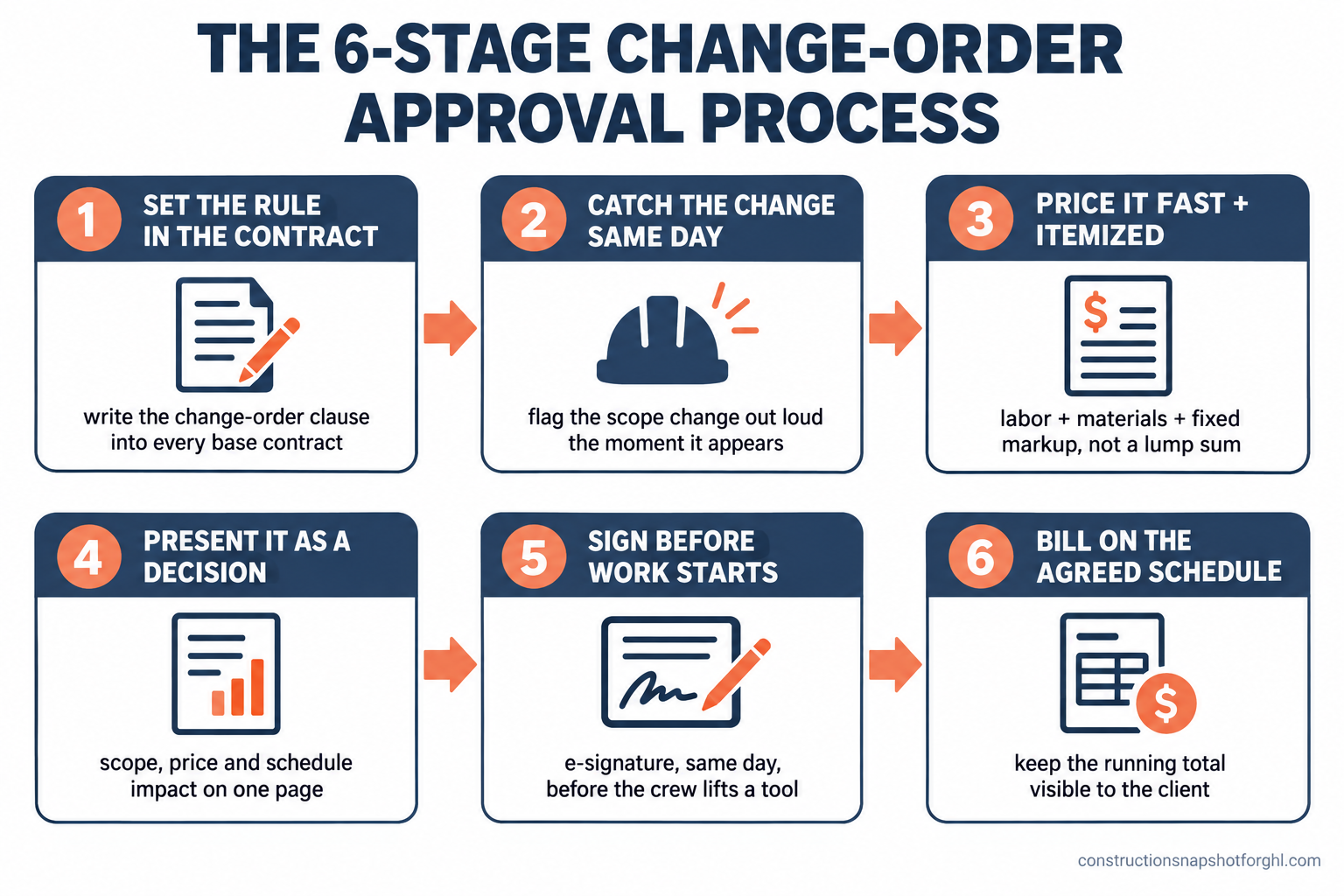
Here is the system end to end. Each stage closes one gap where change orders normally turn into fights, and each has a failure mode I have watched cost good builders real money.
Stage 1: Set the rule in the contract, before the job starts. The best time to make a change order feel normal is before there is one. Write a plain change-order clause into every base contract: any work beyond the written scope gets priced, written up, and signed before it happens, and the schedule may move to match. Walk the client through it at signing so the first change order is not a surprise, it is the thing you told them about on day one. Where it breaks: no clause, or a buried one nobody read. Then every change order feels like a cash grab you invented mid-job, and the client fights it on principle.
Stage 2: Catch the change the moment it shows up, and say it out loud. A change order starts the second reality diverges from the plan: rot behind the tile, a client who wants a different window, an inspector who wants a beefier header. The instant it happens, name it. A quick “heads-up, we just hit something that is outside the current scope, I will have a number to you today” turns a hidden cost into a shared problem. Where it breaks: the silent fix. You handle it on the fly, never mention it, and now you are carrying an unpriced change the client does not even know exists. That is how 97 percent of contractors end up working ahead of approval (Dodge/Clearstory), and how the money quietly becomes bad debt.
Stage 3: Price it fast, and itemize it. Speed is trust. The longer a client waits for the number, the more they assume you are padding it. Get the price back same day when you can, and never as a vague lump sum. Break it out: labor hours, material cost, and a fixed markup percentage the client already saw in the contract. An itemized change order says “here is exactly what this is,” and it is almost impossible to argue with a number you can see the parts of. Where it breaks: the slow, round lump sum. “Call it fifteen hundred” three weeks after the fact reads as a guess, and a guess invites a negotiation you should never have had to have. Remember the industry baseline you are beating: 22 days from field tag to priced change order is average (Dodge/Clearstory). Same-day is a competitive advantage the client can feel.
Stage 4: Present it as a decision, not a bill. This is the stage that actually stops the fight. Do not hand the client a charge. Hand them a choice: here is the scope, here is the itemized price, here is what it does to the schedule, and here is your option to approve it or skip it and keep going as-is. When the homeowner is the one deciding, they own the outcome, and a cost you chose is not a cost you resent. Where it breaks: presenting the change order as a done deal or a surprise invoice. The moment the client feels cornered, they push back on everything, including the parts that were fair. You can read more about why clients go quiet and dig in during a build in our piece on where construction profit leaks.
Stage 5: Get the signature before the crew lifts a tool. No signature, no work. This is the hard line that protects both of you, and in several states it is the law. Route every change order through e-signature so the client can approve from their phone in two minutes, and do not schedule the trade until the approval lands. Where it breaks: starting on a verbal “yeah, go ahead.” Verbal approvals evaporate the moment the bill arrives, and “you told me to do it” is not a document you can collect on. The whole point of the written, signed change order is that it survives the client’s selective memory.
Stage 6: Bill it on the agreed schedule, and keep the total visible. A signed change order still has to get paid, so tie it to your billing the same day it is signed, whether that means a deposit, a progress draw, or a line on the next invoice. Keep a running total of change orders the client can see, so the number at closeout is a number they have been watching climb, not a shock. Where it breaks: letting signed change orders pile up unbilled until the end. Even approved work lands badly as one giant closeout invoice. If you bill in draws, fold each change order into the schedule as it is signed, the same discipline you would use on a clean construction draw schedule.
What goes on the change order itself
A change order that gets signed looks different from one that starts a fight, and the difference is on the page. One is specific, fast, and framed as a choice. The other is vague, late, and framed as a bill. Here is the side-by-side.
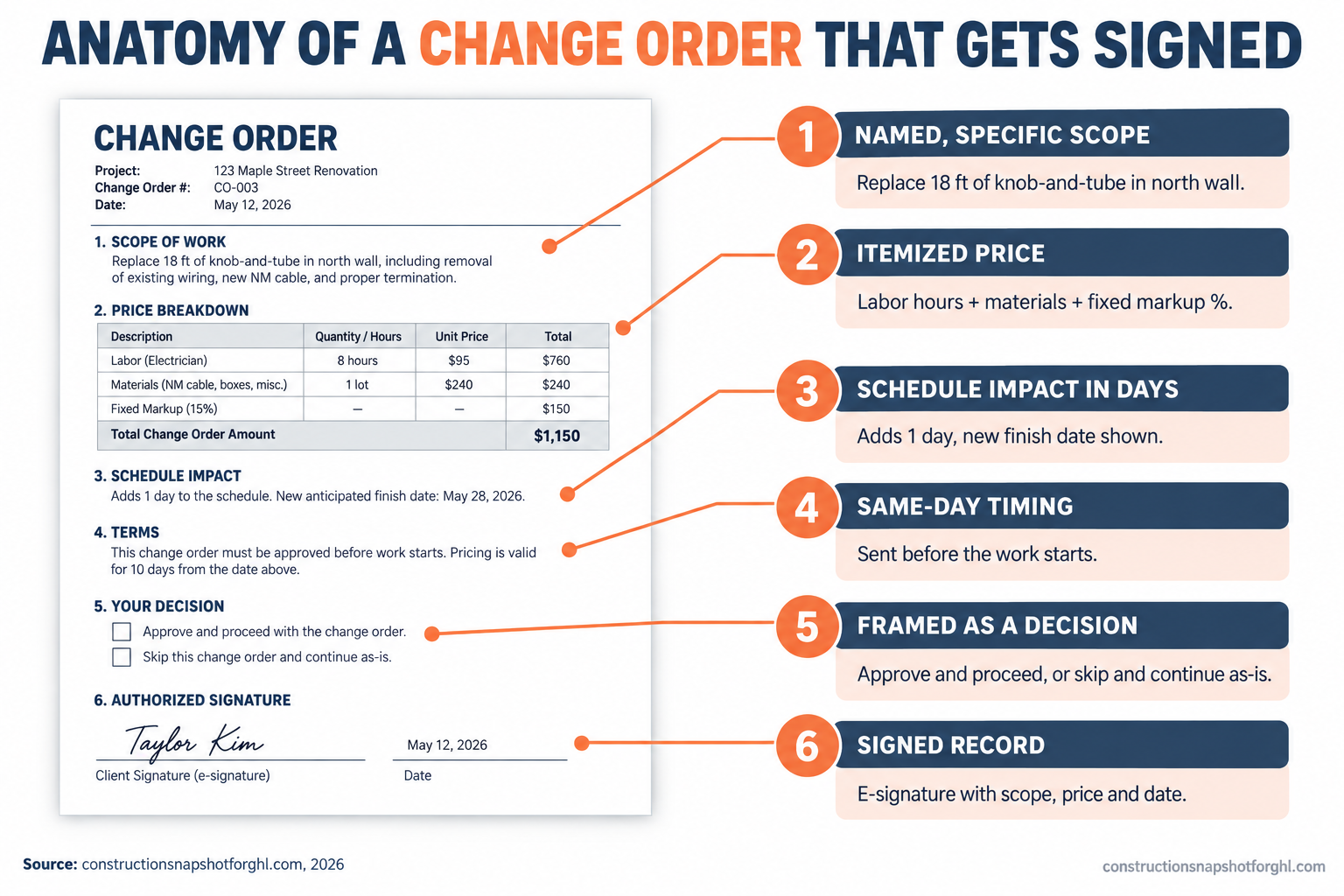
The change order that starts a fight vs. the one that gets signed
| Feature | Starts a fight | Gets signed |
|---|---|---|
| Scope | "Extra electrical work" | Named, specific: "Replace 18 ft knob-and-tube in north wall, bring to code" |
| Price | Round lump sum, no breakdown | Itemized: labor hours, materials, fixed markup % |
| Schedule impact | Not mentioned | Stated in days: "adds 1 day, moves finish to the 14th" |
| Timing | Weeks late, after the work is done | Same day, before the work starts |
| Framing | A charge the client must accept | A decision the client gets to make |
| Record | Verbal or a text thread | Signed e-signature with scope, price, and date |
Notice that none of the “gets signed” column is about being cheaper. It is about being clear and being early. The client in the right-hand column is never surprised, always sees the math, and always chooses. That is the entire difference between a change order that builds the relationship and one that ends it. The operational mechanics behind this, the contract clause, the line-item template, the signature capture, are laid out step by step in our change-order workflow that protects margin.
Steal this: the messages that get a fast yes
The process is only as good as what you actually send the client. Here is the exact sequence, ready to adapt, that moves a surprise behind the wall into a signed change order the same day, without a tense phone call.
Send these by hand and they work. The catch is that “by hand” is exactly what fails on a busy week, which is how the average stretches to 22 days between the field tag and the priced change order (Dodge/Clearstory). The smartest move is to template these messages and fire the heads-up and the nudge automatically off the change-order record, so the client always hears from you fast, even when you are on a roof. It is the same follow-up discipline that decides whether your estimates ever get signed, pointed at the changes that happen mid-build instead of the bids that win the job.
Run it three ways: solo, mid-size, and large
The right change-order process depends on your size, because who does the pricing and the chasing changes everything.
The solo operator or small remodeler (6 to 12 jobs a year). You are the estimator, the field guy, and the one sending the text, so your process has to survive you being up a ladder for half the day. Keep a simple itemized template on your phone so pricing a change takes minutes, not an evening. Lean hardest on Stage 2 and Stage 3: catch the change out loud and get the number back same day. On smaller kitchen and bath remodels, a same-day heads-up and a two-minute e-signature will protect more margin than any amount of back-office software, because the leak is almost always the change you meant to write up and never did.
The mid-size design-build or remodeling firm (15 to 25 jobs). You are running several builds at once, so an unpriced change on one job hides easily behind the noise of the others. Standardize the change-order template and the markup percentage across every contract so nobody is reinventing the math per job, and give one person clear ownership of pricing and sending them. This is the tier where automated heads-up and nudge messages pay for themselves fastest, because the leak is not one dramatic unpaid change, it is a few hundred dollars slipping through on job after job, spread thin enough that nobody notices it adding up to real money.
The larger custom builder (30 to 40 jobs). Now change orders are a formal process run by a project manager, and the risk shifts from “I forgot to write it up” to “the process is inconsistent across a dozen jobs and two PMs.” Lock the clause, the itemized template, the signature-before-work rule, and the billing tie-in into a documented standard everyone follows. At this scale a shared client portal and an automated change-order cadence are how you keep every PM handling changes the same defensible way, which is what keeps a big custom build out of the dispute column.
The rules that make a change order hold up
A change order is a legal document, and a few rules bite hard depending on where you build. This is not legal advice and the rules vary by state, so confirm yours before you finalize a contract or a change-order template.
Change orders must be in writing and signed, before the work. In California, a home-improvement contract and any change to it must be in writing and signed by both parties before the added work begins, and the change order has to describe the scope, the cost change, and the effect on the schedule (California BPC 7159). The Contractors State License Board spells the same requirement out for homeowners in its own consumer guide (CSLB). That makes the “I’ll add it to the final bill” habit not just risky but, in California, a violation. Build a signed change order into Stage 5 and you are compliant by default.
In-home sign-offs carry a cancellation window. If you close a change order or an upgrade at the client’s home, know that the FTC Cooling-Off Rule gives the buyer three business days to cancel most sales of $25 or more made at their home (FTC). For a true emergency you stabilize anyway, but for a planned upgrade signed at the kitchen table, know the clock exists and give the required notice.
Your license details still apply. In California your CSLB license number has to appear on your contracts and advertising, and the license threshold now covers work of $1,000 or more. Texas has no statewide general-contractor license and pushes registration down to the city. A change order does not change which rules apply to the job, so a licensed base contract means a licensed change order, same as the original scope.
Common objections
“Clients already hate change orders. Won’t making a formal thing of it scare them off?” It does the opposite. What scares clients is the unknown: not knowing whether the number is fair, when they will find out, or how much the whole thing will end up costing. A clear, itemized change order handed over the same day is reassurance, not a threat. It tells the homeowner you run a tight shop and that there will be no ugly surprise at the end. The clients who bristle at a written change order are usually the ones who were hoping to dispute the bill later, and the document is exactly what protects you from them.
“I already pay for Buildertrend or JobTread. Doesn’t it handle change orders?” Your project-management tool can store a change-order form and route a signature, and the good ones do it well. What it does not do on its own is catch the change the moment it happens, write the client the honest heads-up, and nudge them when they go quiet while your crew waits. The leak is rarely the software’s change-order feature. It is the human follow-up that never fires on a busy week, which is a workflow problem, not a storage problem.
“I don’t have time to write up every little change.” You have even less time to chase an unpaid invoice, re-sequence a stalled job, or answer a one-star review about a “surprise charge.” A templated change order takes a couple of minutes to price and send. The unpriced change you did as a favor takes hours to collect on and sometimes never gets paid, which is how 77 percent of contractors end up writing off change-order revenue as bad debt (Dodge/Clearstory). The two minutes is the cheap option.
“What about true emergencies? I can’t stop to get a signature on an active leak.” Stabilize first, document immediately. For a genuine emergency, protect the home, then get the written change order to the client within the hour, exactly as in message five above. The difference between an emergency change order that gets paid and one that gets fought is whether you created the written record the same day, while the client still remembers the water on the floor, or weeks later when all they remember is the bill.
Where to start this week
Pull your next contract and check one thing: is there a plain change-order clause in it that the client has actually read? If not, add one and walk the next homeowner through it at signing. Then build the one asset that does the heavy lifting: a simple itemized change-order template, labor plus materials plus your standard markup, that you can fill out from your phone in two minutes. Those two things, the clause and the template, are most of the system. Then fix the part that actually loses the money: decide how the same-day heads-up and the follow-up nudge get sent every time, without depending on you to remember between jobsites. Nail that and change orders stop being fights and start being a normal, paid part of every job. That heads-up-and-nudge cadence is exactly what the Construction Snapshot for GoHighLevel automates, and you can hand the whole change-order follow-up to a trained GHL VA if you would rather never chase a signature by hand again.
Frequently asked questions
How do I get a client to approve a change order quickly?
Speed and clarity. Send a same-day heads-up the moment the change appears, then follow with an itemized change order showing the scope, the price broken into labor, materials, and markup, and the schedule impact in days. Present it as a decision the client gets to make, approve it and you proceed, or skip it and continue as-is, and route it through e-signature so they can sign from their phone in about two minutes. Clients approve fast when they are never surprised, can see the math, and are the ones choosing. The industry average is 22 days from field tag to a priced change order, so same-day pricing is a real competitive edge.
Should a change order be signed before the work starts?
Yes, and in several states it is legally required. In California, a home-improvement contract and any change to it must be in writing and signed by both parties before the added work begins (Business and Professions Code 7159). Beyond the law, the signature is how you get paid: a verbal 'go ahead' evaporates the moment the invoice arrives, while a signed change order with a dated scope and price survives the client's selective memory. The only exception is a true emergency, where you stabilize first and document within the hour.
Why do homeowners fight change orders?
Almost always because of timing, not the amount. A homeowner who agrees to an extra cost in advance feels like a partner making a smart call. The same homeowner who discovers that cost for the first time on a closeout invoice feels worked, even if the price is completely fair. The fight is about being surprised by money, not about the money itself. Catch the change early, price it transparently, and let the client decide, and the resistance largely disappears.
What should a change order include?
At minimum: a specific, named scope of the added or changed work; an itemized price broken into labor hours, material cost, and a fixed markup percentage; the schedule impact stated in days with the new finish date; the date; and both signatures. In California the change order must state the scope, the dollar change to the contract price, and the effect on the schedule. Avoid vague lump sums and verbal approvals, which are exactly what turn into disputes.
How do I handle an emergency change order I can't get signed in time?
Stabilize the problem first to protect the home, then document immediately. Send the client a message in real time explaining what you found and that you had to act, and get the full written change order to them within the hour so they can see exactly what was done and what it costs. The key is creating the written record the same day, while the client still remembers the emergency, rather than weeks later when all they see is the charge. Same-day documentation is what separates an emergency change order that gets paid from one that gets fought.
How much do change orders typically add to a project?
It varies by project type, but renovation work carries the most. A University of Nevada study of 161 school renovation projects found change orders added an average of 3.56 percent to total contract cost and accounted for three-fourths of all project cost growth, with about 40 percent of projects seeing schedule overruns tied to change orders. On residential remodels with unknowns behind the walls, change orders are often where the real money moves, which is exactly why a tight approval process protects your margin.
Sources
- Dodge Construction Network & Clearstory: Only 1 in 3 Contractors Say Their Change Order Process Works (2026)
- Clearstory: The Change Order Process Is Costing Specialty Contractors Real Money (2026 report)
- UNLV: Effect of Change Orders on Cost and Schedule Overruns of School Building Renovation Projects (2018)
- McKinsey: Imagining Construction’s Digital Future / Reinventing Construction
- Arcadis Global Construction Disputes Report 2025 (via BD+C)
- Houzz: 2026 U.S. Houzz & Home Study, Renovation Trends
- California BPC 7159 (home-improvement contracts and change orders in writing)
- CSLB: Home Improvement Contracts Consumer Guide
- FTC: Cooling-Off Rule for sales made at the buyer’s home
- JCHS: Remodeling growth set to downshift in late 2026 (LIRA)