
You are 40 minutes into a software demo you did not really want to sit through, and you still do not know the price. The rep has shown you the schedule board, the client portal, the daily logs, all of it slick. You ask the only question you came with, “what does this cost me a month,” and you get the answer you have now heard from three vendors in a row: “it depends on your volume, let me build you a custom quote.” That is not a pricing model. That is a negotiation you did not agree to start, and you are already behind in it.
Here is the short version. Construction management software in 2026 splits into two camps: tools that print their price on a web page, and tools that make you sit through a demo to find out. The transparent anchor is JobTread at $199/month including one user, plus about $20 per extra user (Capterra). The two big names that hide their number, Procore and Buildertrend, are the ones you have to work hardest to price. Procore charges a slice of your Annual Construction Volume, reported at roughly 0.1% to 0.2% of what you build, which lands most small-to-mid contractors somewhere between $15,000 and $30,000 a year (Projul). Buildertrend pulled its public pricing in 2026 and now quotes across volume brackets, with third-party trackers reporting the mid-$300s into four figures a month (Projul). This teardown gives you the real numbers, the fees nobody quotes, and three full cost scenarios so you can price your own shop before a rep prices it for you.
In this post
- Why so many vendors hide the price
- The three ways construction software is priced
- Procore: the volume-based teardown
- Buildertrend: the quote-only default
- JobTread and the transparent field
- Every tool, side by side
- The hidden costs nobody quotes you
- Three real cost scenarios
- The line item none of these prices cover
- Licensing and consent rules to bake in
- Common objections
- Frequently asked questions
- Sources
Why so many vendors hide the price
Start with the pattern, because it tells you more than any single number. Roughly half the construction management tools a builder shops in 2026 publish their pricing on a page you can read in 30 seconds. The other half, led by the two biggest names, make you request a demo and wait for a quote built around your business.
There is a reason for it, and it is not shyness. When a vendor prices to your revenue or your construction volume, a public number would either scare off small shops or leave money on the table with big ones. Hiding the price lets the rep read your business first, then set the number where they think you will pay. That is a fine strategy for them. It is a worse position for you, because you are negotiating a figure you cannot benchmark, against a rep who prices dozens of these a week and knows exactly where the anchors sit.
The tools with a public price are telling you something too. Confidence, mostly. A vendor that puts $199 a month on a page is betting that the number wins on its own, and it usually means the software is built for owner-operators who will not sit through a 40-minute qualifying call. For a builder doing 6 to 40 jobs a year, that alignment matters as much as the dollar figure. You want a tool priced for your size, not one priced for the enterprise account the rep would rather be closing.
So before you compare features, sort the field into those two camps. It changes how you shop each one.
The three ways construction software is priced
Underneath the marketing, there are only three pricing models in this category, and knowing which one you are looking at tells you where the cost will come from as you grow.
Flat tiered pricing. You pick a plan, you get a set of features and often unlimited or capped users, and the price is the price. Buildertrend historically worked this way with its Essential, Advanced and Complete tiers, and it is the easiest model to budget because your bill does not move when you hire. The catch is that you can pay for a whole tier to unlock one feature you actually need.
Per-user pricing. You pay a base that includes one or a few users, then a set amount for each additional internal seat. JobTread, Knowify and Contractor Foreman all work this way. It is honest and it scales smoothly, but the number to watch is not the base, it is the per-seat cost times the size your team will be in two years. A $199 base looks great until you add eight project managers.
Volume-based pricing. The price is tied to how much you build, not how many people log in. Procore is the clearest example, quoting on Annual Construction Volume, and Buildertrend moved toward this model in 2026 with quotes across construction-volume brackets (Projul). This is the model that surprises growing builders, because a good year on the jobsite quietly raises your software bill even if nothing about how you use the tool changed.
Match the model to your growth plan. If you are adding people fast, per-user math is what will bite. If you are scaling volume with a lean team, the volume-based tools are the ones to price carefully.
Procore: the volume-based teardown
Procore is where this whole conversation starts, because it is the tool with no public number and the model a small builder cannot self-estimate. It earns the teardown.
Procore does not publish pricing. You request a demo, and the quote is built around your Annual Construction Volume, the total dollar value of the work you put in place in a year, rather than a per-seat fee (Projul). Reported effective rates land at roughly 0.1% to 0.2% of that volume. Run the math on your own numbers before a rep runs it on you: a builder putting up $10 million a year is looking at something in the $10,000 to $20,000 range annually at that rate, and user-reported figures put small-to-mid contractors ($10M to $50M in volume) at roughly $15,000 to $30,000 a year (Projul).
What you get for it is real. Procore’s contract includes unlimited users, unlimited data storage, and support at no extra charge, so you can add every field worker, sub and client without paying per seat (Projul). For a large commercial GC coordinating hundreds of people, that unlimited-seat model is a genuine bargain. That is who Procore is built for.
Where it breaks for a small shop: the volume model punishes exactly the builder it is worst suited to. You are a 20-job residential remodeler, you have a great year, your volume jumps, and your software renewal jumps with it, even though your team and your usage did not change. You are also paying enterprise money for enterprise depth you will never turn on. For a shop doing 6 to 40 jobs a year, Procore is not a pricing negotiation to win, it is a tool to walk past. Price it once so you can prove that to yourself, then cross it off.
Buildertrend: the quote-only default
Buildertrend is the name most residential builders and remodelers end up looking at, partly because it absorbed CoConstruct and is the default migration path for those users. It is a mature, capable platform for scheduling, budgets, selections, change orders and client communication. The friction is entirely in the commercial model.
Buildertrend removed its published pricing in 2026 and replaced it with custom quotes tied to construction-volume brackets (Projul). Before that change, its three tiers were tracked publicly, and third-party sources still report figures in the same range: an entry tier in the mid-$300s a month, a middle tier around $500 to $800, and a top tier that runs from roughly $800 into four figures (costbench). Plans are flat and include unlimited users and projects, which is a real plus, but annual billing typically locks you in for 12 months with no refund if you cancel early.
Where it breaks: the combination of a quote you cannot benchmark and a one-year commitment. Builders who took the default path off CoConstruct have reported the new monthly number came in higher than they expected, and by the time they saw it they were already committed. The fix is simple and non-negotiable: get the quote in writing, for your revenue, and confirm the contract length and any onboarding fee before you sign anything. Then put it next to JobTread’s published rate and make the vendor earn the difference.
JobTread and the transparent field
Now the tools that just tell you the price. JobTread is the anchor of this group and the reason the quote-only vendors look expensive by comparison.
JobTread is $199 a month on monthly billing, and that base includes your first user. Additional internal users run about $20 a month each, and price breaks kick in past roughly ten users, scaling the per-seat cost down toward $5. Vendors, subcontractors and clients get free, unlimited access to an external portal, so you are only paying for internal seats. Annual billing drops the base to about $159 and the add-on to about $18 per user, and there are no setup fees, no contracts, free implementation and training, and a 30-day money-back guarantee on monthly plans (Capterra). It covers estimating, budgeting, scheduling, change orders and a client portal, and its team has been actively recruiting builders off CoConstruct. Where it breaks: it is newer than Buildertrend, so if you depend on a specific deep integration, confirm it is supported before you commit.
Contractor Foreman is the budget pick that is not a toy. Pricing runs from $49 a month for one user, up through about $105 at three users, $166 at eight, $221 at fifteen, and $332 for the unlimited tier (Capterra). It packs a wide feature set for the money. Where it breaks: the trade-off is a busier interface and a steeper learning curve, so budget the training time.
Knowify leans toward job-costing and financials with tight QuickBooks integration, which fits builders whose real pain is accounting accuracy rather than client polish. It starts around $99 a month on its Core plan with one user, plus about $29 per additional user (Capterra). Where it breaks: a slick homeowner portal is not its center of gravity.
BuildBook is the simplest and most communication-first option, starting at $79 a month (Capterra). Where it breaks: it is deliberately light on heavy estimating and job-costing, so a numbers-heavy custom-home builder may outgrow it.
Houzz Pro fits design-build and interior-heavy remodelers who already pull leads from Houzz. Its full contractor tier lands around $399 a month, with lighter starter tiers below that (Capterra). Where it breaks: its project-management side is lighter than a production builder running many trades will want.
Every tool, side by side
Here is the whole field on one screen, sorted by whether the vendor will actually tell you the price.
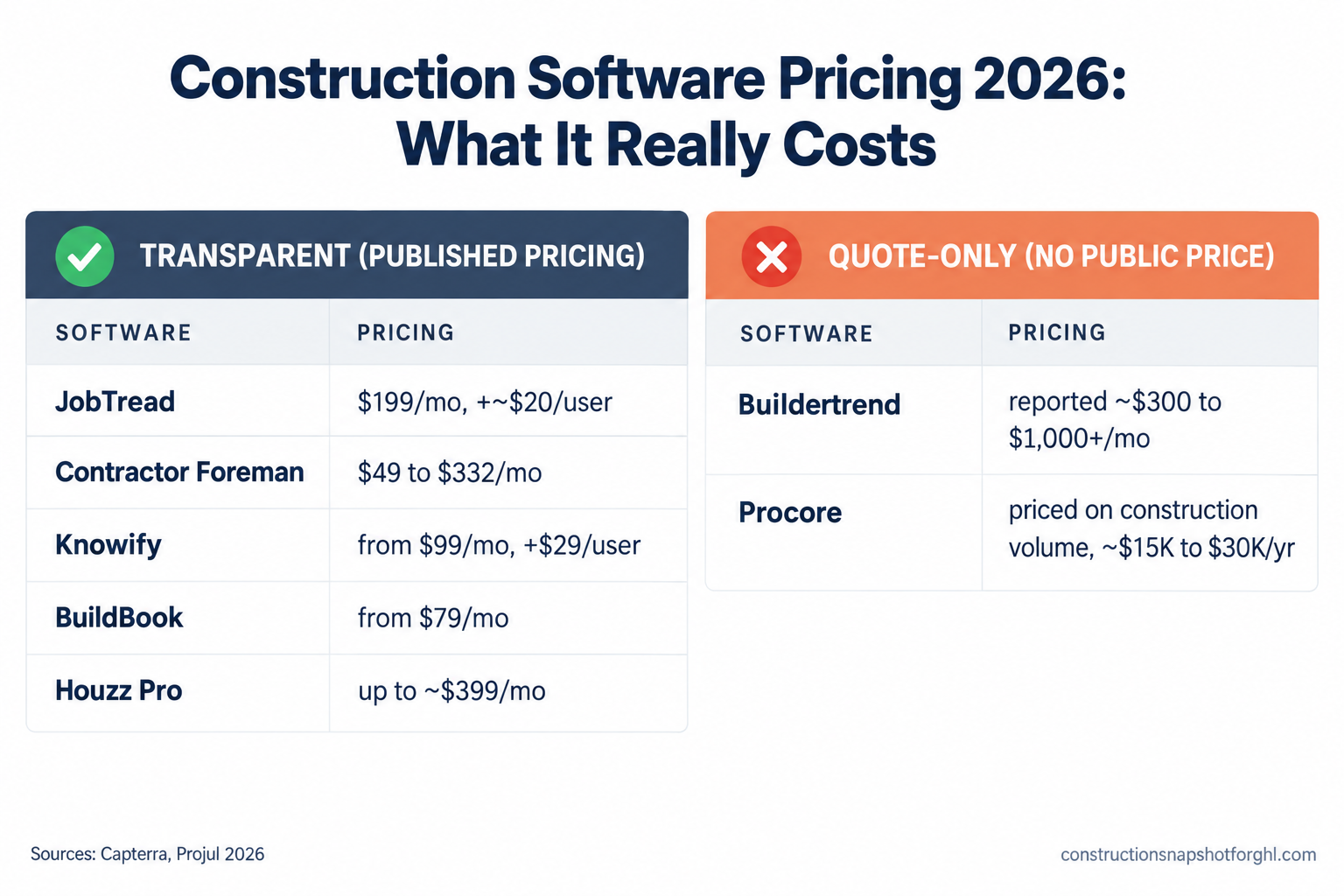
Construction management software pricing (2026)
| Feature | What it costs | Pricing model |
|---|---|---|
| JobTread | $199/mo incl. 1 user, +~$20/user (published) | Per user, transparent |
| Contractor Foreman | $49 to $332/mo by user tier (published) | Per user, transparent |
| Knowify | From ~$99/mo, +~$29/user (published) | Per user, transparent |
| BuildBook | From ~$79/mo (published) | Tiered, transparent |
| Houzz Pro | Up to ~$399/mo top tier (published) | Tiered, transparent |
| Buildertrend | No public price; reported ~$300 to $1,000+/mo | Volume brackets, quote-only |
| Procore | No public price; ~$15K to $30K/yr reported | Annual Construction Volume, quote-only |
The bars that are missing tell the story. Every transparent tool handed you a number. The two quote-only vendors make you get on a call, and neither is cheaper for it. Put the published starting prices on one chart and the shape is obvious.
Published entry or representative monthly pricing, US dollars, 2026. Buildertrend and Procore publish no pricing and quote to revenue or construction volume, so they cannot be plotted. Sources: Capterra (JobTread, BuildBook, Knowify, Houzz Pro), Capterra (Contractor Foreman).
The hidden costs nobody quotes you
The monthly number is the part vendors want you to focus on, because it is the smallest part. The real cost of construction software lives in four line items that rarely make it into the first quote.
Implementation and onboarding. Some tools include it, some charge for it. JobTread advertises free implementation and training (Capterra). Others add a one-time onboarding fee, and on the enterprise end, a full Procore rollout can run into five and six figures in the first year once configuration and training are counted (Projul). Always ask what the first year costs, not what the first month costs.
Per-user creep. On per-user pricing, the base is bait. The real number is the base plus your seats at your real headcount, in the year you will actually be that size. A $199 base with eight users at $20 is $359 a month, not $199. Do that multiplication before you fall in love with the sticker.
Annual lock-in. The discount for paying annually is real, usually around 10% to 20%, but it comes with a 12-month commitment and, on some tools, no refund if you cancel early. If you are not certain the tool fits, the monthly plan is cheaper insurance than the annual discount is a saving.
Add-on modules and integrations. The plan you were quoted may not include the feature you actually came for. Payments, advanced financials, specific integrations, extra document storage, these are often bolted on. Before you compare two tools, confirm both quotes include the same feature set, or you are comparing a base plan against a loaded one.
Price all four and the ranking can flip. A tool with a higher monthly number and free onboarding, no lock-in and the features included can easily beat a “cheaper” tool that charges for setup, locks you in, and nickels you on modules.
Three real cost scenarios
The right answer depends entirely on your size, because these pricing models behave very differently as you scale. Run the whole framework three ways, on a three-year total cost so the lock-in and per-user math actually show up.
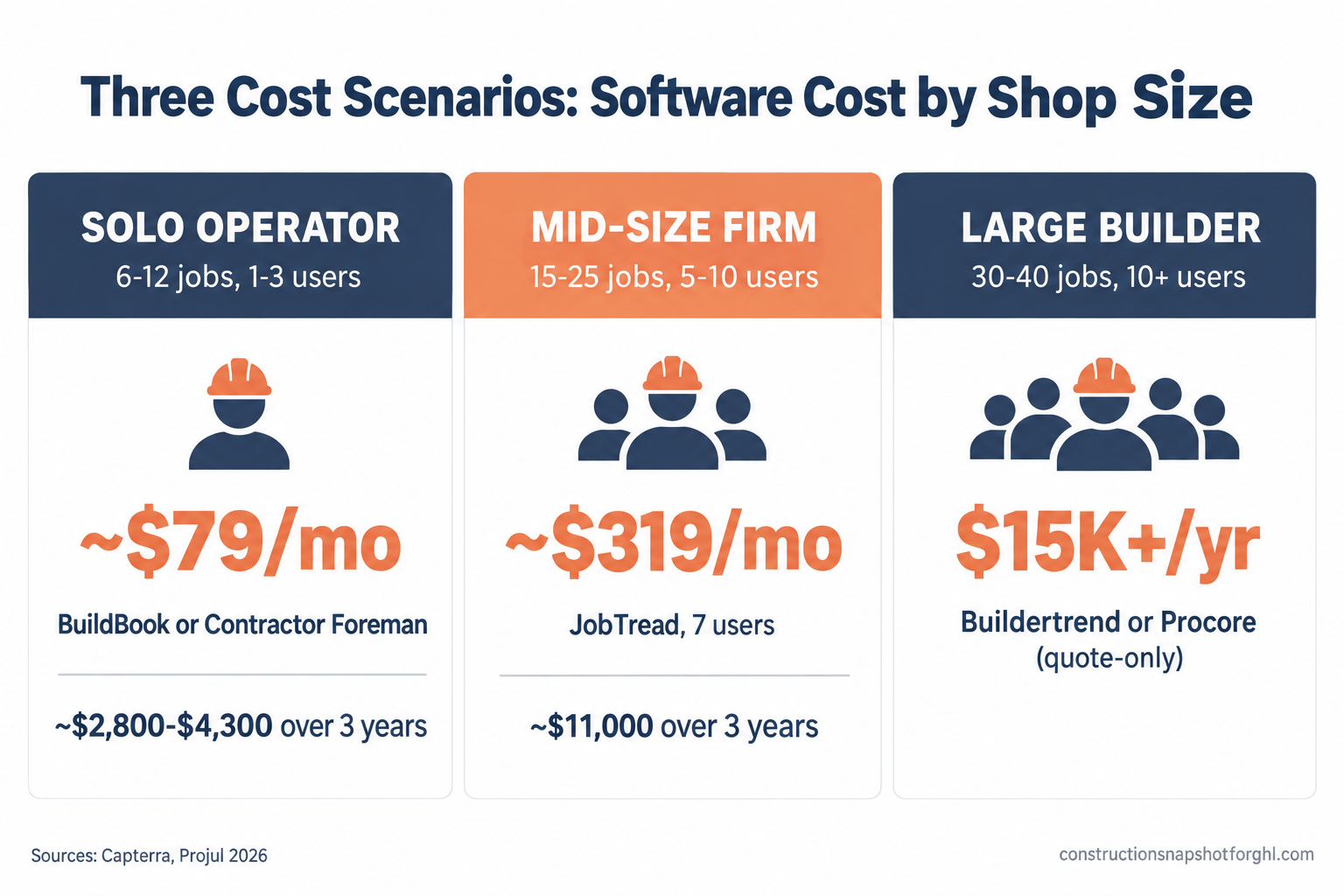
The solo operator or small remodeler (6 to 12 jobs, 1 to 3 users). You want a low monthly number, fast setup and a decent client portal so you stop fielding update calls. BuildBook at about $79 a month or Contractor Foreman at $49 gets you running cheap; over three years that is roughly $2,800 to $4,300 all in. JobTread at $199 with one or two users is the step up if you want a stronger estimating core and room to grow, around $8,000 over three years with a second seat. Skip Buildertrend unless a must-have feature lives only there, and do not price Procore at all. At this size, transparent and cheap wins.
The mid-size design-build or remodeling firm (15 to 25 jobs, 5 to 10 users). This is JobTread’s sweet spot: a $199 base plus, say, six extra seats at about $20 is roughly $319 a month, or near $11,000 over three years on monthly billing and less on annual. Houzz Pro is a real contender near $399 a month if design and Houzz-sourced leads drive your sales. Buildertrend becomes worth a quote here, but get the number for your revenue and compare it honestly against JobTread’s published rate before you assume the default is right. This is the tier where per-user math and the quote-only gap matter most.
The larger GC or production builder (30 to 40 jobs, 10-plus users). Now Buildertrend’s depth and unlimited-user model may genuinely earn their quote, and it is the least disruptive move if you are coming off CoConstruct. JobTread still competes hard on cost even at scale, because its per-user rate steps down past ten seats, and it is worth running as the challenger. This is the only tier where Procore is even a conversation, and only if you are pushing into serious commercial volume where the unlimited-seat model pays off.
Illustrative three-year total cost, US dollars, using published or reported monthly rates times 36 months (Procore shown at the low end of the reported $15K/year range). Real quotes for volume-priced tools vary. Sources: Capterra, Projul.
Notice what is identical across all three scenarios: none of these tools decides whether the lead ever became a job. That line item is the same everywhere, and it is the one quietly leaking the most money.
The line item none of these prices cover
Here is the part the pricing pages will not tell you, because it is not their job to. Every tool in this teardown, Procore and Buildertrend and JobTread and all the rest, is project-management software. It takes over after the job is signed: schedules crews, tracks budgets, manages selections and change orders, gives the homeowner a portal. Real, valuable work. None of it wins you the job in the first place.
The money most 6-to-40-job builders lose is not lost on the jobsite. It is lost in the 48 hours after a homeowner fills out your form and nobody calls back fast enough, in the estimate you sent Tuesday that is still sitting unopened with no follow-up, in the missed call at 4:50pm that went to a competitor who picked up. That is the front end of the business, and no amount of project-management spend touches it. You can pick the perfect PM tool at the perfect price and still lose the same leads next Monday.
So when you budget for construction software, budget for both ends. A PM tool to run the jobs, and a real sales system in front of it to win them. That front-end system is what the Construction Snapshot for GoHighLevel installs: a lead-to-deposit sales pipeline, instant speed-to-lead text-back, an estimate follow-up sequence, booking and review automation, preconfigured for how builders sell. It does not replace Buildertrend or JobTread on the jobsite. It fills the hole every one of them leaves open. New to GoHighLevel? You can start an account here and drop the system on top.
Licensing and consent rules to bake in
Two compliance details cost real money when you get them wrong, and both are quick fixes worth handling while you are choosing software and updating templates anyway.
License number in advertising. In California, your CSLB license number is required by law in all advertising, including your website, business cards, vehicle lettering and online listings, under Business and Professions Code section 7030.5 (California BPC 7030.5). Put the number in your site footer and your outbound message templates so you are covered by default. Rules vary by state: Texas has no statewide GC license and pushes registration to the city level, so a national template will be wrong for someone. Whatever tool you buy, the templates you build inside it should carry the right license language for the states you build in.
The three-day right to cancel. If you close a deal in a homeowner’s home for more than $25, the FTC Cooling-Off Rule gives the buyer until midnight of the third business day to cancel, and you must give written notice of that right at the time of sale (FTC). If you sign at the kitchen table, build the cancellation notice into your contract template so it goes out every time. One more state-scoped item for your templates: lien-notice deadlines. California and Arizona require a preliminary notice early in the job to preserve lien rights while other states require none, so scope your lien language to where you actually build.
Common objections
“Can’t I just get quotes and compare?” You can, and you should, but understand the position you are negotiating from. When you request quotes from the quote-only vendors, you are giving them your revenue and volume before they give you a number, which means they price you before you price them. Get the transparent tools’ published rates first so you walk into those calls with a real benchmark instead of an empty spreadsheet.
“I already pay for Buildertrend, is switching worth it?” Maybe not, if it fits and the price is fair. But do the exercise anyway at renewal: get your quote in writing, put it next to JobTread’s published rate for your team size, and make Buildertrend justify the gap. Staying is fine. Staying because you never checked is how you overpay for years.
“Do I need to be technical to run one of these?” No. The transparent tools are built for owner-operators, and most include free training. If even that feels like too much on top of running jobs, the setup and daily driving is exactly the kind of work you can hand to a trained GHL VA or a done-for-you install. You make the call, someone else does the clicking.
“Why does a construction software post keep talking about leads?” Because the biggest number on your P&L is not your software bill, it is the jobs you did not close. Every tool here costs a few hundred to a few thousand a month. One lost project is worth more than a year of any of these subscriptions, and none of them is built to save that project. Pricing the software right is smart. Pricing the software right while your lead follow-up leaks is rearranging the small costs while the big one runs.
Where to start this week
Go back to that 40-minute demo. The builders who come out ahead are not the ones who sit through the most sales calls. They spend one afternoon pricing on purpose: pull the published rates for JobTread, Contractor Foreman, BuildBook and Knowify, run your real team size and three-year math, and only then request quotes from Buildertrend or Procore so you have a benchmark to hold them to. Then fix the front end while you are in there, because the right PM tool at the right price still does nothing for the leads you are not calling back. That last part is the piece we build.
Frequently asked questions
How much does construction management software cost in 2026?
It ranges widely by pricing model. Transparent per-user tools start low: Contractor Foreman from $49/month, BuildBook from about $79, Knowify from about $99, and JobTread at $199/month including one user. Quote-only tools cost more and hide it: Buildertrend is reported in the mid-$300s to over $1,000 a month, and Procore is priced on your Annual Construction Volume, with small-to-mid contractors reporting roughly $15,000 to $30,000 a year. Always price your real team size and the second year, not just the first month.
How much does Procore cost for a small contractor?
Procore does not publish pricing and quotes based on your Annual Construction Volume rather than per user, at a reported effective rate of about 0.1% to 0.2% of that volume. User-reported figures put small-to-mid contractors (roughly $10M to $50M in volume) at $15,000 to $30,000 a year, and a full rollout can add significant first-year implementation cost. For a shop doing 6 to 40 jobs a year, it is usually the wrong fit at the wrong price.
Why doesn't Buildertrend show its pricing?
Buildertrend removed its public pricing in 2026 and moved to custom quotes tied to construction-volume brackets. Third-party trackers still report figures from the mid-$300s into four figures a month, typically with a 12-month commitment. To price it, request a quote for your revenue in writing and confirm the contract length and any onboarding fee before you sign.
What is the cheapest construction management software?
On monthly sticker price, Contractor Foreman is the lowest full-featured option at $49/month for one user, and BuildBook starts around $79. But cheapest monthly is not always cheapest over three years once you add setup fees, annual lock-in and per-user costs as you grow. Price the total for your real team size before deciding.
Is JobTread cheaper than Buildertrend?
For most small-to-mid builders, yes, and it is easier to verify because JobTread publishes its price ($199/month including one user, about $20 per extra user) while Buildertrend quotes privately. The honest way to know is to get a written Buildertrend quote for your revenue and put it next to JobTread's published rate at your team size. The transparent number is your benchmark.
Does buying construction software help me get more leads?
No. Every project-management tool in this teardown runs the job after it is signed: scheduling, budgets, change orders, the client portal. None of them captures a new lead, replies within seconds, or chases an unanswered estimate. If leads go cold before you call back, that is a front-end sales problem and needs a sales system such as a GoHighLevel setup in front of your PM tool, not a different PM tool.
Sources
- Projul: Procore pricing analysis, 2026
- Projul: Buildertrend pricing analysis, 2026
- Capterra: JobTread pricing
- Capterra: Contractor Foreman pricing
- Capterra: Knowify pricing
- Capterra: BuildBook pricing
- Capterra: Houzz Pro pricing
- costbench: Buildertrend pricing
- NAHB: Three states drive over 20% of remodeling activity (Aug 2026)
- JCHS: Remodeling growth set to downshift in late 2026 (LIRA)
- California BPC 7030.5 (license number in advertising)
- FTC Cooling-Off Rule