
You log into CoConstruct on a Tuesday to price a change order, and there it is at the top of the screen: a banner telling you the product you have run your business on for years is moving to Buildertrend. No new features are coming, support is thinner than it used to be, and there is a date attached. You have run 200 jobs through this thing. Now you have to pick somewhere else to put them, learn it, move your data, and do all of that without dropping a single active build. That is a real problem, and pretending it is a small one helps nobody.
Here is the short version: CoConstruct is in maintenance mode, you can still add new projects through March 31, 2027, and if you plan to move to Buildertrend the migration has to begin by June 30, 2027 (CoConstruct migration page). Buildertrend is the default path, not the only path. JobTread, Houzz Pro, Contractor Foreman, Knowify, and BuildBook are all real destinations, and they cost wildly different amounts. And none of them, Buildertrend included, is built to win you the lead in the first place. That last part is the gap most migration guides skip, and it is where a lot of your lost money actually lives.
In this post
- What is actually happening to CoConstruct?
- What doing nothing costs you
- The 8 things to judge a replacement on
- The real CoConstruct alternatives, compared
- What each option actually costs
- Which one is right for your shop
- How to migrate without losing a project or a lead
- The gap none of these tools fills
- Licensing and consent rules to bake in
- Common objections
- Frequently asked questions
- Sources
What is actually happening to CoConstruct?
CoConstruct is not being killed off overnight, and it is not being improved either. Buildertrend acquired CoConstruct back in 2021 (Buildertrend), and the two products have been on a collision course ever since. As of 2026, CoConstruct sits in what the company calls maintenance mode: the lights stay on, but there are no new features, no new integrations, and support has been scaled back while the team pushes everyone toward Buildertrend.
The dates matter, so write them down. You can keep adding new projects through March 31, 2027. Starting April 1, 2027, no new projects can be created. And if Buildertrend is your destination, your migration needs to begin by June 30, 2027 (CoConstruct migration page). The company says no project data is lost in the official move and that you keep access to historical projects. That is the good news. The catch is that “no data lost” and “easy to leave for a different vendor” are two very different promises, and only the first one is being made.
This is not a niche problem. There are about 128,000 remodeling firms in the United States as of early 2025, up from 69,000 in 2000 (NAHB), and a big share of them are the exact residential builders and remodelers CoConstruct was built for. When a tool that size winds down, tens of thousands of shops are making the same decision you are, at the same time.
What doing nothing costs you
The tempting move is to ride CoConstruct until the last day and let Buildertrend migrate you when they force the issue. That feels safe and cheap. It is usually the expensive choice.
You give up your negotiating position, first of all. Wait until mid-2027 and you are switching on the vendor’s timeline, to the vendor’s default destination, at whatever price they quote when you have no time to shop. Builders who already went through the Buildertrend move report notable price jumps versus CoConstruct, plus the thinner support that comes with any transition (Buildertrend reviews, Capterra). Treat those as user reports, not gospel, but the pattern is consistent enough to plan around. Migrations are not free even when the vendor eats the data transfer, either: the real bill is your team’s hours exporting and cleaning data, rebuilding templates, and running slow while everyone learns a new screen. Industry estimates put that absorbed labor in the thousands to low tens of thousands of dollars for a busy shop (Cornerstone PM), which is a vendor-blog figure, so hold it loosely, but the direction is right.
The cost nobody puts on the invoice is the one that hurts most: a rushed switch is when leads leak. If your intake, follow-up, and estimates live inside the tool you are abandoning, the weeks you spend migrating are weeks your front end is distracted. And this is a strong market to be leaking in. The Harvard Joint Center projects US home-improvement spending near $522 billion in 2026, with growth easing from about 2.9% early in the year toward 1.6% by year-end (JCHS). Demand is there, but it is softening, which makes every dropped lead more expensive than it was two years ago.
The 8 things to judge a replacement on
Before you sit through a single demo, decide what you are buying on. Score every candidate against the same eight criteria:
- Price transparency. Can you see the cost without a sales call? Hidden pricing means the number depends on how much they think they can get.
- Real monthly cost for your size, not the headline number, for your user count and job volume.
- Fit for residential and small-commercial work. Some tools are built for roofers, some for enterprise GCs. Match it to your jobs.
- Change orders and selections, where margin leaks. They have to be fast to price, easy to approve, and impossible to lose.
- Client communication and portal. Homeowners calling for updates is a symptom of a weak portal.
- Migration support. Will they move your data, or hand you a CSV and wish you luck?
- Contract terms. Month-to-month or a one-year lock? Onboarding fees? Data-export charges later?
- Front-end sales tools. Does it capture leads, reply fast, and chase estimates, or only manage jobs you already won? Almost none do the first part. Hold that thought.
The real CoConstruct alternatives, compared
Here are the destinations that make sense for a builder or remodeler doing 6 to 40 jobs a year. Prices are the current published or third-party-reported figures at the time of writing, so confirm the live number before you sign.
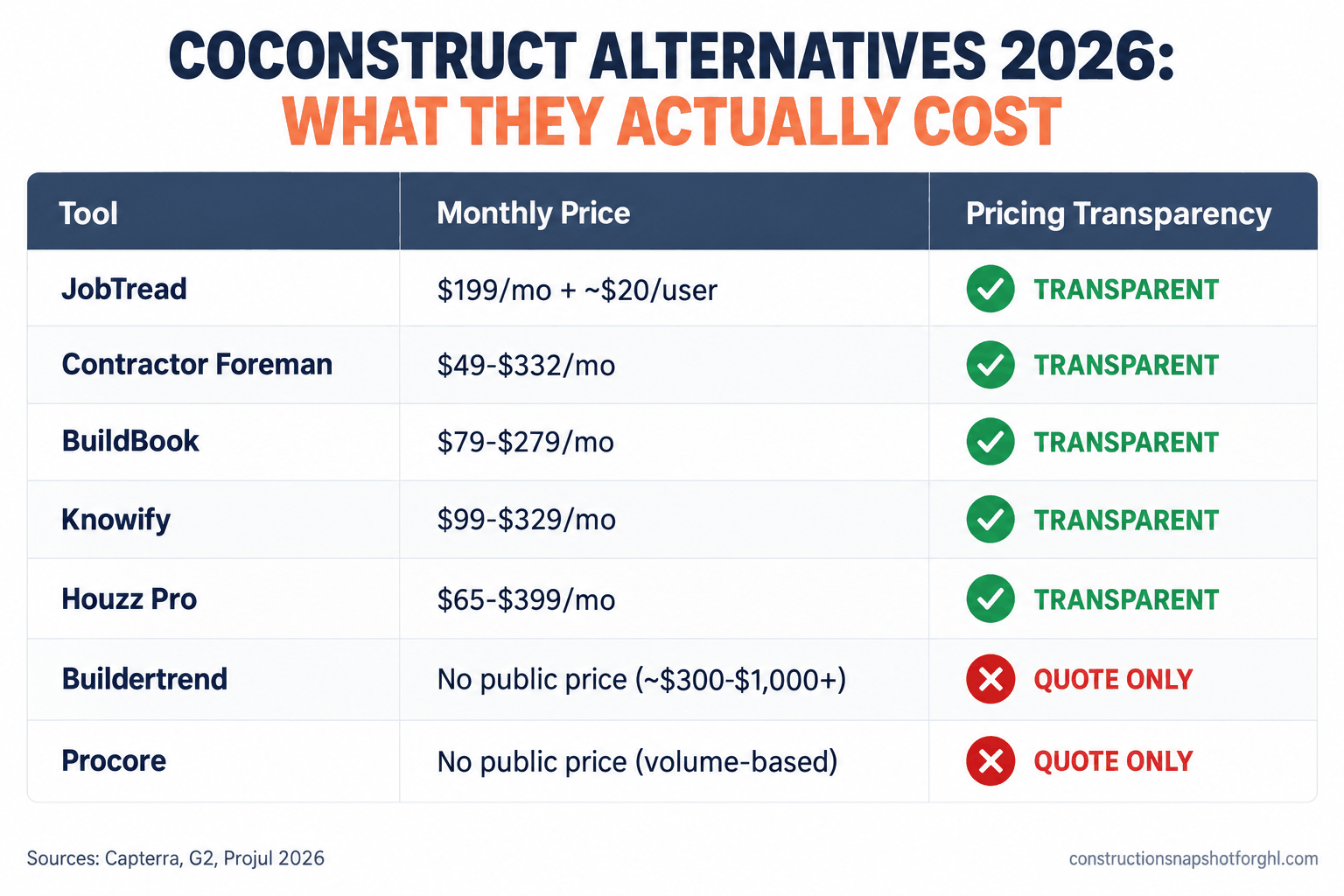
CoConstruct alternatives at a glance (2026)
| Feature | Transparent pricing | Quote-only pricing |
|---|---|---|
| JobTread | $199/mo incl. 1 user, +~$20/user | n/a |
| Contractor Foreman | $49 to $332/mo by user tier (annual) | n/a |
| Knowify | ~$99 to $329/mo (annual), +$29/user | n/a |
| BuildBook | $79 to $279/mo (annual) | n/a |
| Houzz Pro | ~$65 to $399/mo published, top tier custom | n/a |
| Buildertrend (default path) | n/a | No public price; reported ~$300 to $1,000+/mo |
| Procore | n/a | No public price; based on construction volume |
Buildertrend is the path CoConstruct steers you toward, and from their side it makes sense: it is a mature residential and light-commercial platform that handles scheduling, budgets, selections, change orders, daily logs, and a client portal well. The friction is the commercial model. It publishes no pricing, quotes to your revenue, and third-party trackers report plans from the mid-$300s into four figures a month, often with a one-year minimum and onboarding fees of $400 to $1,500 (Projul). Where it breaks: builders who took the default path and only later found out the new monthly number and the annual commitment. Get the quote in writing, for your revenue, before you commit.
JobTread is the transparent anchor of the category, and the reason the others look expensive. A base plan at $199/mo includes your first user, additional internal users run about $20/mo, and portal access for subs and clients is free, with price breaks past roughly ten users. Annual billing drops the base to about $159 and add-ons to about $18 (Capterra). It covers estimating, budgeting, scheduling, change orders, and a client portal, and its team has been actively courting CoConstruct refugees with migration help. Where it breaks: it is newer than Buildertrend, so if you rely on a deep integration, confirm your specific tools are supported first.
Houzz Pro fits if a chunk of your leads already come from Houzz and you want design tools plus a client dashboard in one place. Published tiers run from around $65/mo to roughly $399/mo, top tier quoted custom (Capterra). Where it breaks: it is strongest for design-build and interior-heavy remodelers, and a production builder running many trades may find its project-management side lighter than CoConstruct was.
Contractor Foreman is the budget pick that is not a toy: $49/mo for one user up to $332/mo unlimited on annual billing, with tiers between (G2). It packs a wide feature set for the money. Where it breaks: the trade-off is a busier interface and a steeper learning curve, so budget extra training time.
Knowify leans toward job-costing and financials with tight QuickBooks integration, which suits builders whose pain is accounting accuracy more than client polish. Tiers run about $99/mo to $329/mo annually, plus roughly $29 per user (G2). Where it breaks: a slick homeowner portal is not its center of gravity.
BuildBook is the simplest, most communication-first option: Solo $79/mo, Team $149/mo, Business $279/mo on annual billing (Capterra). Where it breaks: it is deliberately light on heavy estimating and job-costing, so a numbers-heavy custom-home builder may outgrow it.
Procore earns a mention only so you can skip it. It is excellent enterprise software priced on Annual Construction Volume rather than per user, with no public numbers and reported annual figures that start where most small builders’ entire software budgets end (Projul). At 6 to 40 jobs a year, it is not your tool.
What each option actually costs
The clearest way to see this category is to line up the published starting prices next to the two vendors that publish nothing.
Published entry or representative monthly pricing for CoConstruct alternatives (annual billing where offered), in US dollars. Buildertrend and Procore publish no pricing and quote to revenue or construction volume, so they cannot be plotted. Sources: Capterra, G2, BuildBook.
The gap in that chart is the story. Every tool with a bar told you its price on a web page. The two without bars make you get on a call. That does not make them bad software, but it does mean you are negotiating from behind, and the CoConstruct default path is the one option where you cannot know your cost until you are deep into the sales process.
Which one is right for your shop
The honest answer depends on your size, because the math changes a lot between a solo remodeler and a 40-job builder. Run the framework three ways.
The solo operator or small remodeler (6 to 12 jobs, 1 to 3 people). You want low cost, fast setup, and a good client portal so you stop fielding update calls. BuildBook at $79/mo or Contractor Foreman at $49/mo are the value plays; JobTread at $199/mo is the step up if you want a stronger estimating core and room to grow. Skip Buildertrend unless a must-have feature lives only there, and do not touch Procore.
The mid-size design-build or remodeling firm (15 to 25 jobs, 4 to 10 people). This is JobTread’s sweet spot: transparent per-user pricing that stays sane as you add project managers, plus proper change-order and selection workflows. Houzz Pro is a real contender if design and Houzz-sourced leads are central to how you sell. Buildertrend becomes worth a quote here, but get the number for your revenue and compare it honestly against JobTread’s published rate before you assume the default is right.
The larger GC or production builder (30 to 40 jobs, 10-plus people). Now Buildertrend’s depth and custom quote may genuinely earn their price, and it is the least disruptive move because feature parity with CoConstruct is closest. JobTread still competes hard on cost and is worth running as the challenger. This is the only tier where Procore is even a conversation, and only if you are pushing into serious commercial volume.
Notice what did not change across all three: none of these tools decides whether the lead ever became a job. That row is identical everywhere, and it is the part actually leaking your money.
How to migrate without losing a project or a lead
Migrating is less scary than it sounds if you do it in order and keep active builds untouched until the new system is proven.
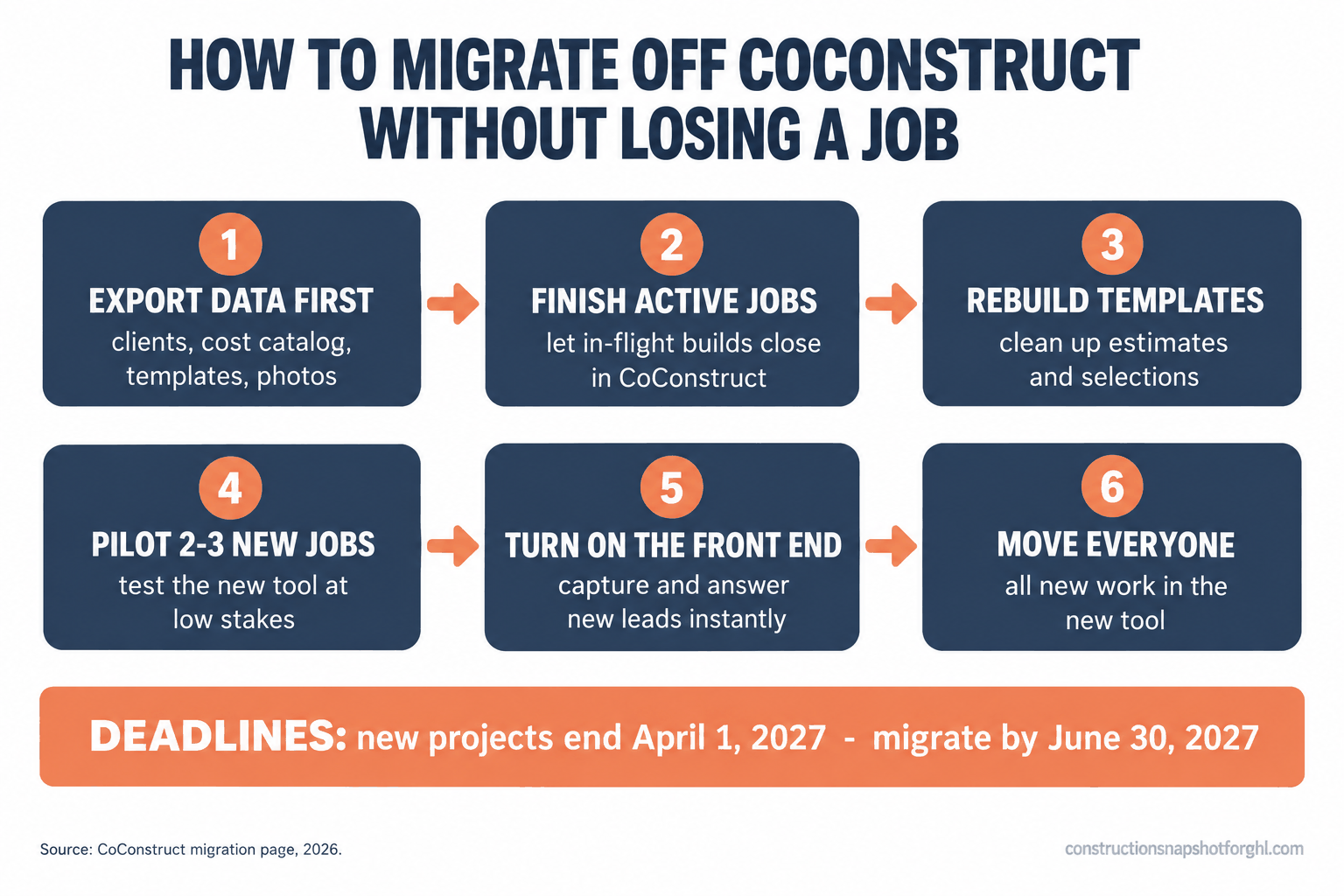
- Export everything before you cancel anything. Pull your client and lead list, cost catalog, templates, active project data, photos, and documents while you still have full CoConstruct access. This is your most valuable asset; secure it first.
- Finish active jobs where they live. Do not move a build that is 80% done. Let in-flight projects run to completion in CoConstruct and start only new jobs in the new tool. This removes most of the risk on its own.
- Rebuild templates and your cost catalog deliberately. A migration is a rare chance to clean up estimate templates and selection lists that have gotten messy. Rebuild them right instead of importing the clutter.
- Pilot with two or three new jobs. Run a small batch fully through the new platform before you commit the whole shop, and fix the workflow gaps while the stakes are low.
- Turn on the front end first. Before the fancy reporting, make sure new leads get captured and answered instantly. That is where revenue is won during a transition.
- Then move everyone. Once the pilot is clean, roll out for all new work and set a date to stop starting jobs in CoConstruct.
The thing a migration quietly breaks is client trust, because homeowners notice when your process changes mid-project. Get ahead of it with a short, plain message. Steal these.
If that list makes you want to hand the whole thing off, that is a legitimate option too. Some builders move day-to-day operation of the new system to a trained virtual assistant so the switch does not pull the owner off the jobsite for a month.
The gap none of these tools fills
Here is the part the other migration guides skip, usually because a vendor wrote them. Every tool in this article, Buildertrend and JobTread and all the rest, is project-management software. It takes over after the job is signed: schedules crews, tracks budgets, manages selections and change orders, gives the homeowner a portal. Real, valuable work. None of it wins you the job in the first place.
The money most 6-to-40-job builders lose is not lost on the jobsite. It is lost in the 48 hours after a homeowner fills out your form and nobody calls back fast enough, or the estimate you sent Tuesday still sitting unopened with no follow-up, or the missed call at 4:50pm that went to a competitor who picked up. That is the front end of the business, and switching your project-management tool does nothing for it. You can migrate perfectly and still lose the same leads next Monday.
So the smart move during a migration is to fix both ends at once: a new PM tool to run the jobs, and a real sales system in front of it to win them. That front-end system is what the Construction Snapshot for GoHighLevel installs, a lead-to-deposit sales pipeline, instant speed-to-lead text-back, an estimate follow-up sequence, booking, and review automation, preconfigured for how builders sell. It does not replace Buildertrend or JobTread on the jobsite; it fills the hole every one of them leaves open. New to GoHighLevel? You can start an account here and drop the system on top.
Licensing and consent rules to bake in
A migration is the right moment to fix the compliance details that are easy to get wrong, because you are rebuilding templates and messages anyway. Two of them are quick changes that matter most locally.
License number in advertising. In California, your CSLB license number is required by law in all advertising, including your website, business cards, vehicle lettering, and online listings, under Business and Professions Code section 7030.5 (California BPC 7030.5), and a first offense can cost up to $1,000 (CSLB). The dollar threshold for needing a license is low and has seen recent updates, so confirm the current figure with the CSLB, but the advertising rule is settled. Put the license number in your site footer and your outbound templates so you are covered by default. Rules vary by state: Texas has no statewide GC license and pushes registration to the city level, so a national template will be wrong for someone.
The three-day right to cancel. If you close a deal in a homeowner’s home for more than $25, the FTC Cooling-Off Rule gives the buyer until midnight of the third business day to cancel, and you must give written notice of that right at the time of sale (FTC). If you sign at the kitchen table, build the cancellation notice into your contract template now so it goes out automatically. One more state-by-state item for your templates: lien-notice deadlines. California and Arizona require a preliminary notice early in the job to preserve lien rights while other states require none, so scope your lien language to the states you actually build in.
Common objections
“Can’t I just let Buildertrend migrate me and be done?” You can, and for a larger builder already leaning that way it may be right. Just do it with eyes open: get the price quote for your revenue in writing, confirm contract length and onboarding fees, and compare against JobTread’s published rate first. Convenience chosen without a comparison is how you overpay for years.
“I already pay for CoConstruct and it works fine, why rush?” Because the timeline is not yours. New projects stop April 1, 2027, and Buildertrend migrations must begin by June 30, 2027 (CoConstruct). Choosing early, while you still have room to negotiate and time to pilot, is cheaper and calmer than choosing in a panic.
“Do I need to be technical to switch?” No. The tools with published pricing are built for owner-operators, and both JobTread and Buildertrend offer migration help. If even that feels like too much on top of running jobs, the setup and day-to-day is exactly the kind of work you can hand to a trained GHL VA or a done-for-you install. You make the call; someone else does the clicking.
“Isn’t switching mid-year too risky with active jobs?” Only if you move active jobs, which you should not. Finish in-flight builds in CoConstruct and start only new work in the new tool. Done that way, the disruption is a few new projects, not your whole book.
Where to start this week
Go back to that Tuesday banner. The mistake is treating it as a problem for future-you. The builders who come out of this ahead are the ones who spend one afternoon now: export a clean copy of your data, shortlist two tools against the eight criteria above (JobTread and Buildertrend for most shops), and get real numbers for your size before the vendor’s calendar becomes yours. Then fix the front end while you are in there, because a new place to run your jobs does nothing for the leads you are not calling back.
That last part is the piece we build. If you want the lead-capture, text-back, and estimate-follow-up side handled while you sort out your PM tool, come see how it works on a short call.
Frequently asked questions
Is CoConstruct shutting down?
CoConstruct is being retired into Buildertrend rather than switched off instantly. It is in maintenance mode as of 2026, with no new features and reduced support. You can add new projects through March 31, 2027, then no new projects can be created, and Buildertrend migrations must begin by June 30, 2027. Historical project data is retained. In practice it is a clear countdown, so plan your move rather than waiting to be forced.
What is the best CoConstruct alternative for a small builder?
For most residential builders and remodelers doing 6 to 40 jobs a year, JobTread is the strongest all-around alternative because it publishes its pricing ($199/mo including one user, about $20 per extra user) and covers estimating, scheduling, change orders, and a client portal. Budget-focused shops should also look at Contractor Foreman ($49 to $332/mo) and BuildBook ($79 to $279/mo). Buildertrend is the default path and capable, but it publishes no pricing and quotes to your revenue.
How much does Buildertrend cost compared to CoConstruct?
Buildertrend does not publish pricing; it quotes based on your company revenue. Third-party trackers report plans from the mid-$300s to over $1,000 per month, often with a one-year minimum and onboarding fees of roughly $400 to $1,500, and many builders report a price increase in the move from CoConstruct. Get a written quote for your revenue and compare it against a transparent option like JobTread.
Should a small builder use Procore instead?
Almost certainly not. Procore is enterprise software priced on Annual Construction Volume rather than per user, with no public pricing and reported annual costs that start above most small builders' entire software budgets. A shop doing 6 to 40 jobs a year gets better value and fit from JobTread, Buildertrend, or a lower-cost residential tool.
Will I lose my data when I migrate off CoConstruct?
On the official Buildertrend path, the company states no project data is lost and you keep access to historical projects. If you move to a different vendor, export your full client list, cost catalog, templates, active project data, photos, and documents before you cancel anything, while you still have full access. Do the export first, keep active jobs in CoConstruct until they close, and start only new jobs in the new tool.
Does switching project-management software fix slow lead follow-up?
No. Every option here, Buildertrend and JobTread included, is project-management software that runs a job after it is signed. None is built to capture a new lead, reply within seconds, or chase an unanswered estimate. If leads go cold before you call back, that is a front-end sales problem and needs a sales system such as a GoHighLevel setup in front of your PM tool, not a different PM tool.
Sources
- CoConstruct to Buildertrend migration page
- Buildertrend acquires CoConstruct (press release)
- Projul: Buildertrend pricing analysis, 2026
- Projul: Procore pricing analysis, 2026
- Capterra: JobTread pricing
- Capterra: Houzz Pro pricing
- G2: Contractor Foreman pricing
- G2: Knowify pricing
- Capterra: BuildBook pricing and BuildBook pricing page
- Capterra: Buildertrend reviews
- NAHB: Three States Drive Over 20% of Remodeling Activity (Aug 2026)
- JCHS: Remodeling Growth Set to Downshift Late 2026
- California BPC 7030.5 (license number in advertising)
- CSLB advertising guidelines
- FTC Cooling-Off Rule (16 CFR Part 429)
- Cornerstone PM: hidden cost of switching construction software