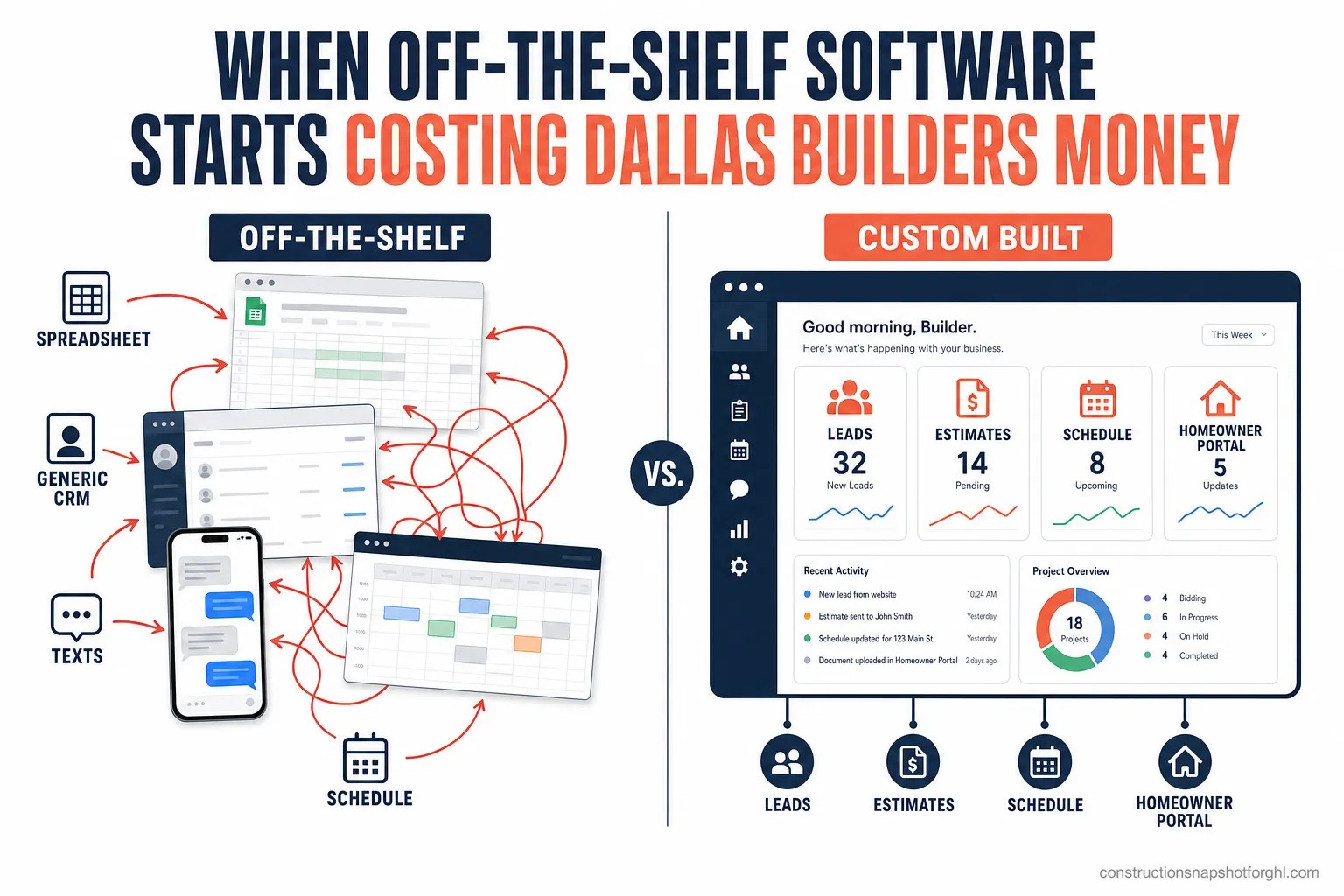
Off-the-shelf software starts costing a Dallas builder money the moment your team spends more time moving data between apps than acting on it. When your estimate lives in one spreadsheet, your leads in a generic CRM, your schedule in a second tool, and your homeowner updates in text threads, the gaps between those tools are where hours, jobs, and margin quietly disappear. Industry research puts a hard number on that gap: U.S. construction wastes an estimated $177.5 billion a year in labor costs tied to rework, conflict resolution, and hunting for project data (FMI/PlanGrid, “Construction Disconnected”).
That waste lands hardest in Dallas–Fort Worth, the busiest new-home market in the country — DFW authorized 71,788 new housing units in 2024, No. 1 among all U.S. metros (Dallas Morning News, U.S. Census permit data). More volume means more leads, more change orders, and more homeowners to keep informed — and a stack of disconnected off-the-shelf tools that groans under all of it. This post breaks down exactly when generic software stops paying for itself, what the leak costs in real numbers, and what “custom” actually means for a construction firm (hint: not a two-year moonshot).
In this post
- Why Dallas builders feel this first
- What off-the-shelf software actually costs you
- The four places generic tools quietly leak money
- When off-the-shelf is fine — and when you’ve outgrown it
- What “custom” actually means for a construction firm
- How to know it’s time to build
- Frequently asked questions
- Sources
Why Dallas builders feel this first
Volume exposes bad systems. In a slow market, a builder can run three disconnected tools and paper over the gaps with a diligent office manager who remembers everything. In Dallas–Fort Worth, that doesn’t hold. Texas added construction jobs fast — the state carried 912,923 construction jobs in Q1 2025, up 4.8% year over year, across 60,876 construction firms (Economy Insights, citing Texas workforce and AGC data). DFW is the center of gravity for that growth.
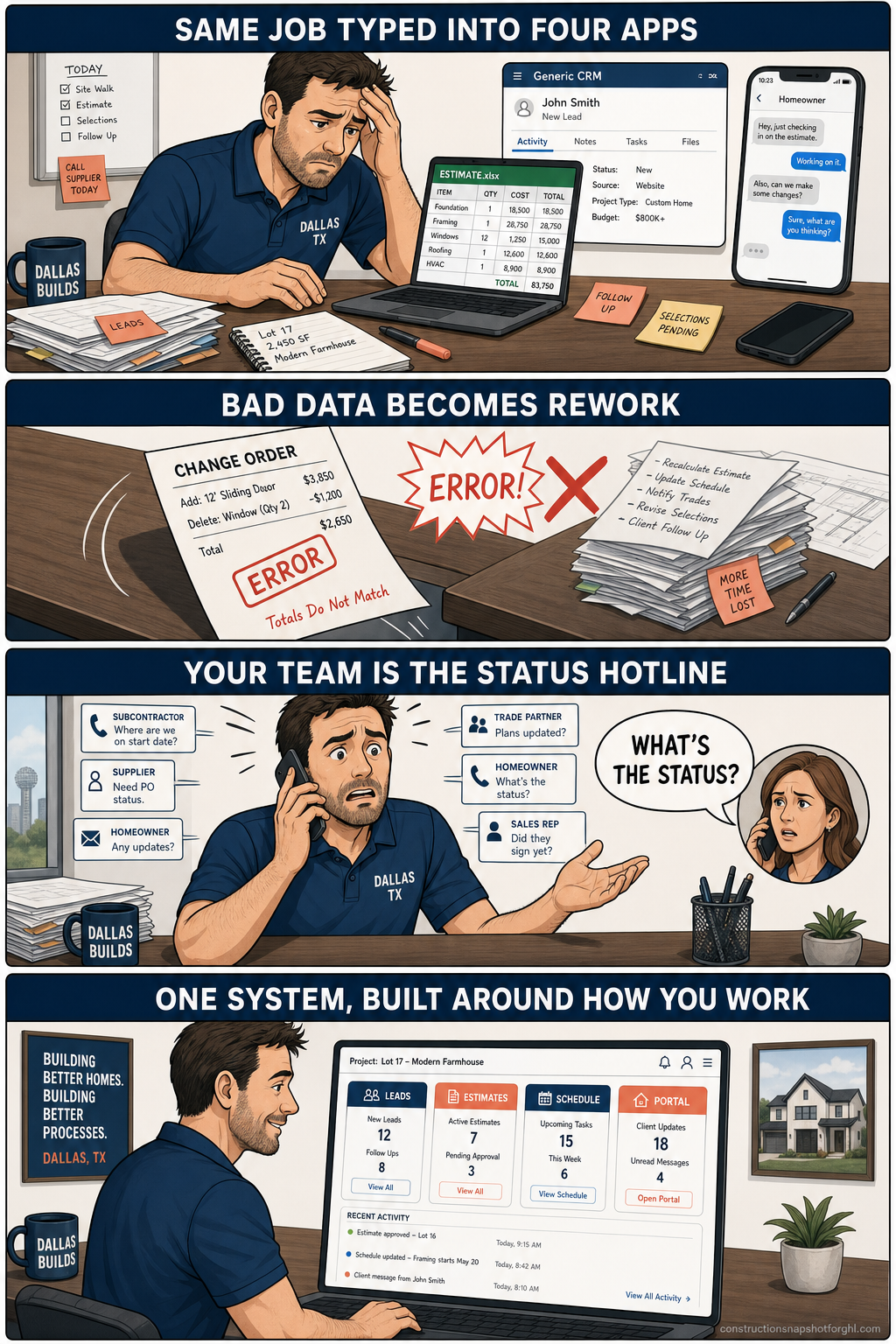
More projects moving at once means more places for a handoff to fail: a lead that sits because it landed in an inbox nobody owns, a change order priced in a spreadsheet that never made it into the contract, a homeowner who calls three times because no one told them the framing inspection slipped a week. None of those are software features problems. They’re integration problems — the tools work fine on their own and fail at the seams. And the busier you get, the more seams you have.
What off-the-shelf software actually costs you
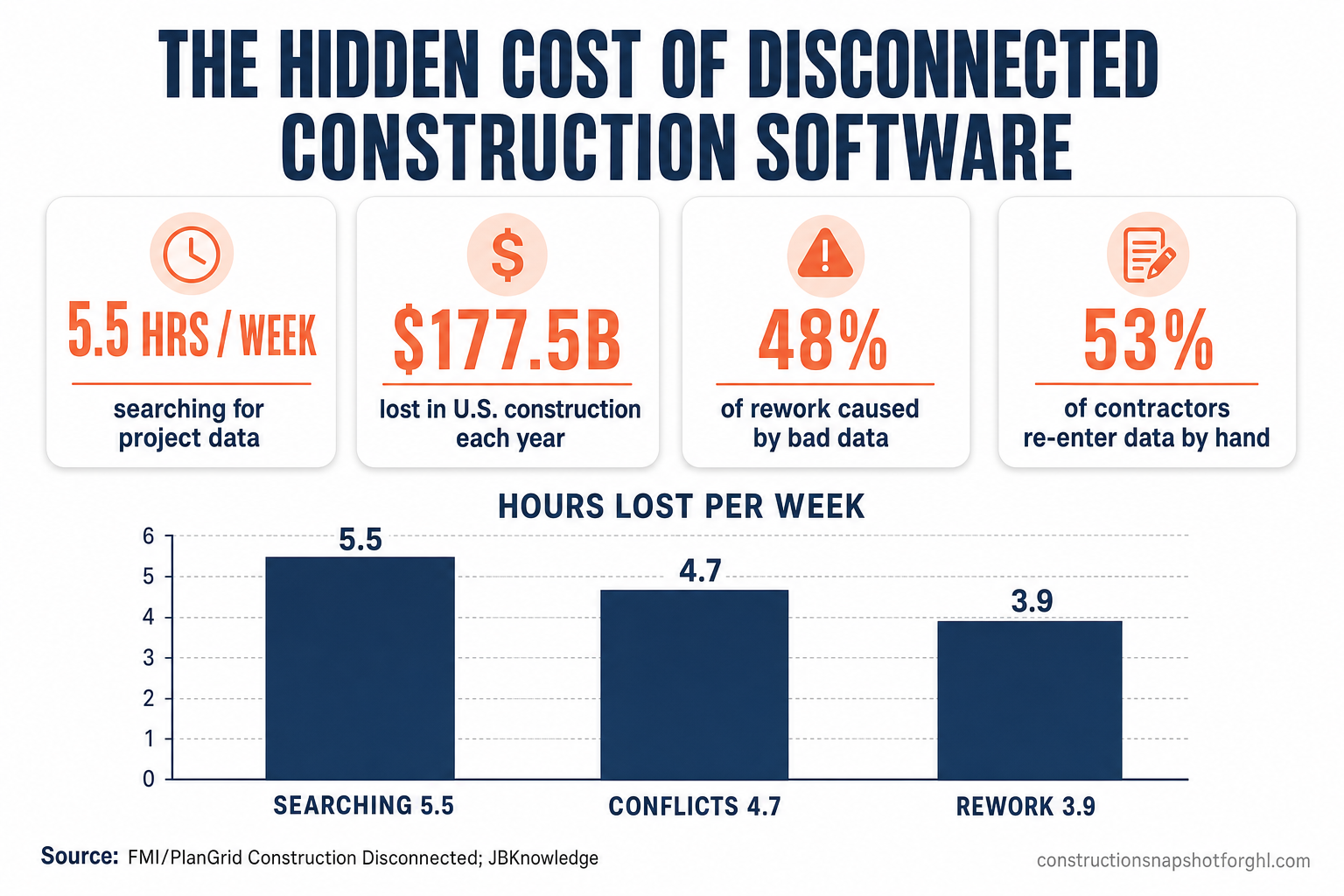
The sticker price of a generic CRM or project tool is the cheapest part. The real cost is the labor spent bridging tools that were never designed to work together. The landmark study here remains FMI and PlanGrid’s Construction Disconnected, which surveyed roughly 600 construction professionals and found the industry loses staggering amounts to activities that produce nothing.
Break the wasted week down and the pattern is unmistakable — the biggest single line item is people hunting for information that a connected system would surface instantly.
Hours lost per construction professional per week, by activity. Source: FMI/PlanGrid, Construction Disconnected (2018).
Now put your own numbers on it. If ten office and field-management staff each lose 5.5 hours a week searching for data, that’s 55 hours a week — well over a full-time salary spent every year on a problem software is supposed to solve. And that’s before the rework: nearly half of all construction rework traces back to bad data and miscommunication, the exact failure mode that disconnected tools and manual re-entry create. This is the same margin leak we’ve written about in the context of the estimate spreadsheet and change-order confusion — different symptom, same root cause.
The four places generic tools quietly leak money
Off-the-shelf software rarely fails loudly. It leaks. Here are the four seams where it costs a growing DFW builder the most.
1. Manual re-entry between apps that don’t integrate
When your lead tool, estimating spreadsheet, and scheduling app don’t share data, somebody types the same job details into each one. 53% of contractors manually re-enter data to move it between disconnected apps (JBKnowledge), and 22% are juggling six or more apps to run a single business. Every re-key wastes minutes and, worse, invites the typo that becomes a mispriced bid or a missed appointment.
2. Rework from bad data
The re-entry problem feeds the rework problem. When the number in the field doesn’t match the number in the office, someone builds off the wrong one. Poor data and miscommunication drive 48% of rework, and rework is pure margin destruction — you pay twice for the same work. On a busy DFW schedule, one avoidable tear-out can erase the profit on an entire job.
3. Slow lead response
Generic CRMs don’t understand a construction sales cycle, so leads sit. That’s expensive: firms that contact a new lead within an hour are about 7x more likely to qualify it than those that wait even one hour longer — and roughly 60x more likely than firms that wait a day (Harvard Business Review). In a market where a homeowner is messaging three builders at once, the slow responder loses by default. (We go deep on this in speed to lead for contractors.)
4. No homeowner visibility
Off-the-shelf tools give the homeowner nothing, so your team becomes the status API — fielding “what’s happening this week?” calls that a portal would answer automatically. Those calls don’t just eat time; they erode confidence and invite the scope creep and bad reviews that come from an anxious client who feels out of the loop.
When off-the-shelf is fine — and when you’ve outgrown it
Custom software is a tool, not a trophy — and for plenty of firms, off-the-shelf is the right call. Here’s an honest split.
Off-the-shelf vs. custom: which fits your firm?
| Feature | Custom-built software | Off-the-shelf tools |
|---|---|---|
| Best when | You run multiple job types & a growing office | One crew, one simple pipeline |
| Your apps | 6+ tools that don't talk to each other | 1–2 tools that cover most of the job |
| Data re-entry | Eliminated — tools share one source of truth | Manual re-keying is constant |
| Fits your workflow | Shaped around how your firm actually works | You adapt your process to the software |
| Homeowner experience | Branded portal, automated updates | Phone calls and text threads |
| Upfront cost | Higher one-time build | Low monthly per-seat fees |
| Right for | Firms where friction now costs real money | Firms still finding product-market fit |
The tipping point isn’t revenue — it’s friction. If you’re a single crew closing a handful of jobs a year, keep it simple; a generic CRM plus a proper construction sales pipeline will serve you well. But if your office manager’s real job has quietly become “human integration layer” between six apps, you’ve outgrown off-the-shelf, and every month you wait is billed in the hours from the chart above.
What “custom” actually means for a construction firm
“Custom software” sounds like a two-year, six-figure moonshot. For a construction firm, it usually isn’t. Modern AI-assisted development ships production software in weeks, not months, so “custom” now means shaped around your workflow — not impossibly expensive. In practice, it’s one of a few concrete builds:
- A custom CRM / project-management hub that unifies leads, estimates, schedule, and job status in one source of truth — so nobody re-keys anything and every stakeholder sees the same number.
- A homeowner project portal where clients track milestones, approve change orders, e-sign, upload photos, and pay — cutting status-update calls to near zero. (We covered the standalone version in client portals for contractors.)
- A bid & estimate dashboard with your cost catalog, margin targets, and one-click, homeowner-ready proposals that track win/loss by project type and lead source.
- AI agents that answer the phone 24/7, chase every unbooked estimate, read and route change orders, or summarize job-cost and cash flow on demand.
The payoff isn’t theoretical. In a 2025 study of more than 1,500 construction professionals, 77% of firms that adopted their software fully (“optimized” adopters) reported higher profit margins, versus only 17% of light adopters — and 76% said project delays dropped by five days or more (Dodge Construction Network + Procore).
Share of construction firms reporting higher profit margins, by depth of software adoption. Source: Dodge Construction Network + Procore (2025).
There’s a bigger backdrop, too. Construction labor productivity has grown only about 1% a year for two decades, versus 2.8% for the total economy and 3.6% for manufacturing — a gap McKinsey pegs at $1.6 trillion in unrealized annual value globally (McKinsey, “Reinventing Construction”). The firms closing that gap are the ones that stopped bending their process to fit generic software and built systems around the work instead.
If a full custom build is more than you need right now, the middle path is a done-for-you GoHighLevel setup that connects your pipeline, follow-up, and reviews first — then layer custom GHL development or software on top once the fundamentals are tight. You don’t have to boil the ocean; you have to stop the biggest leak first.
How to know it’s time to build
You’ve likely outgrown off-the-shelf if three or more of these are true:
- Someone re-types the same job data into 3+ tools. Your office has a human integration layer, and it’s a person you’re paying.
- You run 6+ apps that don’t share data. You’re in the 22% juggling a sprawling stack, and the seams are where jobs slip.
- A recurring rework problem traces back to a number that didn’t match across systems. That’s the 48% data-driven rework tax, showing up on your P&L.
- Your team spends real hours each week answering “what’s the status?” — for homeowners and for each other.
- Your best software still forces your crew to work its way, not yours. You’ve adapted your process to the tool instead of the reverse.
None of these require a moonshot to fix. The move is to start with the seam that costs the most — usually lead-to-estimate handoff or homeowner communication — build one system that owns it end to end, and expand from there. For most DFW builders, the first connected system pays for itself in recovered hours before the second one ships.
Frequently asked questions
What is custom construction management software?
It is software built specifically for how your construction firm works, instead of a generic product you adapt your process to fit. For a builder that usually means a unified CRM/project hub, a homeowner portal, an estimating dashboard, or AI agents — connected so leads, estimates, schedule, and job status share one source of truth and nobody re-keys data between apps.
When should a Dallas builder move off off-the-shelf tools?
When friction starts costing real money. Practically: if your team manually re-enters the same job data into three or more tools, you run six or more apps that do not integrate, or you have recurring rework caused by numbers that do not match across systems, you have outgrown generic software. A single crew on one simple pipeline usually should stick with off-the-shelf.
Isn't custom software too expensive for a contractor?
It costs more upfront than a monthly per-seat SaaS tool, but far less than it used to. AI-assisted development (we build with Claude Code) ships production software in weeks rather than months, so timelines and cost are typically a fraction of a traditional dev shop. The relevant comparison is not the license fee — it is the labor you currently spend bridging disconnected apps, which for a busy firm often exceeds a full-time salary each year.
How long does a custom build take?
It depends on scope. Focused AI agents and voice receptionists typically take two to four weeks; homeowner portals and estimating dashboards run roughly six to ten weeks; a full custom CRM or project-management platform is usually eight to fourteen weeks. Because the build is AI-assisted, timelines are generally about half what a traditional shop quotes.
Do I have to replace GoHighLevel or my current CRM to go custom?
No. Many firms keep GoHighLevel as the marketing, pipeline, and follow-up engine and add custom software only where off-the-shelf falls short — a branded homeowner portal, a bespoke estimating tool, or an AI agent that plugs into GHL via its API. Start by connecting what you have, then build custom on top of the seam that costs you the most.
About the author
Diego Marchetti is a construction operations strategist who spent twelve years running the office for a mid-size general contracting firm before moving into systems work full time. He has scoped, priced, and chased more change orders than he cares to count, and now designs the CRM workflows and custom tools that keep lead-to-deposit pipelines from leaking. He writes about estimating discipline, back-office operations, and the unglamorous habits that protect a builder’s margin.
Related posts
- Best CRM for Contractors (2026): How to Choose the Right One
- Kill the Estimate Spreadsheet: Why Manual Bidding Costs You Jobs
- Change-Order Confusion: The Silent Margin Killer on Every Job
- Speed to Lead for Contractors: Why the First Responder Wins
Sources
- FMI / PlanGrid — Construction Disconnected ($177.5B waste; 14 hrs/week; 48% of rework), 2018
- Autodesk / FMI — Construction Disconnected report detail (hours by activity), 2018
- JBKnowledge — Construction Technology Report (53% manual re-entry; 22% use 6+ apps), via Construction Dive, 2019/2020
- Dodge Construction Network + Procore — Software adoption ROI study (77% vs 17% higher margins), 2025
- McKinsey Global Institute — Reinventing Construction (1% productivity growth; $1.6T gap), 2017
- Harvard Business Review — The Short Life of Online Sales Leads (7x / 60x speed-to-lead), 2011
- Dallas Morning News / U.S. Census — D-FW tops the nation in new-home permits (71,788 units, 2024), 2025
- Economy Insights — Texas construction employment and firm counts, 2025