
It is 6:50am on a Tuesday and the contract you chased for six weeks is finally signed. By 9:15 the same morning, the homeowner texts you: “Just making sure you got it. When does everything start? Do I pick the tile now or later?” You are standing in a supply yard and you have not even told your lead carpenter the job is a go.
That gap, the stretch between “signed” and “first real workday,” is where most residential builds quietly go wrong. Not on the jobsite. In the office, in the first two weeks, before a single stud is cut.
Here is the short answer. A client onboarding process is a fixed, repeatable sequence you run in the 14 days after a contract is signed. It confirms the win, hands the job from sales to production, sets the money and the selection deadlines in writing, and installs a communication rhythm so the client stops calling for updates. Done right, it takes the anxiety out of the client and the scope creep out of the job. This post gives you the exact six-stage version, the messages you can copy, and how each stage breaks when you skip it.
What a bad first two weeks actually costs you
There are more builders fighting for the same homeowner than there used to be. The National Association of Home Builders reports there were fewer than 69,000 remodeling firms in 2000 and more than 128,000 by the first quarter of 2025, with remodelers now making up 56% of all residential building construction establishments (NAHB, 2026). The work is there, too: Harvard’s Joint Center for Housing Studies projects home improvement and repair spending to reach roughly $518 billion by the end of 2026 (JCHS, 2026). Plenty of jobs, plenty of competition. The builder who runs a tight start keeps the client calm and keeps the referral.
The cost of a sloppy start shows up later. The Project Management Institute found that for every $1 billion spent on project work, about $135 million is at risk, and $75 million of that, roughly 56%, is at risk because of poor communication (PMI, 2013). The study covers all project work, not just construction, but any builder who has eaten a change order because “I thought that was included” knows the number in their gut.
Dollars at risk per $1 billion spent on project work. Source: Project Management Institute, The High Cost of Low Performance, 2013.
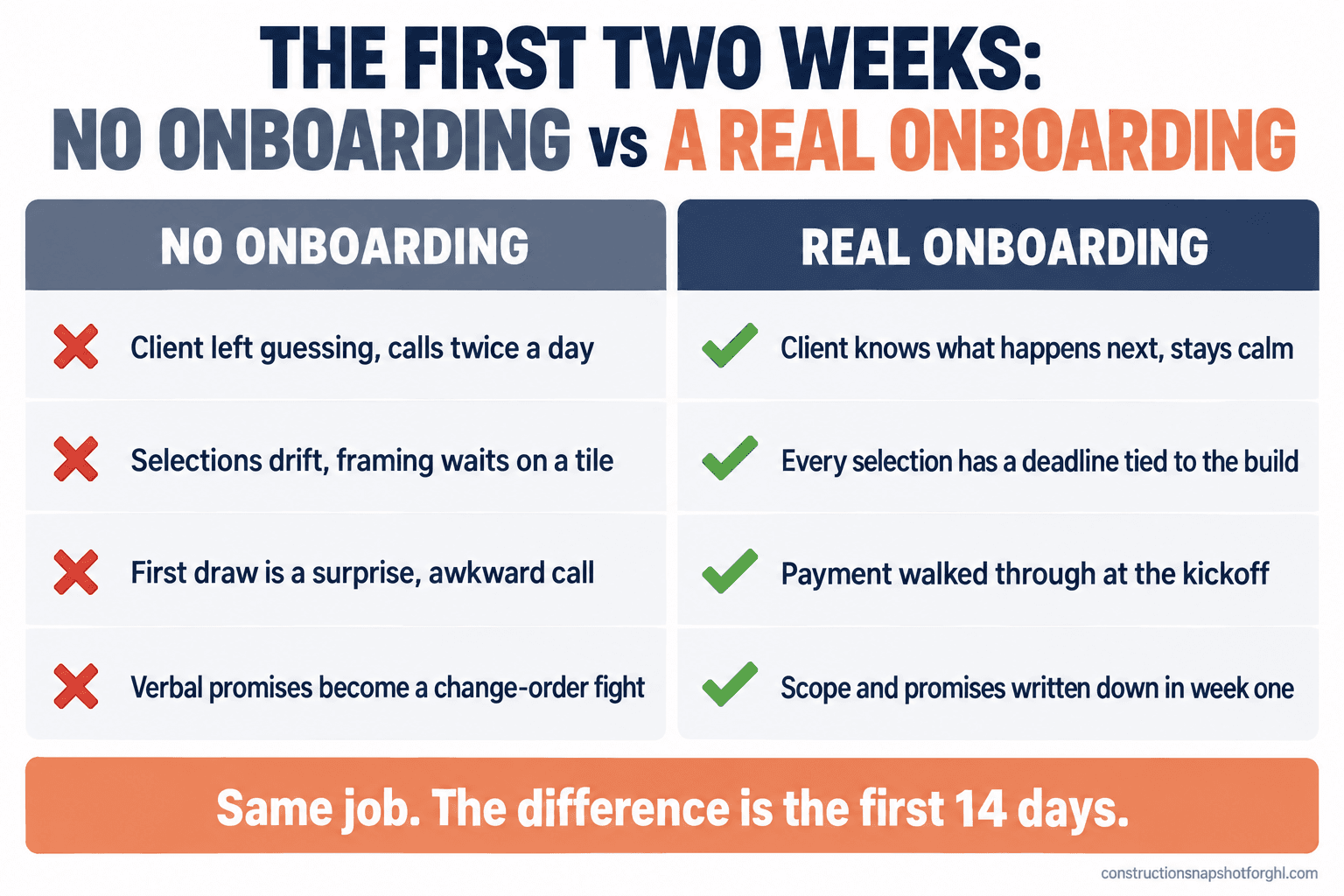
A weak onboarding leaks in four ways. The client stays anxious, so they call you twice a day. Selections drift because no one set a deadline, so framing waits on a tile nobody picked. The payment schedule is fuzzy, so the first draw turns awkward. And the scope the client remembers is not the scope you priced, because nobody walked it while it was fresh. Every one of those is an office problem you can fix before the crew shows up.
The onboarding system: six stages in 14 days
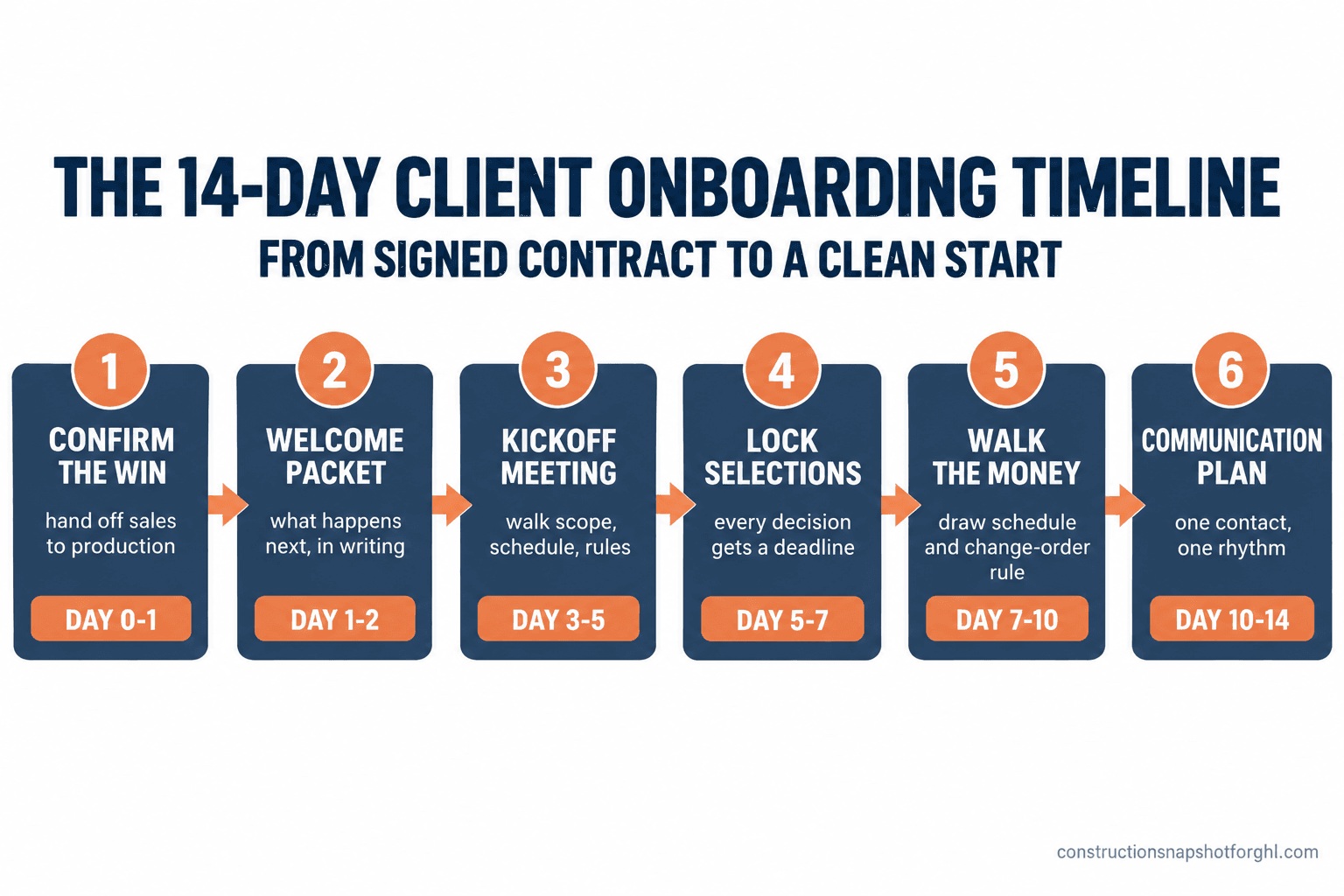
The whole point is that it is the same every time. You are not reinventing the first two weeks for each client. You run the sequence. Here are the six stages and their timing.
- Confirm the win (day 0 to 1): acknowledge the signature, hand the job from sales to production.
- Send the welcome packet (day 1 to 2): what happens next, who to call, in writing.
- Run the kickoff meeting (day 3 to 5): walk the scope, the schedule, and the ground rules.
- Lock the selections schedule (day 5 to 7): every decision gets a deadline.
- Walk the money (day 7 to 10): draw schedule and change-order rules, out loud.
- Set the communication plan (day 10 to 14): one point of contact, one rhythm.
The rest of this post takes each one apart: what to do, the message where it helps, and how the stage breaks when you rush it.
Stage 1: Confirm the win and hand off the job (day 0 to 1)
The moment a contract is signed, two things have to happen within a few hours. The client needs to hear from you, and your production side needs to know the job is real.
The client part is easy and almost everyone skips it. Send one message that says the paperwork is in, thank them, and tell them what is coming next and when. That single text is the difference between a client who relaxes and a client who texts you at 9:15am from a supply yard.
The internal part quietly saves the job: the sales-to-production handoff. Whoever sold the work has a head full of context, what the client cares about, what you promised verbally, which corner they will fight you on. If that never gets written down and passed to the person running the build, it evaporates. Create a one-page handoff: final scope, the three things the client cares about most, anything promised that is not in the contract, and the agreed start window.
How it breaks: the sale closes, everyone celebrates, and the context lives only in the salesperson’s memory. Three weeks later the project manager prices a change order for something the client swears was included, because it was, verbally, and nobody wrote it down. A ten-minute handoff form prevents a $4,000 argument.
Stage 2: Send the welcome packet (day 1 to 2)
The welcome packet is not a glossy brochure. It is a short document, two pages or a simple email, that answers the questions every homeowner has and is too polite to ask all at once. Who is my main contact. How will you tell me what is happening. When do I make decisions. How and when do I pay. What do you need from me. Put it in writing, because a verbal answer gets forgotten and then re-asked, and a written packet becomes the thing you point back to for the whole job.
How it breaks: you tell the client all of this on the phone, they nod, and two weeks later they call asking how to pay the first draw and whether they picked the flooring yet. Written once beats spoken five times.
Stage 3: Run the pre-construction kickoff meeting (day 3 to 5)
The kickoff is the most valuable 45 minutes of the whole job. In one sitting, in person or on video, you walk three things with the client: the scope, the schedule, and the ground rules.
Walk the scope out loud, line by line, while the project is fresh. This is where you catch the mismatch between what you priced and what the client pictured, while it is still cheap to catch. Walk the schedule so they understand why the shower tile can’t go in before the plumbing rough-in. Walk the ground rules: how you communicate, when the crew arrives, where they park, who can approve a change. Then send a short recap: three bullets covering what you agreed, what they owe you by when, and what you owe them by when.
How it breaks: you skip the kickoff because “we already went over all this during the estimate.” But the estimate was a sales conversation. The client was deciding whether to hire you, not memorizing the build sequence. Skip the kickoff and every one of those items becomes a mid-build interruption instead of a 45-minute meeting.
Stage 4: Lock the selections schedule (day 5 to 7)
Selections are the number-one cause of a stalled residential build. The homeowner has not picked the tile, so the tile is not ordered, so it is not on site, so framing or finish waits. The fix is not nagging. The fix is a calendar.
During onboarding, build a selections schedule: every decision the client has to make, the date each is due, and what it blocks if it is late. Tie each deadline to the build, not to a vague “soon.” “Cabinets due March 3, because they take four weeks to arrive and install starts March 31.” Now the deadline has teeth the client can see. Then automate the reminders, so a selection due in three weeks gets a nudge at three weeks, one week, and two days. For the full version, read our construction selections process.
How it breaks: you hand the client a list and say “let me know.” No dates, no consequences. They have a day job and a life, so it slides. You find out on the Friday before install that the vanity was never ordered, and now your plumber has a hole in his week and you have a hole in your finish date.
Stage 5: Walk the money out loud (day 7 to 10)
Money is the conversation builders most want to avoid and most need to have early. During onboarding, walk the payment schedule with the client so the first draw is never a surprise. Tie each draw to a visible milestone, not a date, so the client sees the work before they pay for it. If you need a template, we published a construction draw schedule by phase.
Cover the change-order rule in the same breath: any change to the scope gets priced and signed before the work happens, and that keeps both sides honest. Clients do not resent a clear change-order process. They resent a surprise bill. Setting the rule when nobody is upset is far easier than introducing it mid-argument. Our guide on getting change orders signed without a fight walks the full approach.
How it breaks: the payment schedule lives in the contract but you never talk it through. The first draw request lands and the client is startled, because they read the contract once, weeks ago, under a stack of paperwork. Now you are chasing a payment and the relationship has its first dent, three weeks in.
Stage 6: Set the communication plan (day 10 to 14)
The last stage stops the phone from ringing. Decide, and tell the client, two things: who their single point of contact is, and the rhythm they will hear from you on.
One point of contact matters more than builders think. When a client can text the carpenter, the office, and you, they get three different answers and trust none of them. Name one person. Everything routes through them.
The rhythm kills the anxiety. A client calls for updates because they do not know when the next one is coming. Give them a fixed cadence, a short note every Monday, Wednesday, and Friday, and the update calls stop almost entirely, because the client knows Wednesday’s note is on its way. We broke the exact cadence down in why every long build needs a status-update rhythm.
How it breaks: you never set a rhythm, so the client sets their own, which is to call you whenever they feel nervous. You spend your drive-time fielding “just checking in” calls that a two-line Wednesday text would have prevented.
Running this at your size: solo, mid, and large
The six stages do not change. Who runs them and how much is automated does.
The solo operator (6 to 10 jobs a year). You are sales, production, and office, so onboarding gets skipped because you are on a roof. Template everything: write the four messages once as reusable snippets, and build the welcome packet as a fill-in-the-blanks document. The kickoff can be a 30-minute video call. Automate the selection and draw reminders first, because those are the ones you forget while you are busy.
The mid-size team (10 to 25 jobs, with an office admin). Now the handoff is between two people, so the Stage 1 form becomes non-negotiable. Your admin runs Stages 2 through 6 off a checklist while you run the kickoff. The danger is inconsistency, great when you are involved, thin when you are slammed. This is the size where automating the sequence pays for itself fastest, because it removes the “did we send the packet?” question entirely.
The large builder (25 to 40 jobs, with a PM and a coordinator). You have the people to run onboarding well and the volume to be hurt badly when it slips. Assign owners: the coordinator owns the packet, reminders, and comms rhythm; the PM owns the kickoff and scope walk; sales owns the handoff. The failure mode at your scale is drift between crews. Make onboarding a system every project runs through, not a habit that depends on which PM caught the job.
The compliance details most builders miss in week one
Three rules touch the first two weeks, and they are easy to get wrong.
Your license number belongs in your advertising and on the welcome packet. States that license general contractors generally require the number on advertising and contracts. California requires licensed contractors to put their license number in their advertising, and as of January 1, 2025, AB 2622 raised the no-license-needed ceiling for small jobs from $500 to $1,000, with conditions (CSLB, 2025). Texas has no statewide GC license, so the rules drop to the city. We go deeper in the 2026 contractor advertising rules.
If you sign in the client’s home, the FTC Cooling-Off Rule applies. It gives the buyer three business days to cancel certain sales of $25 or more made at their home, and the seller must give a cancellation notice and a copy of the contract at signing (FTC). Saturday counts as a business day. Build that window into your start date so you are not ordering materials on a contract the client can still unwind.
Get SMS consent before the text sequence fires. Under the TCPA, you need the client’s prior express consent to text and a clear way to opt out (FCC). Capture it on the contract or intake form, and your sequence is clean from message one.
Common objections, answered
“My clients would find a formal onboarding stiff and corporate.” The opposite is true. A homeowner spending six figures with you is nervous, and nervous people want to know what happens next. A clear process reads as competence, not coldness. The builders who feel “corporate” are the ones who send a dense legal packet and nothing warm. Lead with the human message, back it with structure.
“I already pay for Buildertrend or JobTread. Isn’t onboarding built in?” Those tools give you a client portal and a place to store documents. They do not decide your six stages, write your four messages, or set your selection deadlines. Software is the filing cabinet. Onboarding is the process you run through it.
“I don’t have time to run a two-week process on top of the build.” You are already spending that time. It is just scattered across the job as interruptions: the repeated questions, the surprise-payment call, the stalled selection, the change-order fight. Onboarding does not add work. It moves the same work to week one, where it is cheap, instead of week six, where it is expensive.
“Do I need to be technical to automate this?” No. You can run the whole thing on paper and a phone. Automating it, the welcome sequence, the reminders, the Wednesday note, just means it fires without you remembering. That is what a system like the Construction Snapshot does: it installs the sequence into GoHighLevel so the messages send on their own.
The market is crowded. The start is where you win.
Number of U.S. remodeling firms. Source: National Association of Home Builders, 2026.
There are nearly twice as many firms competing for the homeowner as there were a generation ago. You do not out-build that field on price. You out-build it on the feeling a client gets in the first two weeks, when they decide, quietly, whether they trust you. Run the six stages and the 9:15am text from a nervous homeowner never gets sent, because they already know exactly what happens next. The version of you that runs onboarding sent the confirmation before leaving the supply yard, booked the kickoff by lunch, and never heard the anxious text at all. Two weeks later the job starts clean, the client is calm, and the referral is already halfway written.
FAQ
What is construction client onboarding?
It is the fixed sequence a builder runs in the two weeks after a contract is signed, before work starts: confirm the win, hand the job from sales to production, send a welcome packet, run a kickoff, lock selections, walk the payment schedule, and set a communication plan. The goal is a calm client and a job with no scope surprises.
What goes in a construction welcome packet?
The client's single point of contact, how and how often you will update them, their decision deadlines, the payment schedule, your change-order rule, and what you need from them. Keep it to about two pages, and include your license number if your state requires it in advertising.
Why do selections stall a construction project?
Because no one set a deadline tied to the build. An unpicked tile is an unordered tile, and that holds up the trade waiting on it. Lock every selection to a date during onboarding, tie that date to what it blocks, and send automatic reminders as each one nears.
Does the FTC Cooling-Off Rule apply to construction contracts?
If you sign in the client's home, yes. The rule gives buyers three business days to cancel certain sales of $25 or more made at their home, and you must provide a cancellation notice at signing. Contracts signed at your office are treated differently.
Can I automate construction client onboarding?
Yes. The welcome messages, selection reminders, draw-schedule nudges, and the weekly update rhythm can all fire automatically from a CRM like GoHighLevel. You design the six stages once, and automation runs the sequence without you remembering to send each piece.