
It is a Thursday and you are standing in a kitchen that was supposed to be done last week. The cabinets are in, but the countertop template guy needs the sink cutout confirmed, and the homeowner still has not picked the faucet, and your tile sub is now on another job because the job before this one also ran long. You promised this family they would be cooking Thanksgiving dinner here. You are not going to make it, and you already know the next call is going to be an awkward one. None of this is because you are bad at building. It is because the schedule slipped a few days at a time, in places you were not watching, until a few days became three weeks.
Here is the short version. Your jobs do not finish late because of one big disaster. They finish late because of small coordination gaps that compound: a selection the client sits on, a sub you never got a firm confirmation from, a change order that stalls the whole job while everyone waits for a decision, an inspection nobody booked early enough. Each gap costs a few days, the days stack, and the finish date drifts. McKinsey found that large construction projects run an average of 20 percent longer than scheduled (Autodesk, citing McKinsey), and a big share of the rework and delay traces back to communication and information gaps, not skill (FMI/PlanGrid via Construction Dive). The fix is not working weekends. It is closing the six gaps where a build quietly falls behind, with confirmations, reminders, and status updates that fire on a schedule instead of depending on you remembering. This post walks all six, gives you the exact messages that keep a job moving, and shows how the fix changes with your size.
In this post
- What a late week actually costs you
- The six places a build quietly falls behind
- Run the slip audit on your last three jobs
- Steal this: the messages that keep a job on schedule
- What on-time looks like at three sizes
- The legal lines you cannot cross while chasing a schedule
- Common objections
- Frequently asked questions
- Sources
What a late week actually costs you
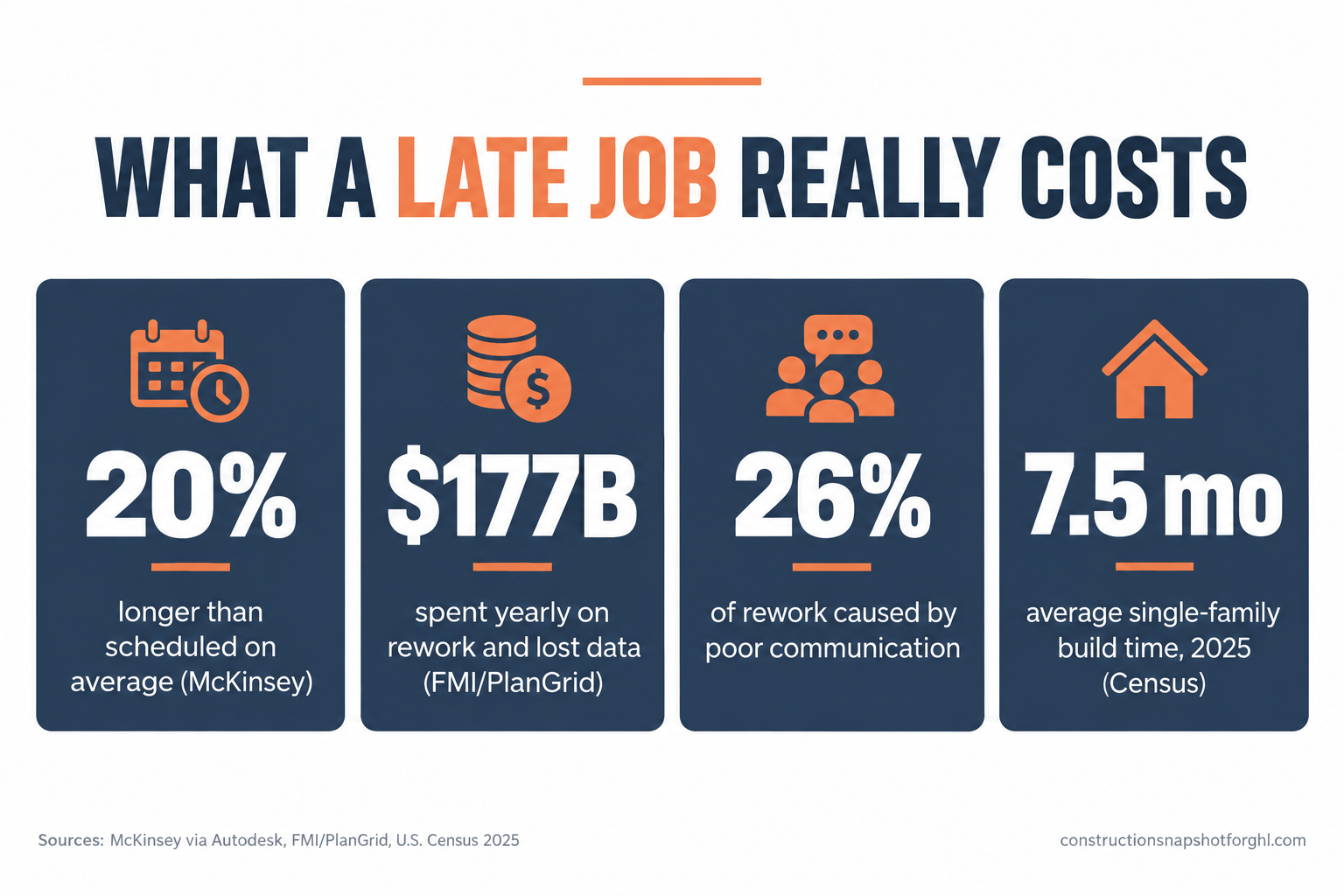
Most builders treat a late finish as a nuisance, an apology to make and a review to sweat. It is a lot more expensive than that, and the cost is spread across four buckets you rarely add up.
First, your labor is stuck. A crew that should have rolled off onto the next job is still here, so either the next client waits (and now that job is late too) or you pay people to stand around while a selection gets made. McKinsey’s research on large projects across asset classes puts the typical schedule overrun at an average of 20 percent, with budgets running up to 80 percent over (Autodesk, citing McKinsey). Residential jobs are smaller, but the mechanism is identical: time you did not plan for is time you are paying for.
Scheduled versus actual duration, indexed to 100, for large construction projects across asset classes. McKinsey research finds these jobs run about 20 percent longer than planned on average (source). The extra fifth of the timeline is overhead your margin has to absorb.
Second, your cash is stuck. Your last draw or your final payment is almost always tied to substantial completion. Every week the job runs long is a week that money sits on the client’s side of the table while your own bills keep coming. If cash flow is already tight, a late finish is the thing that turns a profitable job into a loan you did not mean to make, which is the whole argument behind a disciplined construction draw schedule.
Third, the delay breeds rework, and rework breeds more delay. When trades get out of sequence and information goes stale, people build off the wrong number and then tear it out. The FMI and PlanGrid “Construction Disconnected” study estimated that U.S. construction spends more than $177 billion a year on rework, hunting for project data, and resolving conflict, and that poor communication alone drives about 26 percent of rework while poor or missing project information drives another 22 percent (Construction Dive). Nearly half of all rework, in other words, is a communication failure wearing a tool belt.
Share of U.S. construction rework attributed to communication and information gaps, from the FMI/PlanGrid “Construction Disconnected” survey of about 600 professionals (source). Together these two causes account for roughly 48 percent of rework. They are not skill problems. They are coordination problems you can fix.
Fourth, a late job costs you the review and the referral. A homeowner who waited three extra weeks remembers the wait, not the craftsmanship, and that memory shows up on Google. For a residential builder, where single-family homes already take an average of 7.5 months from start to finish in 2025 (Census, via Calculated Risk), the finish is the part the client judges hardest, because it is the only part they can see coming for weeks. Add it up and a “small” slip is a labor cost, a cash cost, a rework cost, and a reputation cost at the same time.
The six places a build quietly falls behind
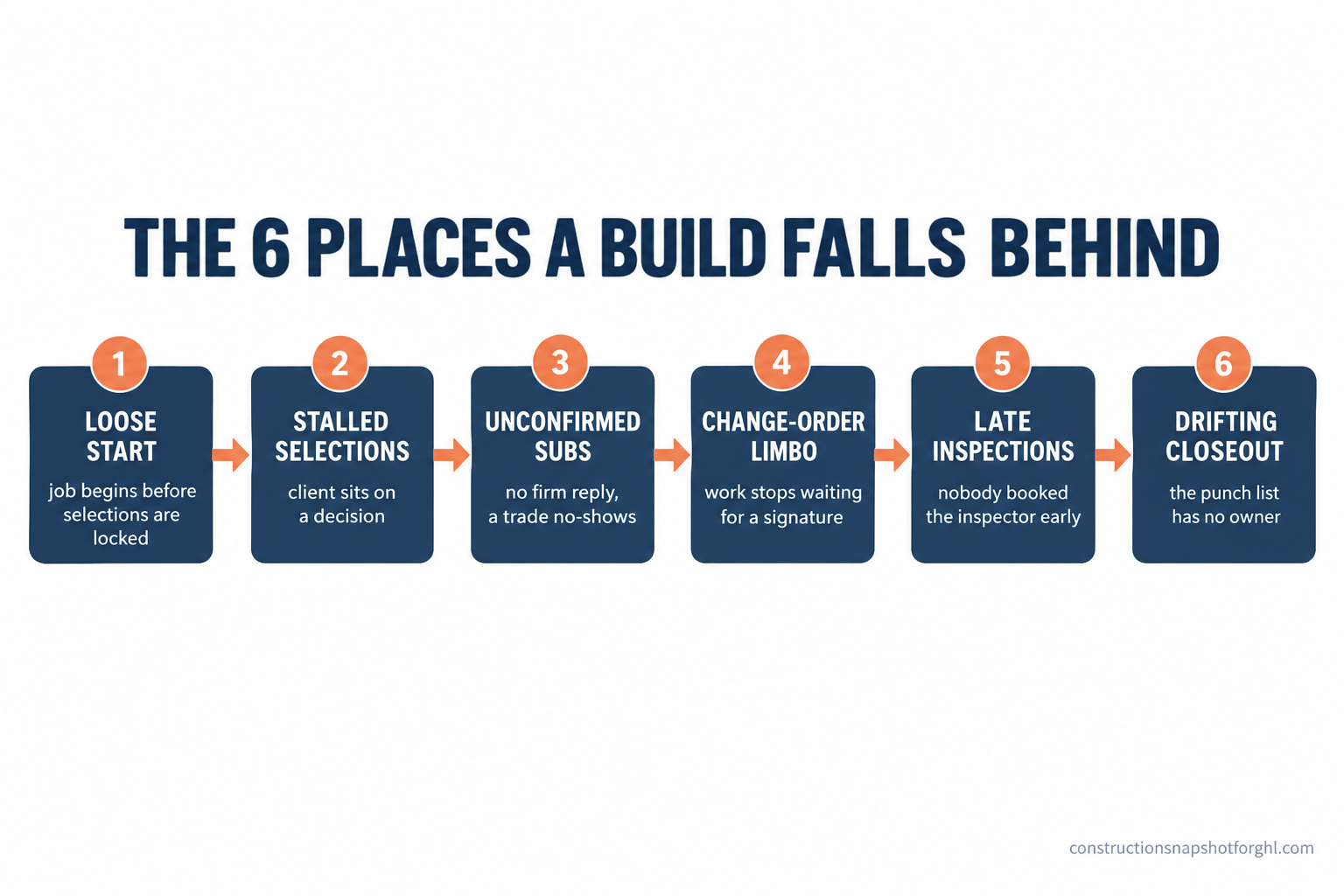
Here they are, in the order they hit a job. Each gap has a way it hides, which is why you feel like you are hustling and still watch the finish date drift.
Gap 1: The job starts before everything is locked. You are eager to get moving, the client is eager to see progress, so you break ground with selections still open and a few scope questions unanswered. It feels like momentum. It is actually borrowing time from the back end of the schedule, because every unmade decision is now a clock ticking against a wall that is already going up. Where it hides: starting fast looks like good service, so nobody notices the job was set up to stall until it stalls. The fix is a locked pre-construction checklist: long-lead items ordered, the first three weeks of selections made, the payment schedule signed, and the critical-path decisions closed before day one. This is the entire point of a disciplined client onboarding process, and it is the cheapest week you will ever buy back.
Gap 2: A selection stalls, and the whole job waits on a faucet. This is the single most common residential delay, and it is almost never the builder’s fault, which is exactly why it goes unmanaged. The client cannot decide on tile, or the quartz is backordered, or they want to “look at a few more options,” and meanwhile your tile sub is standing down and your schedule is bleeding. Where it hides: it feels like the client’s problem, so you wait politely instead of driving it. But the delay lands on you, in your labor and your finish date. The fix is a selections schedule with real deadlines tied to the build, an order-by date for every decision, and automatic reminders that go out before the deadline, not after it blew. We break the whole cadence down in the construction selections process guide.
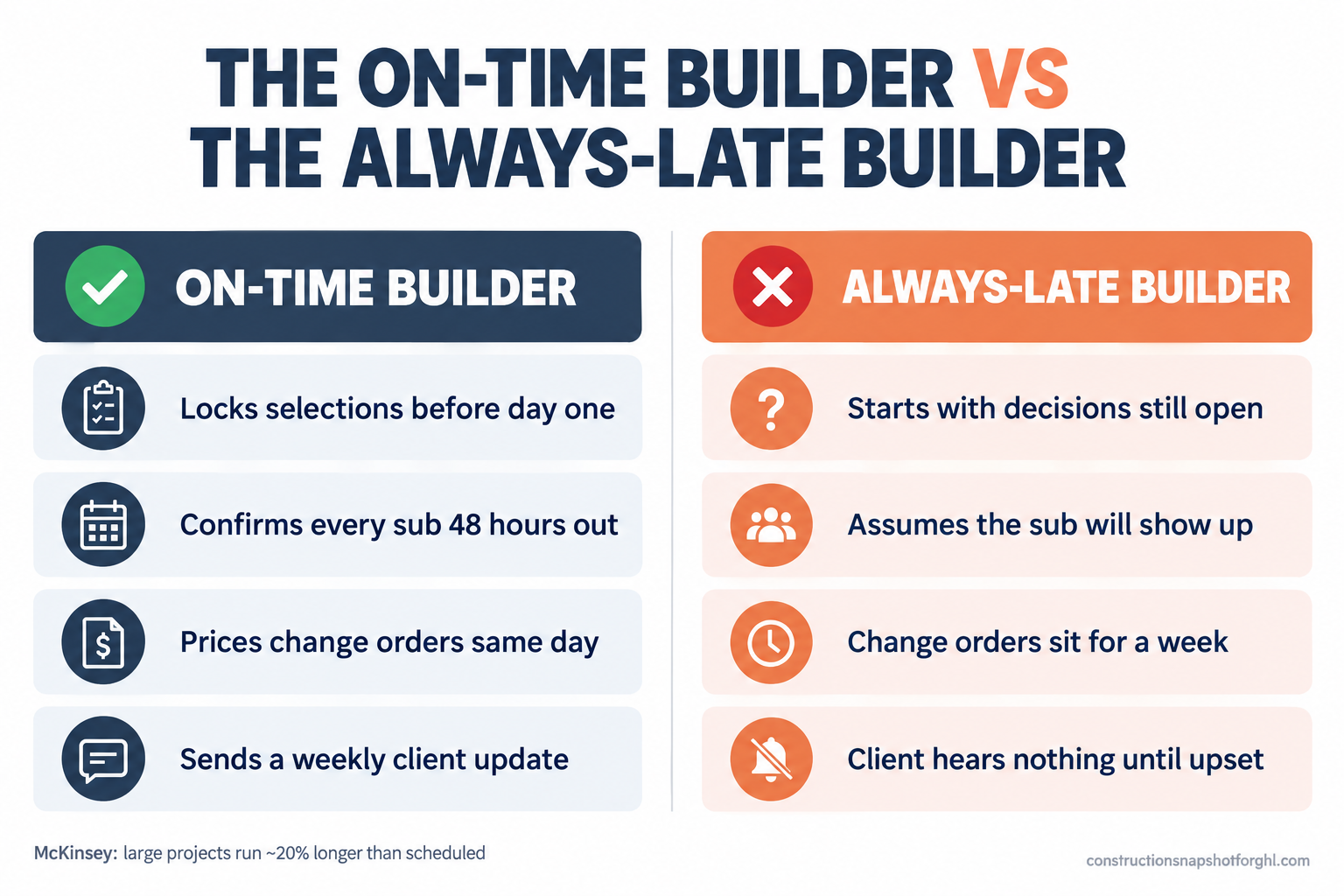
Gap 3: The sub says “yeah, I’ll be there,” and then is not. A verbal maybe is not a schedule. You think the framer is coming Monday, the framer thinks it is tentative, and Monday morning you are calling around while your crew drinks coffee. One no-show does not just cost that day, it pushes every trade behind it, because construction is a relay and a dropped baton stops the whole race. Where it hides: you assume silence means yes, so you do not confirm, and the gap only reveals itself the morning it costs you a day. The fix is a hard confirmation loop: an automatic reminder to every sub 48 and 24 hours out that requires a reply, so a no-show surfaces on Friday afternoon when you can still fill the slot, not Monday at 7 a.m. The Monday-morning sub no-show problem is one of the most fixable delays on this list.
Gap 4: A change order stops the job while everyone waits for a decision. The client wants to move a wall or upgrade the whole master bath. Good news, it is more revenue. Bad news, until it is priced, approved, and signed, nobody knows whether to keep building, so the job idles in limbo. A change order that takes a week to resolve is a week of schedule gone, on top of the actual work it adds. Where it hides: the extra scope feels like a win, so the delay it creates while it sits unapproved gets written off as “part of the job.” The fix is a fast, documented change-order process: priced and sent within a day, a clear approval step, and the client trained from the start that work pauses on affected areas until they sign. That speed is the whole reason to get change orders signed without a fight.
Gap 5: Nobody booked the inspection early enough. Framing is done, but the framing inspection is three days out because you called this morning, and you cannot close walls until it passes. Inspections and third-party approvals have their own calendars that do not care about yours, and treating them as an afterthought is how you lose days at every phase transition. Where it hides: the inspector’s lead time is invisible until you need them, so the delay feels like the city’s fault instead of a scheduling miss. The fix is to book inspections against your look-ahead schedule, not against the day the work happens to finish, so the approval is waiting on you rather than you waiting on it.
Gap 6: The closeout drifts because nobody owns the punch list. The job is 95 percent done, the crew mentally moved on, and the last 5 percent drags for a month. A missing cabinet pull here, a touch-up there, a final clean that keeps getting pushed. This is the slip the client feels most, because from their chair the house looks finished and they cannot understand why they are still waiting. Where it hides: the big work is done, so the urgency evaporates even though the final payment is still sitting out there. The fix is a punch list with a named owner and a hard completion date, worked like its own mini-project instead of a loose list of someday items, which is how a disciplined punch-list and closeout process protects your final draw.
Run the slip audit on your last three jobs
You do not need scheduling software to find your leaks. Pull your last three jobs, the ones that ran long, and answer six questions about each. The pattern will tell you exactly which gap is costing you the most, and it is rarely the one you blame.
The six-question slip audit (run it on your last three jobs)
| Feature | Ask yourself | If the answer is bad, the gap that is leaking is |
|---|---|---|
| Start | Were selections, long-lead orders, and scope locked before day one? | Gap 1: loose start. Hold a pre-construction checklist you do not break ground without. |
| Selections | Did any decision stall the job while a trade stood down? | Gap 2: stalled selections. Put order-by dates on every decision with reminders. |
| Subs | Did a sub no-show or arrive late and push the trades behind them? | Gap 3: unconfirmed subs. Require a reply to a 48 and 24 hour confirmation. |
| Changes | How many days did a change order sit before it was priced and signed? | Gap 4: change-order limbo. Price and send within a day, pause affected work until signed. |
| Inspections | Did you ever wait days for an inspection you booked too late? | Gap 5: late inspections. Book against your look-ahead, not the day work finishes. |
| Closeout | How long did the last 5 percent of the job drag after the big work was done? | Gap 6: drifting closeout. Give the punch list an owner and a hard date. |
The point of the audit is not to feel bad about the jobs that ran long. It is to find the one or two gaps costing you the most, because fixing those two moves your finish date more than anything else you could do. Most builders assume their delays come from subs. When they actually walk their last three jobs, the biggest leaks are usually stalled selections and change-order limbo, both of which are client-decision problems you can manage with deadlines and reminders rather than hope.
One more reason to tighten the schedule: the market is not going to carry you. There are about 128,000 remodeling firms in the U.S., up from 69,000 in 2000, with California, Texas, and Florida alone driving more than a fifth of national remodeling activity (NAHB). At the same time, Harvard’s remodeling indicator projects homeowner improvement spending reaching roughly $522 billion by the end of 2026, but with growth cooling from 2.9 percent to 1.6 percent across the year (JCHS via Qualified Remodeler). More firms competing for demand that is still growing but slowing down. In that market, the builder who finishes when promised wins the referral the builder who runs three weeks long hands to a competitor.
Steal this: the messages that keep a job on schedule
Most of the schedule you are losing comes back with a handful of messages you keep meaning to send and never do on a busy week. Here is the exact wording, ready to use. Copy them, change the brackets, and put them to work on your next job.
Sending these by hand works right up until the week you are slammed on three jobs at once, which is exactly the week your schedule slips. The smarter move is to trigger the selection reminders, the sub confirmations, and the weekly status updates off each job’s stage so they never depend on you remembering on a bad week.
What on-time looks like at three sizes
How you close these gaps depends on how big you are, because who is dropping the baton changes with scale.
The solo operator or small remodeler (6 to 12 jobs a year). You are the estimator, the project manager, and the person swinging a hammer, so the gaps that leak are the ones that need you at a desk while you are on a roof. Selections stall because you did not send the reminder, and the sub no-shows because you never confirmed. Your highest-return fix is automating the two gaps that depend on your memory: the selection reminders and the sub confirmations. Lock the job before you start, let the reminders and confirmations run themselves, and you will claw back most of your slip without adding an hour to your week. You cannot out-work a schedule leak. You buy it back with a system that fires without you.
The mid-size design-build or remodeling firm (15 to 25 jobs). Now the problem is that every project runs a little differently depending on who is managing it. One PM confirms subs religiously, another assumes they will show. One sends weekly updates, another goes dark until the client calls upset. Your finish dates swing on who caught the job. This is the tier where standardizing pays the most. Put every job through the same stages with the same automatic reminders, confirmations, and status updates, so the schedule does not depend on which PM is having a good week. A consistent process is also what makes the delays visible early enough to act on, instead of discovering them at the finish.
The larger custom builder (30 to 40 jobs). At this scale the risk shifts from “I forgot” to “we have a dozen jobs running and no single view of which ones are about to slip.” A week of slip across many jobs at once is serious money in idle crews and delayed final draws. The gap controls become a documented standard: a pre-construction checklist nobody breaks ground without, a selections schedule with enforced order-by dates, a sub-confirmation loop with required replies, and a weekly status cadence that runs automatically and gets reported on. If driving all of that is the bottleneck, a trained GoHighLevel virtual assistant can own the confirmations and the client updates so no job quietly drifts while everyone is heads-down on the next one.
The legal lines you cannot cross while chasing a schedule
Speeding up and automating your job communication touches a few rules, and getting them wrong turns a schedule win into a liability. This is not legal advice, and the rules vary by state, so confirm yours before you finalize a template.
Your license number belongs in your advertising. In California, your CSLB license number is required in your contracts and in all advertising, which courts and the board read broadly enough to include your website and much of your outbound communication (California BPC 7030.5). If you are automating client-facing messages, make sure the license number rides along in the signature. Several states have their own versions of this rule, and California raised the threshold for needing a license at all to work of $1,000 or more as of 2026, up from the old $500 line many contractors still quote.
Automated texts need consent. The sub confirmations and client updates in this post are operational messages to people you are already working with, which is a very different thing from cold marketing. But the moment you fold these contacts into broader promotional texts, the TCPA requires prior consent and a working opt-out (FCC on TCPA). Keep your consent language clean on your lead forms and honor a STOP, and keep operational scheduling texts clearly separate from marketing blasts.
In-home closes come with a cancellation window. If you sign the original contract or a significant change order at the client’s kitchen table, the FTC Cooling-Off Rule gives the buyer three business days to cancel most sales of $25 or more made there (FTC). That matters for schedule because a change order you need signed to keep building can unwind for three days if it was signed in the home. Know the clock exists, provide the required notice, and plan the pause around it.
Common objections
“Delays are just part of construction. Every job runs a little long.” Some variance is real, especially on weather and inspections. But “every job runs long” is usually a story we tell to avoid looking at the pattern. Run the slip audit on your last three jobs. If the delays were genuinely acts of God, fine. More often you will find the same two gaps, stalled selections and unconfirmed subs, costing you days on every job, and those are not weather. They are coordination you chose not to manage, and you can start managing them this week.
“My clients cause the delays, not me.” Often true, and completely beside the point. The client sat on the tile decision, yes. But whose finish date slipped, and whose review takes the hit, and whose final draw sits unpaid? Yours. “It was the client’s fault” is accurate and useless. The builder who wins is the one who manages the client’s decisions with deadlines and reminders instead of waiting politely and eating the delay. Driving a client’s decision is not nagging. It is the job.
“I already text my subs and update my clients. This is what I do.” Then you already know it breaks the week you get busy. The question is not whether you communicate when you have time. It is whether the confirmation still goes out when you are buried on another jobsite, whether the selection reminder fires on the right day without you thinking about it, and whether the client gets their Friday update even on a week from hell. By hand, all of that depends on your memory on your worst day. Automated off the job stage, it happens every time.
“Setting up automation sounds like a bigger project than the problem.” It is less work than what you are doing now, moved earlier and made automatic. The hour you spend once to set up selection reminders, sub confirmations, and a weekly update is a fraction of the days you lose to no-shows and stalled decisions, and the margin you give back on jobs that run long. The schedule-protection system is the cheapest project manager you will ever hire, and it never forgets to send the reminder.
Where to start this week
Do not try to fix all six gaps at once. Pull your last three jobs and run the six-question slip audit tonight, find the one gap bleeding the most, and close only that this week. For most builders that means two moves: a selection reminder that beats every order-by date, and a sub confirmation that requires a reply 48 hours out. Those two usually protect a finish date more than anything else, because they stop the two delays that hit almost every job. The part that depends on someone remembering, the reminder and the confirmation and the weekly update, is exactly what the Construction Snapshot for GoHighLevel automates, so the message that keeps your job on schedule goes out whether or not you are at a desk. Finish when you promised, and the review and the referral take care of themselves.
Frequently asked questions
Why do my construction jobs always finish late?
Because the schedule slips in small, predictable places long before any single crisis. The six most common gaps are starting before selections and scope are locked, a client decision that stalls the job, a sub who never firmly confirmed and then no-shows, a change order that sits unpriced while work idles, an inspection booked too late, and a closeout nobody drives. Each leaks a few days, the days stack, and the finish date drifts. Most of these are coordination problems you can manage with deadlines and reminders, not acts of God.
What is the biggest cause of construction schedule delays?
For residential builders, stalled client decisions and poor coordination top the list. Industry data backs this up: the FMI and PlanGrid Construction Disconnected study found poor communication drives about 26 percent of rework and poor project information another 22 percent, nearly half between them. Production-scheduling analysis of more than 321,000 tasks pointed to handoffs between trades, staffing shortages, material delays, design changes, and weather as the leading operational causes. Most of those are information and coordination failures, which is why reminders and confirmations move the needle more than working weekends.
How much does it cost me when a job finishes late?
More than most builders add up. A late finish ties up crew that should be on the next job, so either that job starts late too or you pay people to wait. It holds your final draw or final payment on the client's side of the table while your bills keep coming. It breeds rework when trades get out of sequence. And it costs you the review and the referral, because a homeowner remembers the wait. McKinsey found large projects run an average of 20 percent longer than scheduled and up to 80 percent over budget, and the extra time is overhead your margin absorbs.
How do I stop subcontractors from showing up late or not at all?
Stop relying on a verbal maybe and build a confirmation loop. Send every sub an automatic reminder 48 and 24 hours before they are due that requires a reply to lock the slot. A required confirmation surfaces a no-show on Friday afternoon, when you can still fill the gap, instead of Monday at 7 a.m. when it pushes every trade behind it. Pair that with a look-ahead schedule you share so each trade knows the site will be ready, and you remove the two reasons subs drift: uncertainty about the date and uncertainty about whether the prior trade finished.
How do I keep client selections from delaying the build?
Put a real order-by date on every selection, tied to the build schedule and the material lead time, and send reminders before the date rather than chasing after it blew. Give clients a short list of in-budget options so the decision is easy, and train them from onboarding that a missed selection date moves their finish date. The goal is to make the next decision happen before it blocks the next crew. Managing selections with deadlines and reminders, instead of waiting politely, is the single biggest schedule fix for most remodelers.
Can software really keep a construction job on schedule?
Software does not swing a hammer, but it closes the coordination gaps that cause most delays. The value is consistency: the selection reminder fires on the right day, the sub confirmation goes out whether or not you remembered, and the client gets a weekly update even on your worst week. That is what keeps decisions from stalling the job. You can do all of it by hand, but by hand it breaks exactly when you are busiest, which is when jobs slip. Automating the reminders and confirmations off each job's stage is what makes on-time repeatable instead of lucky.
Is a weekly client update worth the time when I am already busy?
Yes, and it usually saves time rather than costing it. A short Friday update that says what got done, what is next, and what the client still owes you on their side keeps them calm and off your phone during the week. It also surfaces open decisions early, before they stall the job. Anxious clients who hear nothing call daily and often expand scope out of nervousness. A steady update rhythm reduces both. Automated off the job stage, it takes almost none of your time and protects both your schedule and your review.
Sources
- Autodesk, citing McKinsey research (large projects run an average of 20% longer than scheduled, up to 80% over budget)
- Construction Dive: FMI/PlanGrid “Construction Disconnected” ($177B/yr; poor communication 26% of rework, poor project data 22%)
- NRCA / Construction Dive: top five causes of construction delays (Touchplan analysis of 321,000+ scheduled tasks)
- Calculated Risk: Census length of time from start to completion (single-family 7.5 months in 2025)
- NAHB: Three states drive over 20% of remodeling activity (128,000 firms; CA, TX, FL market sizes)
- JCHS Leading Indicator of Remodeling Activity (~$522B by end of 2026; growth 2.9% to 1.6%), via Qualified Remodeler
- California BPC 7030.5 (license number required in advertising and contracts)
- FCC: Telemarketing and robocall rules (TCPA consent for automated texts)
- FTC: Cooling-Off Rule for sales made at the buyer’s home (3-day cancellation window)