
Your Contractor Foreman trial has four days left, or maybe you already pay for it and you are standing in the truck wondering if it was the right call. On paper it looked perfect: a flat price starting at $49 a month, a feature list a mile long, and no per-user charge to gut you every time you add a foreman. But a week in, the thing feels like a Swiss Army knife with forty blades, your crew keeps asking where the button is, and the one thing you actually wanted, a proposal that makes a homeowner say yes, looks like it was built in 2012. So now you are shopping again.
Here is the short version, so you stop opening trial tabs. Contractor Foreman is genuinely good value for a budget-minded builder who wants everything in one flat-priced box and does not mind a busy interface (ERP Research). But three real reasons push people off it: the interface is cluttered, the client-facing polish is thin, and the depth in any one area is shallower than a specialist tool. If client experience is your pain, BuildBook or Houzz Pro. If job costing and clean books are your pain, Knowify. If you want an all-in-one that looks sharper and runs the whole job, JobTread. And if you are being quoted Buildertrend or Procore money, the honest move for a small shop is almost always to go the other way. Below is the real 2026 pricing, who each tool is built for, and where every single one of them breaks.
In this post
- Why builders go looking for a Contractor Foreman alternative
- What Contractor Foreman actually costs in 2026
- The four alternatives worth your time
- 1. Pricing and what your real seat count costs
- 2. Who each one is actually built for
- 3. Estimating and proposals
- 4. Client communication and the homeowner portal
- 5. Financials, job costing and QuickBooks
- 6. Setup, learning curve and getting your data out
- The whole field on one screen
- The switching test you can run this week
- Three shops, three right answers
- The compliance work none of them do for you
- Common objections
- Frequently asked questions
- Sources
Why builders go looking for a Contractor Foreman alternative
Start with what Contractor Foreman gets right, because the reasons to leave only make sense against that. It is one of the most affordable full-featured construction platforms on the market, and its pricing model is the real selling point. You pay a flat monthly rate per tier, from $49 a month on Basic up to $332 a month on Unlimited, and each tier includes a fixed number of users instead of charging you per seat (ERP Research). For a growing crew that is a genuine cost advantage, because adding your fourth or fifth person does not change the bill. It also packs in a huge feature list: estimating, scheduling, time tracking, daily logs, invoicing, a QuickBooks connection, and a client portal, all in one login.
So why do people shop around? Three reasons come up again and again. First, the interface is busy. With that many features crammed in, the screen can feel cluttered and the learning curve is real, especially for a non-technical owner who just wants to send a proposal. Second, the client-facing side is functional but plain, and a plain proposal is a weak spot when a homeowner is comparing your bid against two prettier ones. Third, because it does everything, it does not go as deep as a specialist in any one area, so a numbers-obsessed contractor or a communication-first remodeler can outgrow the part they care about most.
That last point matters more than it sounds, because builders rarely switch over price. Software Advice, analyzing more than 8,200 buyer conversations in 2026, found the top reasons contractors change software are efficiency and productivity gains and plain functionality gaps, not cost, and that 55 percent of those buyers were firms with ten or fewer employees (Software Advice). In other words, small shops leave a tool because it fights them or lacks the one thing they need, not because it costs too much. With 128,000 US remodeling firms competing for work as of early 2025, up from 69,000 in 2000 (NAHB), the tool that fits how you actually run jobs is an edge, and the one that fights you is a tax you pay every day.
What Contractor Foreman actually costs in 2026
Here is the full ladder, so you know what you are comparing against. All five tiers are at their cheapest when billed annually.
Contractor Foreman pricing (2026, billed annually)
| Feature | Monthly price | Users included |
|---|---|---|
| Basic | $49/mo | 1 user |
| Standard | $105/mo | 3 users |
| Plus | $166/mo | 8 users |
| Pro | $221/mo | 15 users |
| Unlimited | $332/mo | unlimited users |
The thing to notice is the user math. Where most competitors charge a base plus a fee per seat, Contractor Foreman folds the seats into the tier. A shop with eight people on the $166 Plus plan is paying about $21 per user, and that number keeps dropping as you fill the tier. Contractor Foreman also offers a 30-day free trial and a 100-day money-back guarantee on annual plans, which is a long leash to decide if it fits (ERP Research). The QuickBooks integration is included, though sources disagree on exactly which tier unlocks the desktop sync, so confirm that on a demo if your bookkeeper runs QuickBooks Desktop.
Where the value breaks: cheap software you fight every day is not cheap. If the cluttered interface means your crew only uses a third of what you pay for, or the plain proposals are costing you the occasional job, the $49 you saved is dwarfed by the work you are not doing and the bids you are not winning. Price is only a bargain when the tool gets used.
The four alternatives worth your time
For a residential builder or remodeler doing anywhere from a handful to a few dozen jobs a year, four tools come up as the real alternatives, each solving a different version of the Contractor Foreman problem.
JobTread is the all-in-one that looks the part. It runs the whole job from lead to final invoice, with CRM, estimating and takeoff, budgeting, purchase orders, scheduling, change orders, a client portal and a two-way QuickBooks sync. It is $199 a month including your first user, about $20 for each additional internal user on monthly billing, with price breaks as you add seats, and subs and clients get free unlimited portal access (JobTread). It is built for the general contractor who wants one polished system and sells partly on how sharp the proposal looks.
Knowify is the finance engine. Estimates, fixed-price and cost-plus contracts, AIA-style progress billing with retainage, phase-level job costing, and the tightest QuickBooks Online sync of the group. Core starts at $99 a month billed annually for one user, and the deeper job-costing depth sits on the Advanced plan at $329 a month annually, which includes ten users (Knowify). It is for the contractor or sub whose margin problem is really an accounting problem.
BuildBook is the simplest and most client-first. Messaging, proposals, a clean homeowner portal and basic budget tracking, in an interface a non-technical owner adopts in an afternoon. It starts at $79 a month billed annually on the Solo plan, with Team and Business tiers above it (BuildBook). It is for the small custom builder or remodeler whose stress and bad reviews both come from communication gaps.
Houzz Pro is the lead-and-client platform with a design bent. It pairs project management and client collaboration with Houzz’s marketing reach, and runs $99 a month for the Design plan, $199 for Pro, and from $399 for Teams, with additional seats around $50 each (DesignFiles). Note that Houzz does not publish those numbers on its own page, so confirm the current plan on a call. It fits design-build firms and remodelers who want client-facing polish and a pipeline of design-minded homeowners.
1. Pricing and what your real seat count costs
This is where Contractor Foreman’s whole case lives, so it goes first. At one or two users, the alternatives are competitive: BuildBook Solo at $79, Knowify Core and Houzz Pro Design at $99. But watch what happens when you put a real crew on each tool.
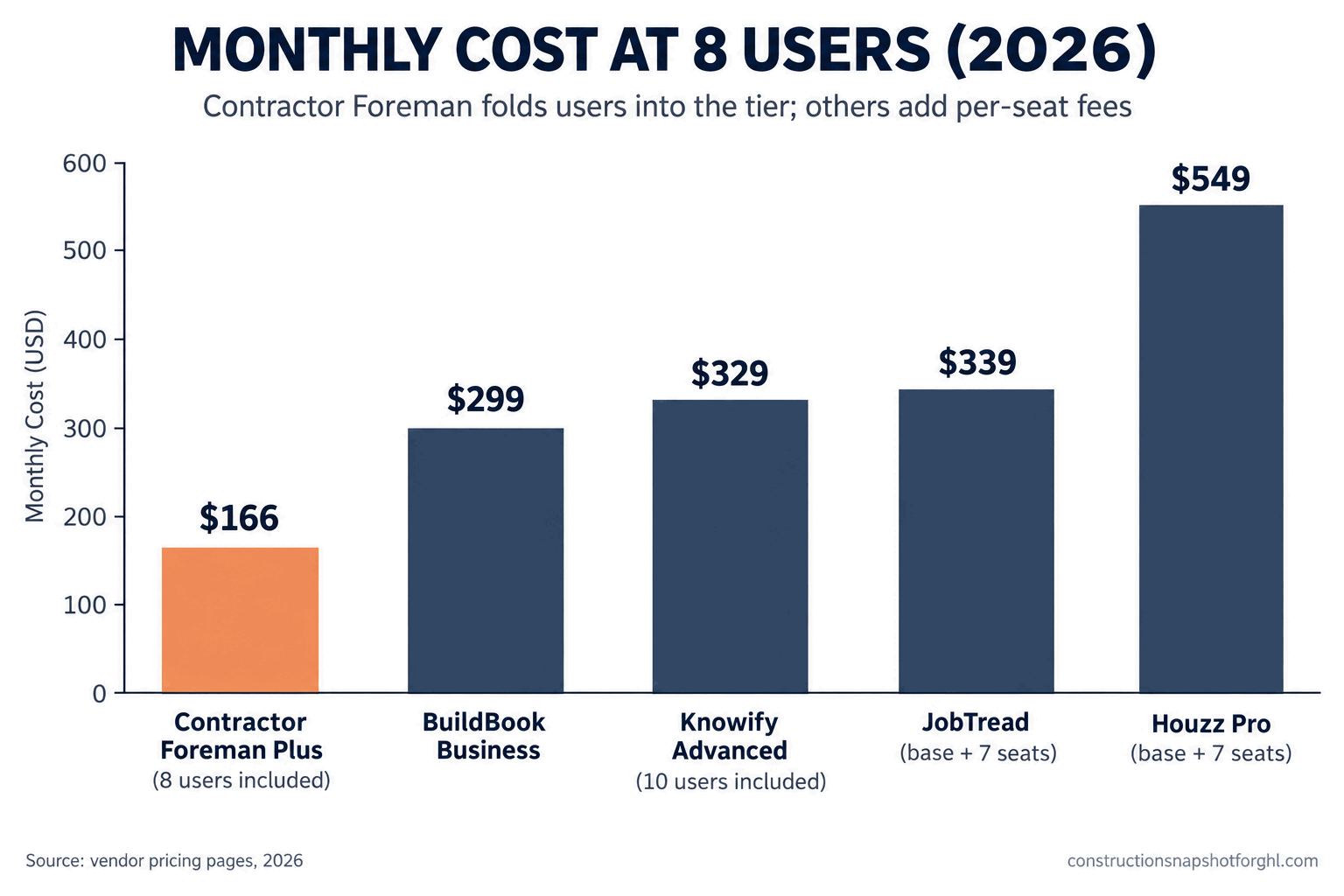
Estimated monthly cost at eight users on the plan a growing shop would actually use, US dollars, 2026. Contractor Foreman Plus and Knowify Advanced fold the seats into the tier; JobTread and Houzz Pro add per-seat fees on top of the base. Sources: JobTread, Knowify, BuildBook, ERP Research (Contractor Foreman).
The picture is clear: at crew size, Contractor Foreman’s flat-cap model is the cheapest by a wide margin, and Houzz Pro’s per-seat model is the most expensive. That is the trade. You pay less with Contractor Foreman and accept a busier tool, or you pay more for a specialist that does one thing better.
Where pricing breaks your budget: the sticker is bait on every per-user model. JobTread’s $199 looks pricey until you remember subs and clients ride free, so a shop with many external users pays less than the base implies. Knowify’s $99 Core looks cheap until you learn the job costing you came for lives on the $329 Advanced plan. And with 39 percent of construction software buyers working on a budget under $165 a month (Software Advice), the honest truth is that most small shops should be shopping in the Contractor Foreman, BuildBook and Knowify range, not chasing a Buildertrend quote. For the full picture against the quote-only names, read the construction software pricing teardown.
2. Who each one is actually built for
Buy the tool built for your kind of shop and most of the other criteria take care of themselves.
Contractor Foreman fits the budget-conscious general contractor who wants broad all-in-one coverage at the lowest flat price and does not mind trading polish and simplicity to get it. JobTread fits the GC doing 15 to 40 jobs who wants one platform and cares that the proposal looks sharp to a homeowner choosing between three bids. Knowify fits the contractor or specialty sub who lives and dies by job costing and needs AIA billing and a clean QuickBooks handoff. BuildBook fits the small custom builder or remodeler running 6 to 20 jobs where the owner is still close to every client and the pain is communication. Houzz Pro fits the design-build firm or higher-end remodeler who wants client-facing polish and leans on Houzz for leads.
Where the fit breaks: people buy on price or on a slick demo instead of on fit, then fight the tool for a year. A numbers-driven builder who buys Contractor Foreman because it was cheapest still rebuilds job costs in a spreadsheet because the costing is not deep enough. A communication-first remodeler who buys Knowify on an accountant’s advice finds the homeowner side underwhelming and goes back to texting. Match the tool to your pain, not the price to your budget.
3. Estimating and proposals
Estimating is the front door to the whole job, and it is where these tools separate fastest.
JobTread has the most complete estimating stack here: item databases, takeoff, cost-plus and fixed-price options, and proposals that look genuinely polished when they land in a homeowner’s inbox. Knowify is strong on the contract structure behind the estimate, with fixed-price, cost-plus and AIA formats for work that needs formal pay applications. Houzz Pro leans into visual proposals and 3D-adjacent presentation, which plays well with design-minded clients. Contractor Foreman covers estimating competently but plainly, and BuildBook keeps it simple and readable, which is right for a small remodeler and not enough for a builder pricing a complex custom home with dozens of line items.
Where it breaks: a beautiful estimate still dies quietly, because none of these tools chases the client who went silent after you hit send. The estimate is only as good as the follow-up behind it, and follow-up is not what project software does. A builder who outgrows a plain estimator and limps along in a spreadsheet reintroduces the errors and slow turnarounds that lose jobs in the first place.
4. Client communication and the homeowner portal
For a residential builder, this is often the criterion that decides whether the software reduces stress or just adds a login nobody opens.
BuildBook was built around this and it shows: clean messaging, a portal clients actually use, and a noticeable drop in “any update?” texts. Houzz Pro is also strong on client collaboration and presentation. JobTread’s portal is polished and part of why it sells. Contractor Foreman has a working client portal, but it is more functional than delightful. Knowify is the weakest here, because it was built for the books, not the homeowner.
Where it breaks: a portal only calms clients if they log in, and most will not unless you drive them there with a rhythm of proactive updates. The tool gives you the room; the habit is on you.
5. Financials, job costing and QuickBooks
If your margin problem is really a numbers problem, this criterion outweighs all the others.
Knowify goes deepest, by a lot. It was built to complement QuickBooks Online, with a two-way sync that auto-assigns bills, expenses, invoices and payments to the right project, phase and cost category, plus AIA progress billing with retainage, so your job costs and your books match without double entry (Knowify). JobTread has real job costing and a solid two-way QuickBooks Online sync, plenty for a builder who wants costs tracked without running a full accounting operation. Contractor Foreman includes job costing and a QuickBooks connection as part of its all-in-one coverage, which is fine for a budget shop but not as deep as a specialist. Houzz Pro and BuildBook are the lightest, with basic cost tracking and invoice syncing that a financially driven contractor will feel the limits of.
Where it breaks: the deepest financial tool in the world does not fix a job you priced wrong or a change order you never billed. Knowify will show you, in clean detail, exactly where the margin leaked after the fact. Whether you catch it in time depends on your habits, not the software, and on knowing the difference between markup and margin before you bid.
6. Setup, learning curve and getting your data out
The best tool is the one your team actually uses, so adoption is a real cost, not a footnote.
BuildBook is the easiest to stand up, by design, and a non-technical owner can run a project the same day. Houzz Pro and JobTread sit in the middle, and JobTread includes free implementation and training that takes most of the sting out of the ramp. Contractor Foreman is where setup gets heavy, because fitting that many features on the screen means more to learn. Knowify has the steepest curve of all, because financial software with proper job costing and QuickBooks mapping simply has more moving parts.
On the way out, the friendlier tools win again. JobTread advertises no contract and a 30-day money-back guarantee, Knowify and BuildBook run month to month, and Contractor Foreman’s 100-day guarantee on annual plans is the most generous trial window of the group.
Where it breaks: the friction is never the contract, it is the rebuild. Every estimate template, workflow and client record has to be recreated in the new tool, which is why people stay somewhere that no longer fits. If setup or daily driving is the wall you keep hitting, that work is exactly the kind of thing you can hand to a trained GHL VA or an ops person instead of letting the subscription gather dust. You decide the workflow; someone else does the clicking.
The whole field on one screen
Here is the head-to-head on the criteria that decide it.
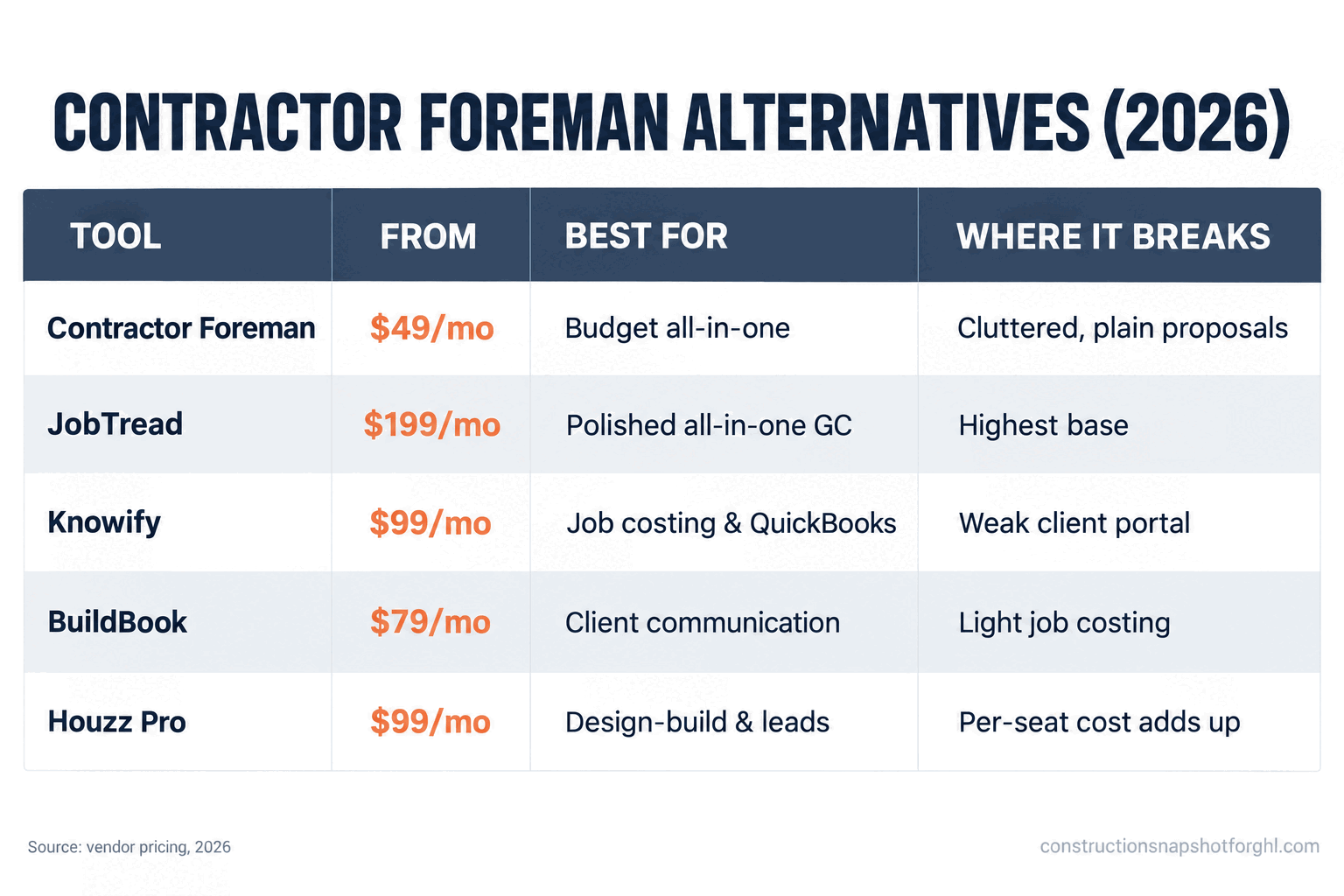
Contractor Foreman vs the four alternatives (2026)
| Feature | What it does best | Where it breaks |
|---|---|---|
| Contractor Foreman (from $49/mo) | Cheapest flat price, broad all-in-one, no per-user fee | Cluttered interface, plain proposals, shallow depth |
| JobTread ($199/mo incl. 1 user) | Polished all-in-one, free sub and client portal | Highest base of the group, more to configure |
| Knowify (from $99/mo, $329 Advanced) | Deepest job costing, AIA billing, QuickBooks sync | Steepest learning curve, weakest client portal |
| BuildBook (from $79/mo) | Client communication, simple proposals, fastest setup | Light on job costing and complex estimating |
| Houzz Pro (from $99/mo) | Visual proposals, client collaboration, Houzz leads | Per-seat pricing gets expensive at crew size |
The pattern is clean once you see it. Pick the row that names your pain. Cluttered-but-cheap and it does the job? Stay on Contractor Foreman. Anxious clients? BuildBook or Houzz Pro. Messy books? Knowify. Want one sharp system to run everything? JobTread.
The switching test you can run this week
Before you move off Contractor Foreman or any tool, run this on one real, recent job instead of a demo dataset. It takes an afternoon and it saves you from switching twice.
Three shops, three right answers
The honest answer to “which one” depends entirely on your shop, so run it three ways.
The solo remodeler or small custom builder (6 to 12 jobs, 1 to 3 users). Your pain is time and client hand-holding, not enterprise financials. BuildBook at $79 to $149 a month gets you a professional portal and simple proposals your clients will actually use, with a setup you finish in a day. Contractor Foreman at $49 to $105 is the pick if budget is tight and you want more features under one roof and will tolerate the busier screen. Skip the heaviest options until you feel a wall.
The mid-size design-build or remodeling firm (15 to 25 jobs, 5 to 10 users). This is where fit, not price, should decide. JobTread’s $199 base plus a handful of seats, with free sub and client access, gives you estimating polish, scheduling and a portal in one place. Houzz Pro is the call if design presentation and lead flow matter more than cost. Contractor Foreman Plus or Pro keeps the bill lowest if you are disciplined about using it. Put the two or three that fit your pain side by side and run the switching test.
The financials-driven or specialty contractor (any size, margin-obsessed). If your business runs on job costing, cost-plus contracts, AIA pay applications and a clean QuickBooks handoff, Knowify is the pick and the size of your shop barely changes that. The Advanced plan at $329 a month earns its number in double entry you no longer do and margin you can see per phase. JobTread is the challenger worth a trial, but on pure financial depth Knowify is built to win.
Representative monthly cost by shop profile, US dollars, 2026, using published rates for the plan that matches each shop’s need. Sources: ERP Research (Contractor Foreman), BuildBook, JobTread, Knowify.
Notice what does not change across all three shops: none of these tools decided whether the lead ever became a job. That line item is identical no matter which one you pick.
The compliance work none of them do for you
Here is the part no project-management tool handles, because it is not their job, and it costs real money when you get it wrong. Your marketing and your paperwork have to be compliant, and that lives on your website and your templates, not inside Contractor Foreman or any alternative.
Your license number in your advertising. In California, your CSLB license number is required by law in all advertising, including your website, business cards, truck lettering and online listings, under Business and Professions Code section 7030.5 (California BPC 7030.5). Put it in your site footer and your outbound message templates so you are covered by default. Rules vary by state, so a national template will be wrong for someone: Texas has no statewide GC license and pushes registration to the city level.
The three-day right to cancel. If you close a job in a homeowner’s home for more than $25, the FTC Cooling-Off Rule gives the buyer until midnight of the third business day to cancel, and you must hand over written notice of that right at the time of sale (FTC). If you sign at the kitchen table, build that notice into your contract template. One more state-scoped item: California and Arizona require a preliminary lien notice early in the job to preserve your lien rights, while other states require none, so scope your lien language to where you actually build. For the full rundown, see the contractor advertising and consent rules for 2026.
Common objections
“Contractor Foreman is so cheap, why would I pay more?” You would not, if it fits and your crew uses it. But cheap software you fight every day or that costs you the occasional job on a weak proposal is not cheap. Run the switching test honestly. If Contractor Foreman passes questions 1, 3 and 4 for your shop, keep it and save your money. If it fails one, the extra $50 to $150 a month for a tool that fits is the cheapest thing on your P&L.
“I already pay for Contractor Foreman, is moving worth the hassle?” Maybe not. Switching is not free, and the cost is the rebuild, not the subscription. But do the honest check: if you bought it for the price and now fight the interface every month, or your clients never touch the portal, that is a fit problem, and fit problems compound. Staying is fine. Staying because moving feels like a hassle is how you lose an hour a day for a year.
“Should I just get Buildertrend or Procore instead?” For a 6-to-40-job shop, almost never. Buildertrend hides its price and requires a demo, with third-party reports ranging from roughly $339 to $1,099 a month plus onboarding fees (Projul), and Procore prices on your annual construction volume for an enterprise feature set you will not use (ERP Research). The whole reason tools like Contractor Foreman, JobTread and Knowify exist is to give a small shop 90 percent of the capability without the enterprise price. See the full Buildertrend vs Procore vs JobTread breakdown if you are weighing the big names.
“Why does a software comparison keep bringing up leads?” Because the biggest number on your P&L is not your software bill, it is the jobs you never closed. Every tool here costs a few hundred a month and runs work after it is signed. Not one of them replies to a lead in 30 seconds, texts back a missed call, or chases an estimate that went quiet. One lost project is worth more than a year of any of these subscriptions, and the front end is where a 6-to-40-job builder actually leaks money. If the tooling itself is the wall, a trained GHL VA can run the setup while you stay on the job.
Where to start this week
Close the extra trial tabs. Decide first whether Contractor Foreman’s trade is right for you: cheapest flat price and broadest coverage, in exchange for a busier tool and plainer polish. If that trade fits, stay and stop shopping. If it does not, pick the alternative whose strength matches your pain: BuildBook or Houzz Pro for client experience, Knowify for job costing, JobTread for an all-in-one that looks sharp. Run the switching test on one real job before you commit. Then fix the front end while you are in there, because the right jobsite tool still does nothing for the leads you are not calling back. That last part is the piece we build. New to GoHighLevel? You can start an account through our partner link and drop the sales system on top. (That link is an affiliate link; we may earn a commission at no extra cost to you.)
Frequently asked questions
What is the best Contractor Foreman alternative in 2026?
There is no single best, because the alternatives are built for different shops. For client communication and the simplest setup, BuildBook (from $79/month) or Houzz Pro (from $99/month). For job costing, AIA billing and a deep QuickBooks sync, Knowify (from $99/month, with real job costing on the $329 Advanced plan). For a polished all-in-one that runs the whole job, JobTread ($199/month including one user). Pick the one whose strength matches your biggest pain, not the cheapest sticker.
Is Contractor Foreman actually a good deal?
Yes, for the right shop. Contractor Foreman is one of the most affordable full-featured construction platforms, priced flat per tier from $49 to $332 a month with users included rather than charged per seat, so it stays cheap as your crew grows. The trade-offs are a cluttered interface, plainer client-facing proposals, and shallower depth than a specialist tool. If those do not bother you and your crew uses it, it is hard to beat on price.
How much does Contractor Foreman cost compared to JobTread and Knowify?
Contractor Foreman runs $49 to $332 a month flat by tier with users included. JobTread is $199 a month including one user, about $20 per extra internal user, with free unlimited sub and client portal access. Knowify Core is $99 a month billed annually for one user plus about $29 per additional user, with its deeper job costing on the $329-a-month Advanced plan that includes ten users. At eight users, Contractor Foreman's flat-cap model is typically the cheapest of the three.
Which alternative has the best QuickBooks integration?
Knowify has the deepest QuickBooks Online integration, with a two-way sync that auto-assigns bills, expenses, invoices and payments to the right project, phase and cost category so your books and job costs match without double entry. JobTread also has a solid two-way QuickBooks Online sync. Contractor Foreman includes a QuickBooks connection as part of its all-in-one coverage, and BuildBook and Houzz Pro are the lightest on financials.
Should a small builder use Buildertrend or Procore instead?
Usually not. Buildertrend hides its pricing behind a demo and third-party estimates range from roughly $339 to $1,099 a month plus onboarding fees, while Procore prices on your annual construction volume for an enterprise feature set most small shops will not use. Tools like Contractor Foreman, JobTread, Knowify and BuildBook exist specifically to give a 6-to-40-job builder most of the capability without the enterprise price and the demo gate.
Will switching construction software get me more leads?
No. Contractor Foreman and every alternative here are project-management tools that run work after it is signed: estimating, scheduling, budgets, change orders and the client portal. None of them captures a new lead, replies within seconds, or chases an unanswered estimate. If leads go cold before you call back, that is a front-end sales problem and needs a sales system such as a GoHighLevel setup in front of your project tool, not a different project tool.
Related reading
- What construction management software actually costs in 2026: a pricing teardown
- Buildertrend vs Procore vs JobTread: the honest breakdown for a small shop
- JobTread vs BuildBook vs Knowify: which one fits your shop
- Best CRM for contractors: how to choose the right one
- How to follow up on a construction estimate and win more jobs
Sources
- ERP Research: Contractor Foreman pricing
- Contractor Foreman: official pricing page
- JobTread: pricing
- Knowify: pricing
- BuildBook: pricing
- DesignFiles: Houzz Pro pricing and alternatives (2026)
- Projul: Buildertrend pricing analysis (2026)
- ERP Research: Procore pricing
- Software Advice: Construction software buyer insights (2026)
- NAHB: Three states drive over 20% of remodeling activity (Aug 2026)
- JCHS: Remodeling growth set to downshift in late 2026 (LIRA)
- California BPC 7030.5 (license number in advertising)
- FTC Cooling-Off Rule