
It is a Tuesday night, the kids are in bed, and you have a legal pad with three names on it: Buildertrend, Procore, JobTread. Everybody in your framing crew’s group chat swears by a different one. Two of the three will not even tell you the price without a sales call, and the one that does is somehow the cheapest. You have been running a 20-job-a-year remodeling business off a shared spreadsheet, a whiteboard, and your own memory for too long, and you know the next dropped change order is going to cost you real money. So you sit there, three tabs open, and pick none of them again.
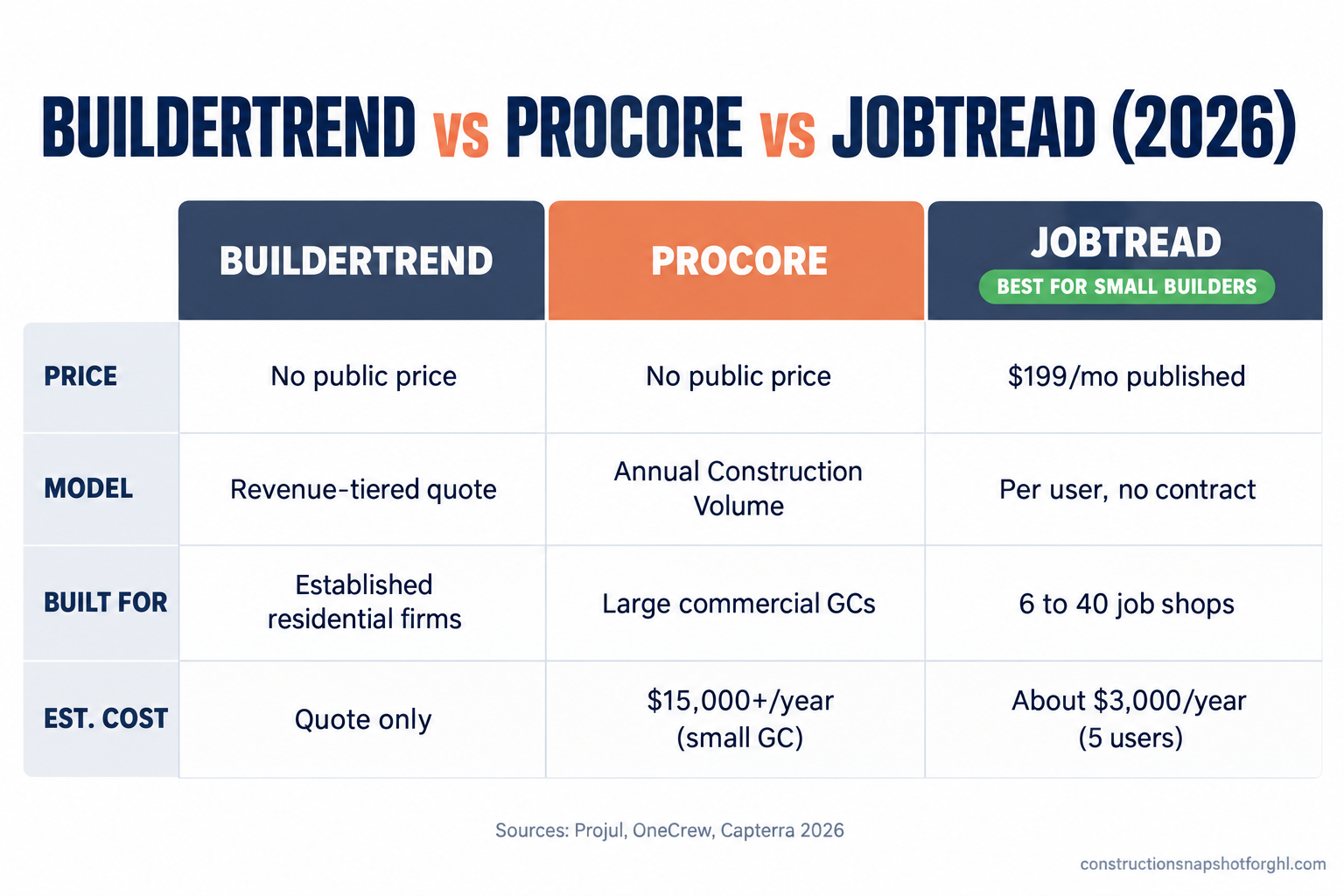
Here is the short version so you can cross two names off tonight. These three are not competitors for the same buyer. Procore is enterprise software priced on your Annual Construction Volume, built for commercial general contractors moving tens of millions a year, and it is almost always the wrong tool for a 6-to-40-job residential shop (Projul). Buildertrend is the big residential default, capable and well-known, but it publishes no price, quotes to your revenue, and now owns and is absorbing CoConstruct (Buildertrend). JobTread is the transparent all-in-one at $199 a month including your first user, no contract, with its full price on a page you can read in a minute (Projul). For most builders doing 6 to 40 jobs a year, the honest shortlist is JobTread first, Buildertrend if you want the established name and will tolerate a quote, and Procore only if you are headed into big commercial work. Below is the eight-criteria breakdown, and the part nobody tells you: not one of these three wins you the job.
In this post
- Why these three land on the same legal pad
- The three tools in one paragraph each
- 1. Who each one is actually built for
- 2. Pricing transparency: who tells you the number
- 3. What it really costs a small builder
- 4. Setup, onboarding and the learning curve
- 5. Contracts, lock-in and getting your data out
- 6. The jobsite features that matter to a small shop
- 7. Change orders and homeowner communication
- 8. The sales side: where all three leave you exposed
- The whole field on one screen
- Three shops, three right answers
- Seven questions to ask on every demo call
- Common objections
- Frequently asked questions
- Sources
Why these three land on the same legal pad
Three very different products end up on the same shortlist for one reason: they are the three names a builder hears most. Procore runs the ads at the big trade shows. Buildertrend has been the residential default for a decade. JobTread is the one your peers keep posting about because it tells you the price without a sales rep. So a search for “best construction software for a small builder” throws all three back at you, and you assume they are roughly interchangeable.
They are not. Underneath similar homepages, each was built for a different company. Procore was built for commercial general contractors and owners running large, complex, multi-stakeholder jobs. Buildertrend and JobTread were both built for residential builders and remodelers, but they sell and price in opposite ways. That split is the whole decision, and it matters because there are 128,000 remodeling firms in the US fighting for the same work, up from 69,000 in 2000 (NAHB). The tool that fits how you actually run jobs is an edge. The one that fights you is a tax you pay every single day.
The three tools in one paragraph each
Buildertrend is the established residential platform. Scheduling, daily logs, selections, change orders, client portal, invoicing, and a long list of integrations, all in a mature product a lot of builders already know. It publishes no price, sets rates in tiers that scale with your revenue, and sells through a demo (Projul). It also now owns CoConstruct, which is closed to new buyers and being folded into Buildertrend (Buildertrend).
Procore is enterprise construction management. It is deep, powerful, and genuinely best-in-class for large commercial general contractors and owners. It charges an annual fee per product based on your Annual Construction Volume, includes unlimited users and storage, and publishes no public price list (Projul). For a residential shop doing a few dozen jobs a year, it is a fire hose aimed at a houseplant.
JobTread is the transparent all-in-one for residential builders and remodelers. CRM, estimating and takeoff, budgeting, purchase orders, scheduling, change orders, a client portal, and a two-way QuickBooks sync, all in one plan. It is $199 a month including your first user, roughly $20 per additional user, with no contract, free training, and a 30-day money-back guarantee (Capterra). It is built for exactly the shop reading this.
1. Who each one is actually built for
Start here, because it settles half the decision before you look at a single feature.
Procore fits the company you are not. It is built for commercial GCs and owners managing large projects with dozens of subs, complex compliance, and multiple stakeholders who all need access. Unlimited users is a feature when you have 80 people who touch a job. When you have four in the office and a handful of subs, you are paying enterprise pricing to use a fraction of an enterprise tool. Procore itself positions on volume, not crew size (OneCrew).
Buildertrend fits the established residential builder who wants a known name, already has someone who can run software, and is not bothered by a sales-led buying process. It genuinely covers the residential workflow well. The friction is commercial, not technical: you cannot compare it on price without getting on the phone, and the quote moves with your revenue.
JobTread fits the 6-to-40-job builder who wants one system, wants to know the price before dinner, and wants to be running real jobs in it within a couple of weeks. It is the natural landing spot for a builder coming off a spreadsheet, or off CoConstruct, who does not want to call sales to find out if they can afford it.
2. Pricing transparency: who tells you the number
This is where the three split hardest, and it is the single most useful thing to understand before a demo.
JobTread publishes everything. One plan, all features, $199 a month including your first internal user, about $20 a month per additional user, with a roughly 20% discount on annual billing ($159 base) (Projul). Customer and vendor portals are free and unlimited. Past 10 internal users you need a quote for volume breaks, but a small shop never hits that wall. You can price your exact setup in your head.
Buildertrend publishes nothing. No price page, no starting number, rates tiered to your revenue, and a demo in front of the quote (Projul). Independent 2026 reviews put plans anywhere from the mid-$300s to over $1,000 a month, but those figures come from third parties and user reports, they disagree with each other, and I will not publish one as fact. The honest answer is you cannot know Buildertrend’s price for your business without asking Buildertrend.
Procore publishes nothing either, and for a reason that matters. Its model is an annual fee per product keyed to your Annual Construction Volume, not a per-seat sticker (Projul). You cannot self-estimate it even roughly without a conversation, because the lever is your revenue, not your headcount.
Published monthly starting price, 1 user, 2026 (USD). Buildertrend and Procore publish no price and quote to revenue or construction volume. Sources: ERPResearch, Capterra, Projul, 2026.
3. What it really costs a small builder
Transparency is nice, but you want the number. Here is the honest math for a small residential builder with a five-person office, since that is a common shape for a 20-job-a-year shop.
JobTread is the only one of the three you can calculate exactly. Five internal users on monthly billing is $199 plus four seats at about $20, so $279 a month, or $3,348 a year. On annual billing it drops to roughly $231 a month, about $2,772 a year (Capterra). No setup fee, free training. If you want a cheaper per-user floor, Contractor Foreman starts at $49 a month for one user and ladders up by seat count (ERPResearch), which is worth a look if budget is the only axis.
Buildertrend cannot be pinned to a single honest figure. Third-party estimates put it in the mid-$300s to over $1,000 a month depending on tier and your revenue, but those are estimates, they conflict, and your real number comes from a quote (Projul). Budget for it to land meaningfully above JobTread, and ask about onboarding and training fees on the call, because those are where residential platforms hide real cost.
Procore is enterprise money. Independent estimates start around $15,000 to $30,000 a year for a small GC in the $10M to $50M construction-volume range, climbing from there with extra modules (OneCrew). Renewal increases of 10% or more are commonly reported (Projul). For a 6-to-40-job residential builder, that is not a close call.
Here is what JobTread costs as you add people, since it is the only one you can chart honestly:
JobTread annual cost by internal user count, annual billing (USD/year): $159 base plus ~$18 per extra seat. Past 10 users, volume pricing is by quote. Source: Projul, Capterra, 2026.
4. Setup, onboarding and the learning curve
A tool you never fully roll out is money set on fire, so adoption matters as much as features.
JobTread is built to self-onboard. Free training and support are included, there is no implementation fee, and most small shops are running live jobs within a week or two because the interface was designed for non-technical owners. The 30-day money-back guarantee on monthly plans means you can actually try it with a real project before you commit (Capterra).
Buildertrend is a bigger product, and bigger products take longer. It is mature and well-documented, but the depth that experienced builders like is also a steeper first few weeks for a small team. Ask directly on the demo whether onboarding and training carry a fee, and how long their typical residential customer takes to go live.
Procore is an implementation, not a signup. Enterprise deployments involve configuration, data migration, and training across a larger org, and the time-to-value is measured in months, not weeks. That is appropriate for a 60-person commercial GC and completely out of proportion for a residential remodeler.
5. Contracts, lock-in and getting your data out
Nobody thinks about leaving a tool until they want to, and that is exactly when lock-in bites.
JobTread lists no contract term, no setup fee, and a 30-day money-back guarantee on monthly subscriptions (Projul). Month-to-month means your bargaining power never expires. If it stops earning its keep, you leave.
Buildertrend is sold on a subscription with terms that come out in the quote, not on a public page. Builders who migrated from CoConstruct into Buildertrend keep their old pricing for the first few months, then move to a Buildertrend package at a quoted rate (JobTread press release). Read the renewal and data-export terms before you sign, because that is where switching cost lives.
Procore is an annual contract by design, and enterprise annual contracts are the hardest to walk away from mid-term. That is fine when the tool is core infrastructure for a large firm. It is a heavy commitment for a small builder still figuring out whether the tool fits.
The deeper point: the more a vendor hides the price and locks the term, the more bargaining power you hand over. Transparent, month-to-month pricing is not just cheaper to start, it keeps you in the driver’s seat for as long as you use it.
6. The jobsite features that matter to a small shop
Strip away the enterprise extras and a small builder needs a short list: estimates and proposals, a budget and job costing, scheduling, purchase orders, a client portal, change orders, and clean accounting. Here is how the three handle the essentials.
Buildertrend covers the full residential workflow and then some. Selections, daily logs, warranty tracking, bid requests, a deep integration list. If your pain is that you need every residential feature under one roof and you will actually use the depth, it delivers. The risk is paying for breadth you never touch.
Procore covers all of that and a great deal more built for complexity: multi-tier approvals, advanced financials, quality and safety modules, owner and architect collaboration at scale. It is genuinely excellent. It is also aimed at jobs with far more moving parts than a kitchen remodel or a custom home.
JobTread covers the small-builder essentials cleanly in one plan, no module shopping: estimating with takeoff, budgeting, POs, scheduling, change orders, a polished client portal, and a two-way QuickBooks sync. For a residential builder or remodeler, that list is the job. The polish of the client-facing side is a real selling point when a homeowner is comparing you against two other bids.
At a glance: the small-builder essentials
| Plan | JobTread recommended | Buildertrend | Procore | Contractor Foreman |
|---|---|---|---|---|
| Price | $199/mo | Quote only | Quote only | $49-$332/mo |
| Feature 1 | Price published, no contract | No public price, revenue-tiered | No public price, ACV-based | Price published, per-user tiers |
| Feature 2 | All features in one plan | Deep residential feature set | Unlimited users and storage | Budget-friendly entry point |
| Feature 3 | Estimating, budgeting, POs, scheduling | Selections, daily logs, warranty | Enterprise financials + safety modules | Core PM + estimating |
| Feature 4 | Client portal + two-way QuickBooks sync | Long integration list | Built for large commercial GCs | 30-day free trial |
| Feature 5 | Free training, 30-day money-back | Demo required before pricing | Est. $15,000+/yr for a small GC | Lighter polish than JobTread |
| Feature 6 | Built for 6-to-40-job residential shops | Now owns and is absorbing CoConstruct | Months-long implementation | Good value floor pick |
7. Change orders and homeowner communication
For a small builder, two things quietly decide whether a job makes money: do change orders get signed before the work happens, and do homeowners stay calm without calling you every day. All three tools help here, and none of them finish the job.
Buildertrend, Procore, and JobTread all have change-order and client-portal features. They let you build a change order, send it, and track approval, and they give the homeowner a place to see schedule and progress. That is a real step up from a text thread and a verbal yes. On a $180k remodel with eight to twelve scope changes, getting each one documented and signed before the crew touches it is the difference between a margin and an argument.
But a portal only works if the homeowner logs in, and most do not, consistently. The change order still stalls in their inbox for three days while your framer stands around. The feature is the easy part. The process that gets change orders signed fast, and the automated nudges that chase the approval without you playing collections, is the part the tool leaves to you. Same with status updates: the portal holds the information, but the homeowner who goes quiet and anxious mid-build needs the update pushed to them by text, not waiting behind a login they forgot.
8. The sales side: where all three leave you exposed
Here is the thing none of the three demos will bring up: every one of these tools starts working after the job is already sold. The lead came in, you qualified it, you did the walk-through, you sent the estimate, they said yes. Only then does Buildertrend, Procore, or JobTread do anything for you.
Which means the money you are losing most, you are losing before any of them are even open. The Houzz lead that sat for four hours and went cold. The missed call at 7:40am while you were up a ladder that rang the next contractor instead. The estimate you sent and never followed up on, which is why you bid more and close less. A project-management tool does not answer your phone, does not text a lead back in 60 seconds, and does not chase a quiet estimate for you. That is a front-end sales and CRM job, and it is a different category of software entirely.
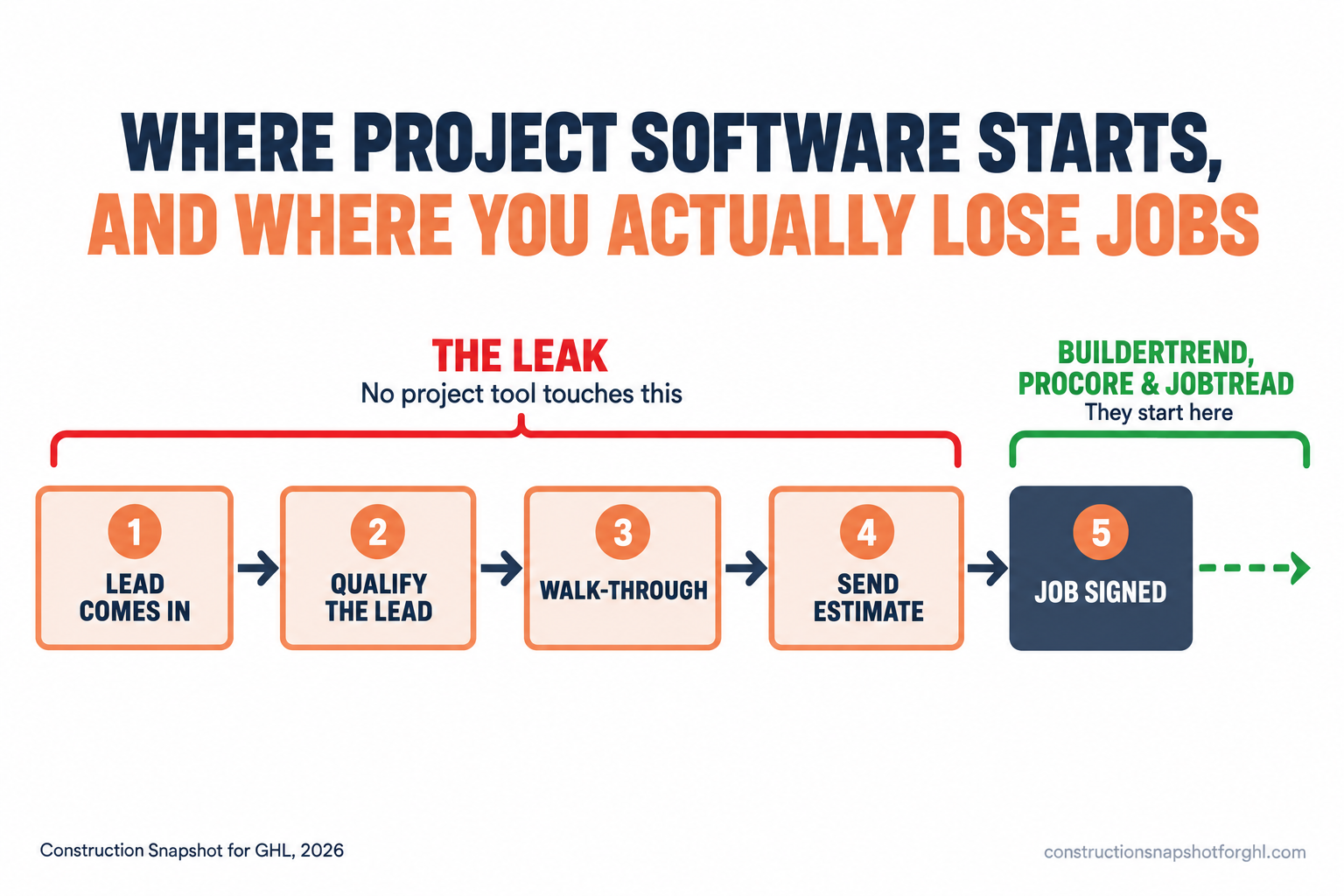
This is not a knock on JobTread, Buildertrend, or Procore. They are project tools, and they are good at running projects. It is a warning: do not buy one expecting it to fix a lead problem. If leads are slipping through before the estimate, the project tool you pick barely matters, because you are optimizing the part of the funnel that is already working.
The whole field on one screen
Pulling it together, here is the honest read for a 6-to-40-job builder.
Procore is the right answer for a shrinking number of readers: those doing or moving into large commercial work. For a residential remodeler, it is overbuilt and overpriced, and the Annual Construction Volume model means you cannot even shop it like a normal product.
Buildertrend is a legitimate pick if you want a mature, established residential platform and you are comfortable buying through a sales rep. Go in knowing you cannot compare it on price up front, ask hard about onboarding fees and renewal terms, and factor in that it just absorbed CoConstruct, so if you are a CoConstruct refugee, you are being funneled here anyway.
JobTread is the default recommendation for most of this audience: transparent pricing you can self-estimate, one all-features plan, no contract, fast onboarding, and a client-facing polish that helps you win the bid. It is the tool that respects a busy owner’s time before you have paid a dime.
And whichever you pick, remember it runs the job. It does not win it.
Three shops, three right answers
The framework changes with the shape of your business. Run it for yourself.
The solo operator or two-person shop, 6 to 12 jobs a year. You do not need enterprise anything. You need estimates out fast, change orders documented, and homeowners who stop texting. JobTread on a one or two-user plan is $199 to about $219 a month and you will use most of it. If even that is a stretch this year, Contractor Foreman at $49 to roughly $105 a month is a real floor (ERPResearch). Procore is a non-starter. Buildertrend is more tool and more money than you need yet.
The mid-size builder, 15 to 25 jobs, three to five in the office. This is the sweet spot for JobTread at roughly $279 a month for five seats, all features, no contract. Buildertrend becomes a genuine alternative here if you want the established name and will sit through the quote, and the price gap narrows as your needs deepen. Compare them head to head on a real demo with your own job as the test case. Procore is still too much.
The larger residential or light-commercial firm, 30 to 40 jobs, bigger team. Now the decision gets interesting. JobTread still fits and stays affordable up to 10 users. Buildertrend’s depth starts to earn its keep if you need warranty tracking, heavy selections, and a long integration list. And if you are drifting into real commercial work, this is the only tier where Procore enters the conversation at all, on the strength of its financials and multi-stakeholder scale, not its price.
Seven questions to ask on every demo call
Steal this. When you get a sales rep from any of these on the phone, these seven questions cut through the demo theater and get you a real comparison. Ask them verbatim.
Question six is the one that matters most and the one they are least prepared for, because it exposes the gap every project tool shares.
Common objections
“I already pay for Buildertrend (or CoConstruct). Do I really switch?” Not automatically. Switching has a real cost in your team’s hours, not just the subscription. But if you are on CoConstruct, the decision is being made for you, since it is closed to new buyers and being folded into Buildertrend (Buildertrend). That is the moment to actually shop, not to get funneled. See the CoConstruct migration guide for how to do it without losing your negotiating position. If Buildertrend is working and the price is fair, stay. If you are switching anyway, compare the full field first.
“Isn’t Procore the safe, industry-standard choice?” It is the standard for large commercial general contractors. For a residential builder doing 6 to 40 jobs, “industry standard” is marketing, not fit. You would be buying a tool designed for a 60-person firm’s complexity and paying accordingly. Safe means the tool that fits your business, that your crew actually uses, and that you can afford to leave.
“JobTread is the cheapest. Is cheap a red flag?” JobTread is not cheap because it is thin, it is cheaper because it prices per user and publishes the number instead of quoting to your revenue. You get the full feature set on one plan. The cheap-is-suspicious instinct is exactly what quote-only pricing counts on. Judge it on whether it does the job for your shop, which for most residential builders it does.
“Won’t migrating cost me a fortune?” The subscription is rarely the real bill. The real cost of switching any construction tool is your team’s hours exporting and cleaning data, rebuilding templates, and running slow while everyone learns a new screen (Cornerstone PM). That is an argument for picking a tool with fast onboarding and no contract, so if it is wrong you are not trapped, not an argument for never moving off the spreadsheet.
Frequently asked questions
Does Buildertrend publish its pricing?
No. Buildertrend does not publish a public price. It sets rates in tiers that scale with your company's revenue and sells through a demo, so you need a quote to know your number. Third-party reports in 2026 put plans anywhere from the mid-$300s to over $1,000 a month, but those estimates conflict and are not confirmed by Buildertrend (Projul).
How much does Procore cost for a small builder?
Procore does not publish a price. It charges an annual fee per product based on your Annual Construction Volume, with unlimited users included. Independent estimates start around $15,000 to $30,000 a year for a small general contractor in the $10M to $50M volume range, climbing with extra modules (OneCrew). For a 6-to-40-job residential shop, it is almost always more tool and more money than the work requires.
Is JobTread really all-in at $199 a month?
Close. JobTread's published plan is $199 a month including your first internal user, plus about $20 a month per additional user, with all features on the one plan and a roughly 20% discount on annual billing. Customer and vendor portals are free and unlimited. Past 10 internal users you need a quote for volume pricing (Capterra).
What happened to CoConstruct?
CoConstruct is owned by Buildertrend and is closed to new buyers, being absorbed into the Buildertrend platform. Existing customers are being migrated, keeping their current pricing for a few months before moving to a Buildertrend package at a quoted rate. If you are a CoConstruct user, treat the migration as your cue to shop the whole market, not just accept the default (migration guide).
Which is best for a remodeler doing about 20 jobs a year?
For most 20-job residential remodelers, JobTread is the strongest fit: transparent per-user pricing you can self-estimate, all features on one plan, no contract, and fast onboarding. Buildertrend is a fair alternative if you want an established name and will sit through a quote. Procore is built for a much larger, more commercial operation.
Do any of these tools help me win more jobs?
No. Buildertrend, Procore, and JobTread all manage work after it is signed. They do not answer missed calls, text leads back in seconds, or follow up on quiet estimates. Winning more jobs is a front-end sales and CRM problem that sits outside every project-management tool (see how).
Can I get my data out if I pick the wrong one?
It depends on the tool's export terms, which is exactly what to ask on the demo. JobTread's month-to-month, no-contract model makes leaving low-risk. Annual enterprise contracts like Procore's are the hardest to exit mid-term. Always confirm the data-export process and any charge before you sign anything.
The bottom line
Three names on a legal pad, three different buyers. Procore for large commercial firms. Buildertrend for established residential builders who will buy through a rep. JobTread for the 6-to-40-job shop that wants to know the price, start fast, and stay un-trapped. For most builders reading this, that is JobTread first, with Buildertrend as the established-name alternative and Procore only if you are headed into big commercial work.
Just do not expect any of them to fix the real leak. They run the job. The leads that die before the estimate, the missed calls, the quiet quotes, those are a front-end problem, and that is the one worth solving first.
Sources
- NAHB, remodeling firm counts and state shares, August 10, 2026: nahb.org
- JCHS Leading Indicator of Remodeling Activity, revised April 15, 2026: jchs.harvard.edu
- JobTread pricing analysis 2026: Projul · Capterra
- Procore pricing analysis 2026: Projul · OneCrew
- Buildertrend pricing analysis 2026: Projul · Buildertrend
- Contractor Foreman pricing 2026: ERPResearch
- CoConstruct phase-out and migration path: JobTread press release
- Hidden cost of switching construction software: Cornerstone PM