
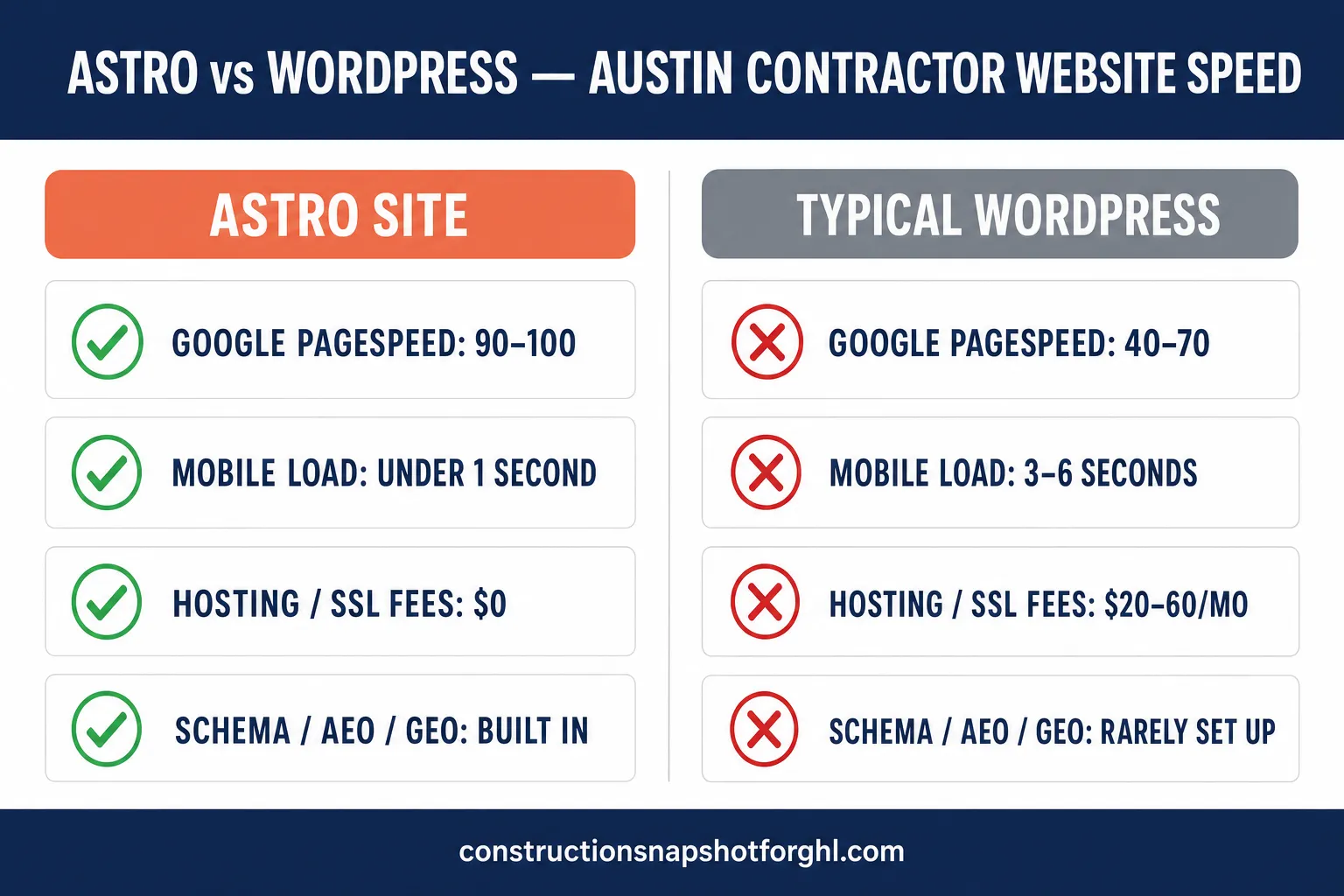
For an Austin contractor, the fastest website wins more projects — and on this measure Astro beats WordPress decisively. A static-first Astro site ships almost no JavaScript and loads in under a second, routinely scoring 90–100 on Google PageSpeed. A typical plugin-heavy WordPress contractor site loads in 3–6 seconds on mobile and scores 40–70. That gap is not cosmetic: it is the difference between a homeowner reading your “kitchen remodel in Round Rock” page and a homeowner tapping back to Google to call the next name on the list.
Austin is one of the busiest construction markets in the country — the Austin–Round Rock–Georgetown metro added 4,700 construction jobs year over year (Feb 2025 to Feb 2026), a 5% gain (AGC of America data). More builders means more competition for the same searches, and a slow site is the easiest way to lose that race before a homeowner ever fills out a form. This comparison breaks down exactly where the speed gap comes from, what it costs you in leads, and when WordPress is still the right call.
In this post
- Astro vs WordPress at a glance
- Why Astro is faster than WordPress
- What page speed actually costs you in leads
- Core Web Vitals: the scoreboard Google grades you on
- Why speed matters more for Austin contractors
- When WordPress is still the right choice
- How to get a fast contractor website without the headache
- Frequently asked questions
- Sources
Astro vs WordPress at a glance
Here is the short version before we get into the mechanics. The numbers below reflect a typical contractor site: a handful of service pages, location pages, a gallery, and a contact form.
Astro vs WordPress for a contractor website
| Feature | Astro (static-first) | Typical WordPress |
|---|---|---|
| Google PageSpeed (mobile) | 90–100 | 40–70 |
| Typical mobile load time | Under 1 second | 3–6 seconds |
| JavaScript shipped | Minimal / none | Theme + plugin JS bundles |
| Hosting / SSL fees | $0 (edge-hosted) | $20–60/mo + renewals |
| Security patching | Nothing to patch (static) | Constant plugin + core updates |
| Schema / AEO / GEO | Built into every page | Rarely configured |
| Editing content | Dev or managed support ticket | Self-serve WYSIWYG editor |
The trade-off is honest and worth stating up front: WordPress wins on do-it-yourself editability, and Astro wins on speed, security, and search readiness. For a contractor whose website’s main job is to load fast, rank locally, and book estimates, speed is the axis that moves money.
Why Astro is faster than WordPress
The speed gap isn’t about one framework being “better code.” It’s architecture.
WordPress builds every page on request. When a homeowner opens your site, a server runs PHP, queries a MySQL database, assembles the page through your theme and every active plugin, and only then sends HTML. Page builders like Elementor or Divi — which most contractor sites lean on — pile on additional CSS and JavaScript to make drag-and-drop layouts work. Each plugin adds its own scripts and stylesheets. The result is a heavy page: the median web page in 2025 weighs about 2.3 MB on mobile (HTTP Archive Web Almanac), and plugin-driven WordPress sites frequently run well past that.
Astro builds every page ahead of time. At build, Astro renders your pages to plain static HTML and strips out JavaScript that isn’t needed — its “islands” model ships interactive code only for the specific widgets that require it (a chat bubble, an image carousel), and nothing else. Those static files are served from a global edge network (Cloudflare), so a homeowner in Austin gets bytes from a nearby node, not a single origin server spinning up PHP. No database query, no plugin assembly, no page-builder bloat. The browser gets HTML it can paint immediately.
This is also why the Astro advantage compounds on mobile, where most contractor traffic lives. Mobile devices generate roughly 64% of global web traffic (Statcounter via Statista, 2025), and mobile devices on cellular connections are exactly where heavy JavaScript hurts most. A homeowner standing in a half-demolished kitchen, Googling “kitchen remodeler near me” on their phone, is on the least forgiving connection you can design for.
What page speed actually costs you in leads
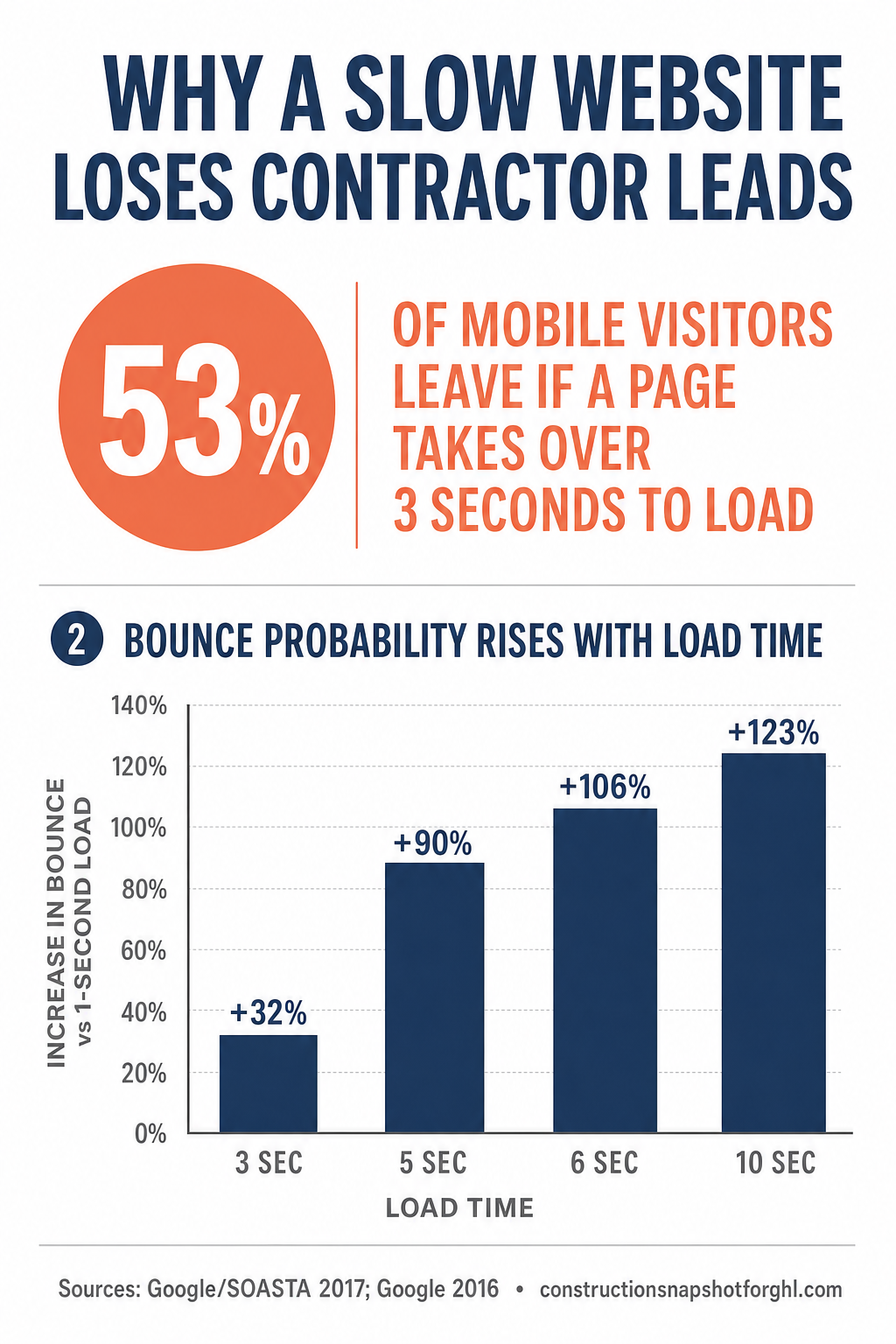
Speed isn’t a vanity score. It maps directly to whether a visitor stays long enough to become a lead. Google’s own research is blunt: 53% of mobile site visits are abandoned if a page takes longer than three seconds to load (Google). Half your ad clicks and map-pack taps, gone before they see your work.
It gets worse the slower you go. Google’s analysis of mobile page speed found that as load time increases, the probability a visitor bounces climbs steeply:
Increase in bounce probability as mobile page load time rises from a 1-second baseline (%). Source: Google/SOASTA, “New Industry Benchmarks for Mobile Page Speed”, 2017.
The flip side is that shaving milliseconds pays. In the landmark Deloitte and Google “Milliseconds Make Millions” study, a mere 0.1-second improvement in mobile site speed produced measurable jumps in business outcomes:
For a lead-generation site — which is exactly what a contractor site is — the same 0.1-second speed gain improved bounce rate by 8.3% (Milliseconds Make Millions). And a separate study by Portent across 94 million page views found conversion rates drop about 4.42% for every additional second of load time between 0 and 5 seconds (Portent). Stack those effects across a month of ad spend and organic traffic, and a slow site is quietly deleting jobs from your calendar.
This is the same speed-to-lead logic that governs how fast you respond to inquiries — covered in speed to lead for contractors — except here the clock starts before the form is even submitted. If the page never loads, there’s no lead to respond to.
Core Web Vitals: the scoreboard Google grades you on
Beyond raw load time, Google measures three specific metrics — the Core Web Vitals — using real visitor data, and it uses them as a ranking signal. The “good” thresholds, measured at the 75th percentile of your real visits, are:
- LCP (Largest Contentful Paint) — under 2.5 seconds. How fast your main content appears.
- INP (Interaction to Next Paint) — under 200 milliseconds. How responsive the page feels when tapped. (INP officially replaced FID as a Core Web Vital on March 12, 2024.)
- CLS (Cumulative Layout Shift) — under 0.1. How much the layout jumps around while loading.
Source: web.dev, Google.
Here’s the sobering part: only about 48% of mobile websites passed all three Core Web Vitals in 2025, with LCP the most common failure (HTTP Archive Web Almanac 2025). Most WordPress contractor sites — heavy themes, unoptimized hero images, page-builder layout shift — land in the failing half. A static Astro build, with small payloads and no layout-shifting plugin injections, ships in the passing half by default. That’s not a tuning victory you have to fight for every month; it’s the starting position.
Why speed matters more for Austin contractors
Austin is a hard market to be slow in. The metro is growing fast, permits are being pulled at a steady clip — the Austin–Round Rock–Georgetown MSA authorized roughly 1,425 new private housing structures in January 2026 alone (FRED / U.S. Census Building Permits Survey) — and homeowners have a long list of contractors competing for every remodel, addition, and custom build.
That competition means two things for your website. First, homeowners are comparison-shopping several contractors in the same session, so the site that loads first and reads clearly gets the attention. Second, Google ranks local results partly on page experience, so a faster site with proper local SEO — location pages for Round Rock, Cedar Park, Georgetown, and the neighborhoods you actually build in — has a structural edge in the map pack and in AI answer engines. A slow site with no location pages is invisible in your own service area, no matter how good your work is.
Speed also feeds the tools that turn a visit into a booked estimate. A fast page that loads an AI chat widget instantly, qualifies the homeowner, and books the site visit converts far better than a bloated page where the widget appears after the visitor has already left. The website is the front door; if it’s slow, everything behind it — your CRM, your follow-up, your best-in-class contractor CRM setup — never gets the chance to work.
When WordPress is still the right choice
An honest comparison names the cases where the alternative wins. WordPress remains the better pick when:
- Your team edits content daily and won’t tolerate a support-ticket workflow. WordPress’s self-serve editor is genuinely convenient for a high-volume in-house blog or a frequently-changing catalog.
- You depend on a specific WordPress plugin — a particular booking system, membership/paywall, LMS, or WooCommerce store — that would be expensive to rebuild.
- You already have a well-optimized WordPress site scoring 90+ and a maintenance routine that keeps it there. Don’t fix what isn’t broken.
For most Austin contractors, though, the website’s job is narrow and high-stakes: load fast, rank locally, and book estimates. On that job, a static-first Astro site wins on the metrics that move revenue — speed, Core Web Vitals, and search readiness — without the monthly maintenance tax. The right question isn’t “which platform is best in the abstract,” it’s “which platform best does the one job my site has to do.” For a lead-gen contractor site, that’s Astro.
How to get a fast contractor website without the headache
You have three realistic paths to a fast site:
- Rebuild on Astro yourself (or hire a developer). You get the speed, but you take on the build, the deployment pipeline, and every future edit. Fine if you have a developer on call; a bottleneck if you don’t.
- Fix your existing WordPress site. Caching, a CDN, image compression, plugin pruning, and deferring JavaScript can get you into the green — but it’s ongoing work, and one bad plugin update can undo it.
- Get a done-for-you Astro site. Our Get-a-Website service builds you a static-first Astro site with a guaranteed 90+ PageSpeed score (often 100), up to 60 pages including proper location pages, schema/AEO/GEO baked in, an AI chat widget, a free domain, and managed Cloudflare hosting — for $497 one-time plus $97/month, with hosting, SSL, and up to 10 change tickets a month included. No hosting fees, no plugin renewals, no “$150/hour for a one-line edit.”
Whichever path you pick, the standard to hold yourself to is simple: under a second on mobile, green on all three Core Web Vitals, and location pages for every area you serve. Everything in this article is really one argument — the front door has to open instantly, or the homeowner never comes in.
Frequently asked questions
Is Astro really faster than WordPress for a contractor website?
Yes, in most real-world cases. Astro renders pages to static HTML ahead of time and ships almost no JavaScript, so pages load in under a second and score 90–100 on Google PageSpeed. A typical plugin-heavy WordPress site builds each page on request and loads in 3–6 seconds on mobile, scoring 40–70. A carefully optimized WordPress site can be fast, but Astro is fast by default.
Will switching from WordPress to Astro hurt my Google rankings?
Not if the migration is done properly. Faster pages and passing Core Web Vitals are a positive ranking signal. The key is preserving your URLs (or setting 301 redirects), keeping your content and schema, and submitting an updated sitemap. Done right, a faster Astro site usually helps rankings rather than hurting them.
Can I still edit an Astro website easily?
You do not edit Astro through a WYSIWYG dashboard the way you do WordPress. With a done-for-you Astro site, you submit change requests (new service page, updated photos, a price change) as support tickets and the team ships them — often within 24 hours for small edits. If daily self-serve editing by your own staff is essential, WordPress may suit you better.
How much does a fast contractor website cost?
A done-for-you Astro contractor site runs $497 one-time plus $97/month, which includes managed Cloudflare hosting, SSL, your domain, and up to 10 change tickets per month. There are no separate hosting, SSL, or per-edit agency fees. WordPress hosting alone typically runs $20–60/month before plugins, maintenance, and paid edits.
What are Core Web Vitals and why do they matter in Austin?
Core Web Vitals are Google’s three page-experience metrics — LCP under 2.5s, INP under 200ms, CLS under 0.1 — measured from real visitors and used as a ranking signal. In a competitive market like Austin, where homeowners compare several contractors at once, passing them gives you an edge in local search and keeps mobile visitors from bouncing before they see your work.
About the author
Travis Okafor is a GoHighLevel snapshot implementation consultant who deploys done-for-you systems and websites for construction and trades businesses across the country. He writes the comparison and implementation pieces — platform migrations, snapshot-vs-DIY breakdowns, and what to configure first — with a bias toward what actually moves booked jobs, not what looks good in a demo.
Related posts
- Local SEO for Contractors: How to Own Your Service Area
- Speed to Lead for Contractors: Why the First Responder Wins
- Best CRM for Contractors (2026): How to Choose the Right One
Sources
- Google — The need for mobile speed (53% abandonment), 2016
- Google/SOASTA — New Industry Benchmarks for Mobile Page Speed (bounce probability), 2017
- Deloitte + Google — Milliseconds Make Millions, 2020
- Portent — Site Speed is (Still) Impacting Your Conversion Rate, 2019
- Google / web.dev — Defining the Core Web Vitals thresholds
- HTTP Archive — Web Almanac 2025: Performance and Page Weight
- Statcounter via Statista — Mobile share of global web traffic, 2025
- AGC of America — Construction employment data, Austin–Round Rock, 2026
- FRED / U.S. Census — Austin–Round Rock building permits, 2026