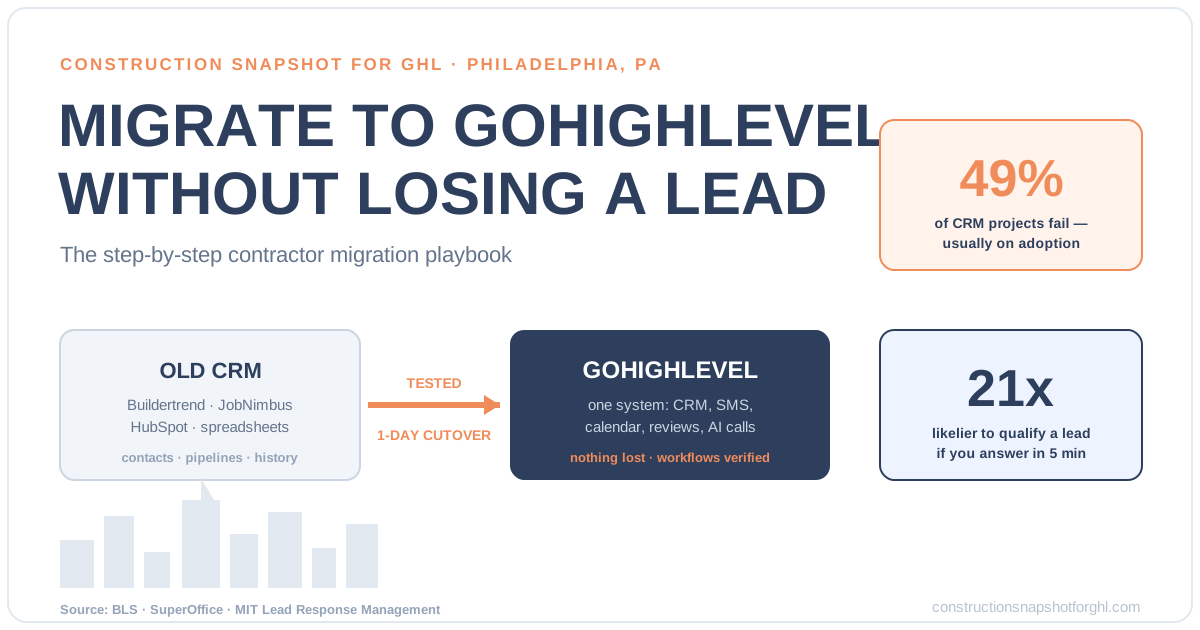
Migrating a Philadelphia construction business to GoHighLevel without losing a lead comes down to sequence: rebuild your pipeline and workflows in GHL first, clean and export your data second, run both systems in parallel, and only then cut over in a single planned day. The mistake that loses leads isn’t the export — it’s flipping the switch before the new system is tested, so a “request a quote” form or a missed-call text-back silently stops firing while contacts are mid-move. Do it in the right order and the homeowner from South Philly who fills out your form at 9pm never notices anything changed except that you answer faster.
That order matters more in a market like Philadelphia. The Philadelphia–Camden–Wilmington metro carries roughly 124,000 construction jobs as of mid-2025 (U.S. Bureau of Labor Statistics) — a dense, competitive field of GCs, remodelers, and home builders chasing the same rowhome renovations, Main Line additions, and Fishtown gut jobs. When your CRM is down or leaking during a sloppy migration, you’re not just inconveniencing yourself; you’re handing warm leads to the contractor across town whose phone still answers. This playbook walks the exact steps to move cleanly.
In this post
- Why Philadelphia contractors are moving to GoHighLevel
- The real risk in a CRM migration (and it isn’t the export)
- The 7-step GoHighLevel migration playbook
- What a clean migration actually gets you
- DIY migration vs. done-for-you
- Why the stakes are higher in Philadelphia
- Frequently asked questions
- Sources
Why Philadelphia contractors are moving to GoHighLevel
Most Philadelphia contractors don’t set out to switch CRMs — they hit a wall. The project-management tool (Buildertrend, JobNimbus, CoConstruct) is great at scheduling and budgets but leaks on the front end, where leads come in and follow-up should happen. So they bolt on a separate texting app, a separate calendar, a separate review tool, and a spreadsheet to track it all. Now the “system” is five logins that don’t talk to each other, and the owner is the only integration.
GoHighLevel consolidates that front end — CRM, two-way SMS, email, calendars, pipelines and workflow automations, reviews, and AI call handling — into one platform. The pull is real, but the switch is where people get hurt, because a CRM migration touches every lead you have. Get the sequence wrong and you don’t just lose time; you lose live opportunities. That’s why this is a how-to, not a why-to: the decision is usually already made by the time an owner searches for it. If you’re still weighing platforms, start with how to choose the best CRM for contractors first, then come back here to move.
The real risk in a CRM migration (and it isn’t the export)
Ask a contractor what scares them about switching CRMs and they’ll say “losing my data.” That’s the wrong fear. Exporting contacts to a CSV is the easy part. The migrations that fail, fail for three quieter reasons — and none of them are about the export file.
Risk one: you move the mess. Whatever dirty data lives in your current system — duplicate contacts, dead leads from 2019, half-finished deals with no phone number — comes across intact unless you clean it. Bad data is expensive at scale: IBM pegged its cost to U.S. business at roughly $3.1 trillion a year (Harvard Business Review). At your scale it shows up as workflows firing at wrong numbers and reports you can’t trust.
Risk two: nobody adopts it. The number that should worry you most: nearly half of CRM projects fail to meet their goals, and the leading cause is poor user adoption — not a botched import (SuperOffice). If your estimator won’t log into GHL because the pipeline looks nothing like the way they actually work, the migration failed no matter how clean the data is.
Roughly half of CRM projects fail to meet their objectives, and adoption — not data transfer — is the number-one reason. Source: SuperOffice, CRM statistics.
Risk three: the gap during cutover. This is the one that costs live leads. If you turn off the old system’s lead capture before the new one is tested, every form fill and missed call in that window vanishes. The fix isn’t luck — it’s running both systems in parallel and cutting over in a single planned day. The seven steps below are built around exactly that.
The 7-step GoHighLevel migration playbook
This is the sequence a professional migration follows. You can run it yourself if you’re technical and patient; most contractors hand it off (more on that below). Either way, the order does not change.
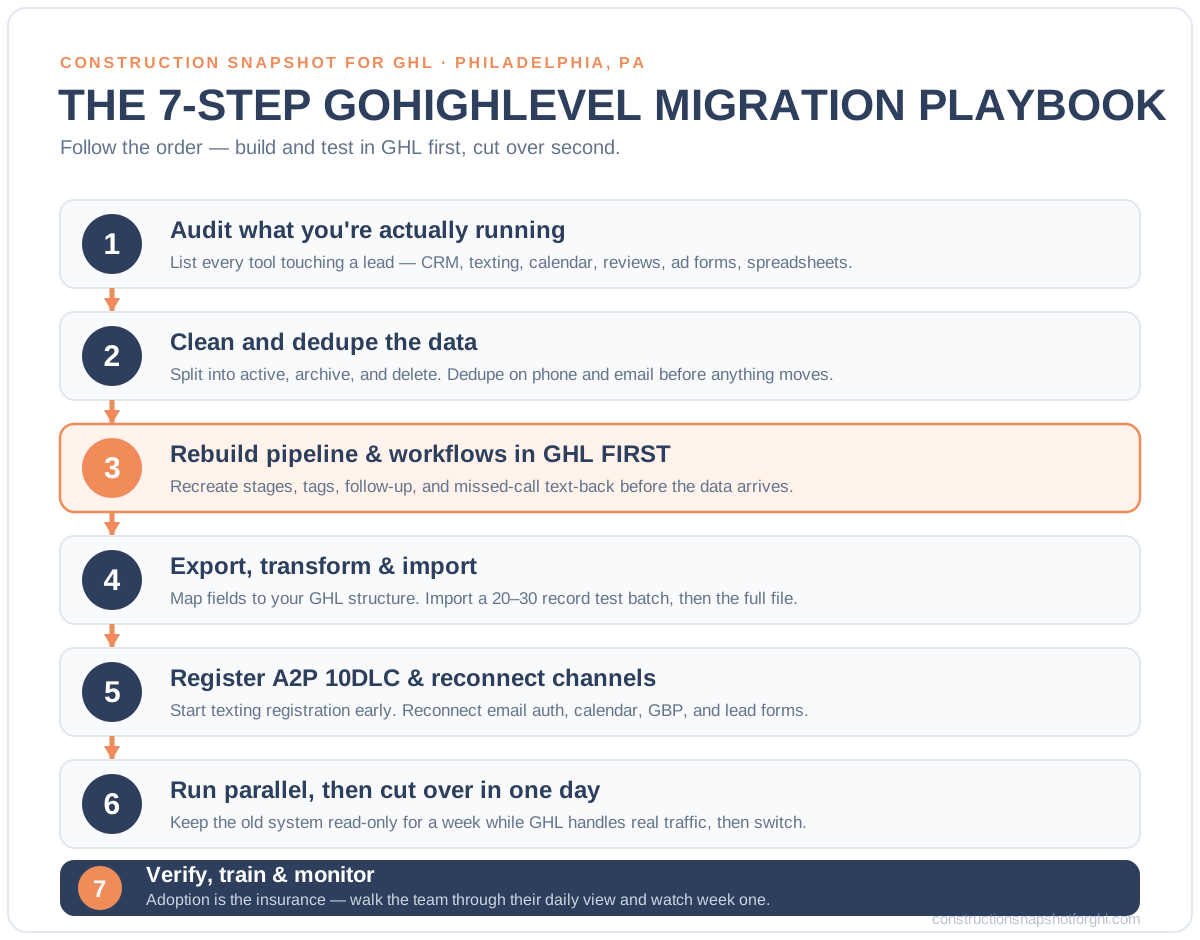
Step 1 — Audit what you’re actually running
Before you export anything, map the current stack. List every tool touching a lead: your CRM or project-management app, texting app, email tool, booking calendar, review platform, ad lead forms, Houzz/Angi inboxes, and any spreadsheet. For each, write down what data lives there and what automations fire from it. You cannot rebuild in GoHighLevel what you never documented — and the “hidden” workflow (the reminder text your office manager set up two years ago) is exactly the one that breaks silently.
Step 2 — Decide what to move, and clean the rest
A migration is your one free moment to throw out the garbage. Split your contacts into three buckets: active (live deals and recent leads), archive (old but worth keeping for database reactivation), and delete (duplicates, bad numbers, test records). Dedupe on phone and email. This is unglamorous back-office work, and it’s the single highest-leverage hour in the whole project — because everything you don’t clean now, you pay for forever inside the new CRM.
Step 3 — Rebuild your pipeline and workflows in GHL first
This is the step that separates a clean migration from a lead-losing one. In GoHighLevel, recreate the system before the data arrives: your pipeline stages (Lead → Qualified → Estimate Sent → Signed → In Production → Complete), your tags, your estimate follow-up sequences, your missed-call text-back, and your review requests. Match the stages to how your crew actually thinks about a job, not to a generic template — that’s how you win the adoption battle from Step “Risk two.” Model it on a proven construction sales pipeline in GoHighLevel rather than starting from a blank board.
Step 4 — Export, transform, and import the data
Now — and only now — move the data. Export each source to CSV, map the fields to your GHL structure (this is the “transform” in ETL: matching Job Type in the old system to Project Type in GHL, splitting a single “Name” column into first/last, normalizing phone formats). Import in a controlled order: contacts first, then opportunities into the pipeline stages you built in Step 3, then notes and history. Import a small test batch of 20–30 records first and eyeball it before you run the full file.
Step 5 — Register A2P/10DLC and reconnect your channels
Texting is where DIY migrations stall for weeks. To send SMS from GoHighLevel in the U.S., your business has to complete A2P 10DLC registration — brand and campaign approval through The Campaign Registry. Start this early; approval can take days, and until it clears, your follow-up texts won’t deliver. Reconnect the rest of your channels too: email domain authentication (SPF/DKIM), your booking calendar, Google Business Profile, and any Facebook/Instagram lead forms.
Step 6 — Run parallel, then cut over in one day
Keep your old system live but read-only for about a week while GoHighLevel handles the real traffic. Point new lead sources at GHL, watch the workflows fire, and fix anything that misbehaves while you still have a safety net. When everything’s verified, do the cutover on a single planned day — ideally a slow one, not the Monday after a holiday — and forward your tracked phone number and web forms fully to GHL.
Step 7 — Verify, train, and monitor
Migration isn’t done at cutover; it’s done when your team uses the system. Walk your estimator and office manager through their daily view, confirm every automation fired correctly on a test lead, and watch the first week closely. This is the adoption insurance that keeps you out of the failing half. Book a recurring 15-minute check for the first month to catch anything the test leads didn’t.
What a clean migration actually gets you
The point of all this care isn’t tidiness — it’s speed. Once your leads, pipeline, and automations live in one system that actually works, you can respond the instant a homeowner reaches out. And in this business, response speed is the whole game.
In the landmark MIT / InsideSales Lead Response Management study, companies that contacted a new online lead within five minutes were 21 times more likely to qualify it than those that waited just 30 minutes (Lead Response Management study). Harvard Business Review’s separate audit found firms that reached out within an hour were 7x more likely to have a meaningful conversation than those who waited even 60 minutes longer (HBR).
Relative likelihood of qualifying an online lead by response speed (30-minute response = 1x baseline). Source: MIT / Lead Response Management study.
You can’t hit five minutes by hand from a jobsite in Manayunk. A properly migrated GoHighLevel does it for you — missed-call text-back fires the second you can’t pick up, an AI receptionist books after-hours calls, and follow-up sequences nudge every estimate on schedule. That’s the difference between a CRM that’s just a database and one that actually books jobs. For the full argument, see speed-to-lead for contractors.
DIY migration vs. done-for-you
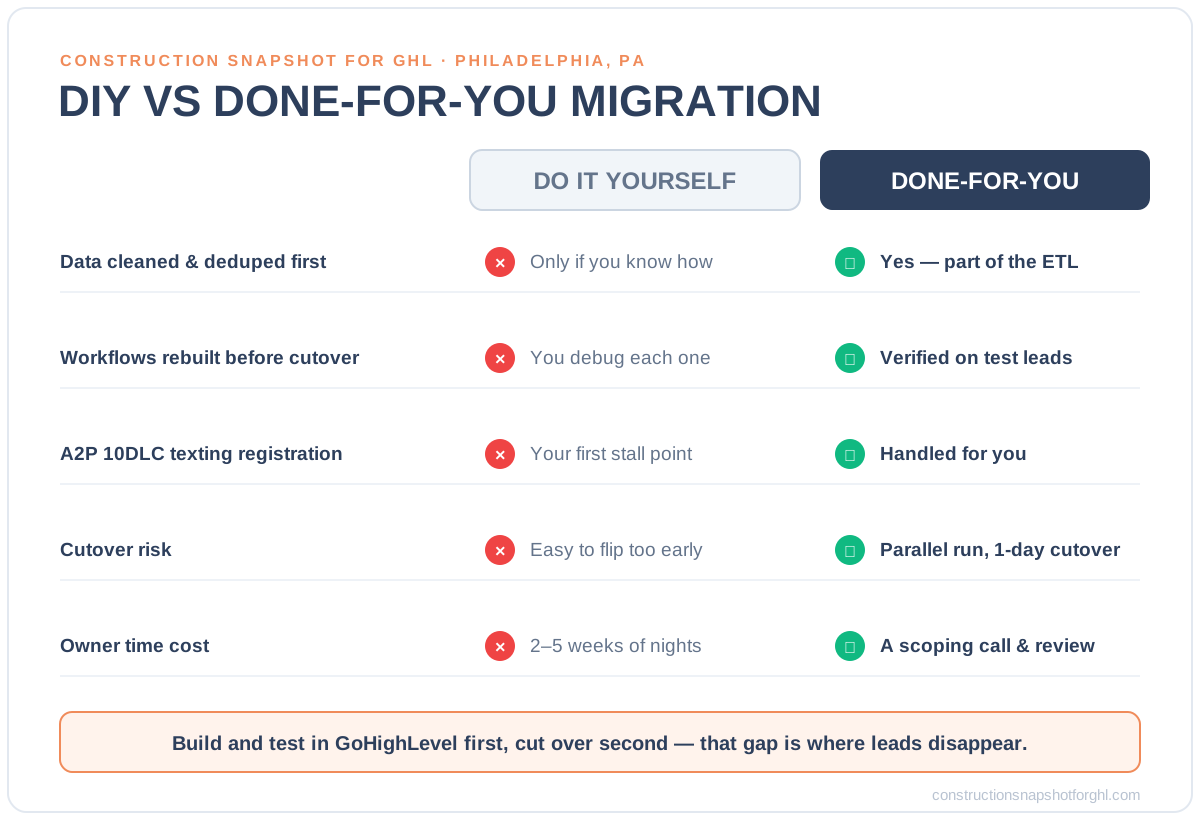
You have two honest paths: run the seven steps yourself, or hand them to a team that migrates contractors every week. Here’s how they compare on the things that decide whether you lose a lead.
Migrating to GoHighLevel: DIY vs. done-for-you
| Feature | Done-for-you migration | Do it yourself |
|---|---|---|
| Data cleaned & deduped first | Yes — part of the ETL | Only if you know how |
| Workflows rebuilt before cutover | Yes — verified on test leads | You build and debug each one |
| A2P/10DLC texting registration | Handled for you | Your first stall point |
| Cutover risk | Parallel run + one-day cutover | Easy to flip too early |
| Time cost to the owner | A scoping call + review | 2–5 weeks of nights |
| If something breaks at go-live | They fix it | You fix it, live |
DIY can work if you’re technical, have the calendar room, and enjoy debugging a texting registration at 11pm. For most Philadelphia contractors, the math favors done-for-you: a professional migration typically runs 2–5 weeks end to end with a fixed scope, versus weeks of the owner’s own nights — and the owner’s time is worth far more on the sales side than inside a field-mapping spreadsheet. The related build-out — connecting the tools GHL should talk to afterward — is covered in our GoHighLevel integration guide for contractors; a migration gets you onto GHL, integrations keep it in sync with Buildertrend, Procore, and QuickBooks.
Why the stakes are higher in Philadelphia
Philadelphia is a mature, crowded construction market — roughly 124,000 metro construction jobs (BLS) — and in a crowded market, speed and reliability are how you separate from the pack, not price. When a homeowner in Chestnut Hill wants a kitchen remodel, they’re messaging three contractors at once. The one whose system answers first, follows up on schedule, and never drops a thread wins — and the one mid-botched-migration loses by default.
That’s the real reason to migrate carefully rather than fast. A clean move onto GoHighLevel isn’t just a tidier back office; it’s a competitive weapon in a region where demand is steady but competition is fierce. Pair it with strong local SEO for your Philadelphia service area and you get both halves: more inbound, and a system that actually converts it. If you’d rather skip straight to a full prebuilt system, the general contractor snapshot installs the whole pipeline this migration would otherwise rebuild by hand.
Frequently asked questions
How long does it take to migrate a contractor to GoHighLevel?
A full CRM migration to GoHighLevel typically takes 2 to 5 weeks end to end, depending on how many systems you are moving off and how dirty the data is. That covers auditing your current stack, cleaning and deduping contacts, rebuilding your pipeline and workflows in GHL, importing the data, completing A2P/10DLC texting registration, running both systems in parallel, and doing a planned one-day cutover. The export itself is fast; the time goes into rebuilding and verifying so nothing breaks at go-live.
Will I lose any leads or data during the migration?
Not if it is sequenced correctly. Leads are lost when someone turns off the old system's lead capture before the new one is tested. The safe method is to rebuild and verify everything in GoHighLevel first, run both systems in parallel for about a week while GHL handles real traffic, and only then cut over in a single planned day. A tested ETL preserves contacts, pipeline stages, notes, and history, and duplicates are cleaned on the way in rather than carried across.
Can you migrate me off Buildertrend, JobNimbus, CoConstruct, or a spreadsheet?
Yes — any of them, plus HubSpot, Salesforce, or a stack of disconnected apps. We export contacts, pipelines, automations, calendars, custom fields, and history, transform the fields to match your GoHighLevel structure, and rebuild your workflows in GHL before go-live. Spreadsheets are common starting points and migrate cleanly once the columns are mapped and deduped.
What is A2P 10DLC and why does it matter for the migration?
A2P 10DLC is the U.S. carrier registration required to send business text messages from a standard 10-digit number, handled through The Campaign Registry. GoHighLevel cannot reliably deliver your SMS follow-ups until your brand and campaign are approved, and approval can take several days. That is why registration is started early in a migration — so your missed-call text-backs and estimate reminders are live the moment you cut over, not weeks later.
Should I clean my data before or during the migration?
During — it is your one free chance. A migration forces you to look at every record, so it is the ideal moment to dedupe on phone and email, archive dead leads for later reactivation, and delete test and bad-number records. Cleaning during the move means you start fresh in GoHighLevel instead of importing years of clutter that makes workflows misfire and reports untrustworthy.
About the author
Diego Marchetti spent twelve years running the office for a mid-size general contracting firm before moving into systems work full time. He has scoped, priced, and chased more change orders than he cares to count, and now builds the GoHighLevel workflows that keep lead-to-deposit pipelines from leaking. He writes about estimating discipline, sub coordination, and the unglamorous back-office habits — clean data and tested cutovers among them — that protect a builder’s margin.
Related posts
- GoHighLevel Integration for Atlanta Contractors: Replace a Stack of Disconnected Apps
- Best CRM for Contractors (2026): How to Choose the Right One
- The Construction Sales Pipeline in GoHighLevel: Stages That Actually Book Jobs
Sources
- U.S. Bureau of Labor Statistics — Philadelphia Area Employment (construction jobs, 2025)
- SuperOffice — CRM statistics: project failure and adoption
- IBM, via Harvard Business Review — Bad Data Costs the U.S. $3 Trillion Per Year
- MIT / InsideSales — Lead Response Management Study (21x within 5 minutes)
- Harvard Business Review — The Short Life of Online Sales Leads