As a construction business owner, managing client appointments can be one of the most time-consuming tasks. Between site visits, consultations, and follow-up meetings, it’s easy for scheduling to get out of control. And if you’re still using traditional methods like phone calls, emails, or paper calendars, there’s a good chance you’re spending more time on administration than running your business.
So, how can you simplify the process? Automated appointment scheduling is the solution. With the right scheduling tool, you can save time, reduce errors, and improve your client experience—all while keeping your business running smoothly.
In this article, we’ll explore how automated appointment scheduling can transform your construction business, making scheduling easier, cutting down on no-shows, and ultimately boosting your efficiency.
Key Takeaways
- How automated scheduling systems can streamline your construction business operations.
- The benefits of reducing no-shows and cancellations through automatic reminders.
- How to integrate an appointment scheduling system into your construction business.
- Pricing information for the top automated scheduling tools.
- Practical steps for implementing automated appointment scheduling to save time and improve client relations.
The Challenges of Managing Appointments in a Construction Business
Running a construction business involves balancing many different tasks, and managing appointments is one of the most challenging. Between clients requesting consultations, follow-up meetings, and urgent site visits, it’s easy to get overwhelmed with scheduling.
Here are some common challenges construction business owners face:
- Double bookings: Without an efficient system in place, you might accidentally book two appointments at the same time.
- No-shows: Clients may forget their appointments, wasting valuable time and disrupting your schedule.
- Manual scheduling: Scheduling appointments over the phone or via email takes up a lot of time, leaving less time for actual work.
- Missed opportunities: If you’re not able to schedule clients quickly or efficiently, you risk losing business to competitors.
These problems can affect your business’s efficiency and bottom line. But automated appointment scheduling can solve these issues with minimal effort. Let’s dive into how it works.
How Automated Appointment Scheduling Works for Construction Businesses
Automated appointment scheduling uses online software to allow clients to book appointments directly from your website, send them reminders, and sync appointments to your calendar without manual input. The entire process happens automatically, saving you time and reducing errors.
Here’s how automated appointment scheduling works in simple steps:
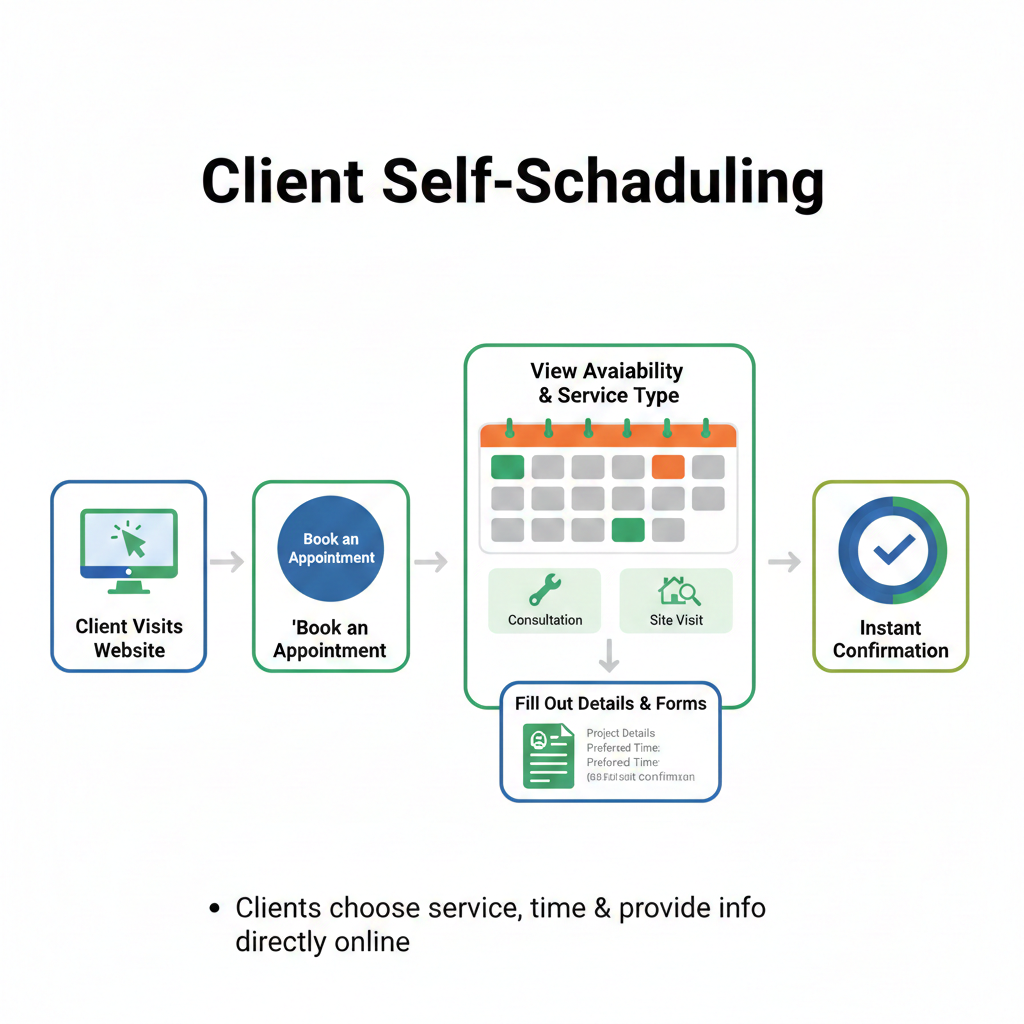
1. Client Self-Scheduling
With automated scheduling, clients can pick and book available time slots directly from your website. They can choose the type of service (consultation, site visit, etc.) and fill out any necessary forms, like project details or preferred time.
For example, a potential client visits your website, clicks the “Book an Appointment” button, and sees a calendar with available dates. They choose a time, fill out their details, and their appointment is instantly scheduled.
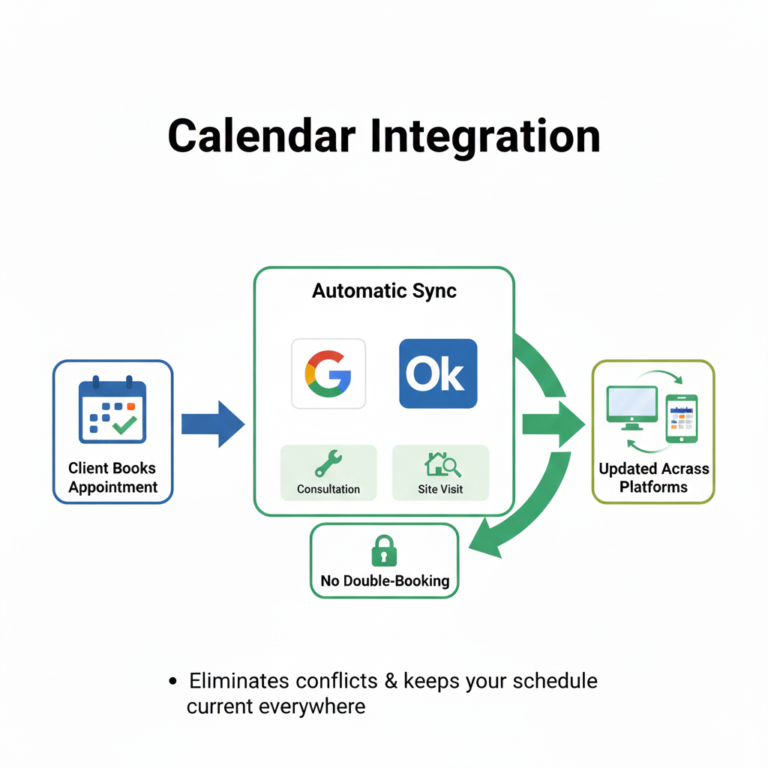
2. Calendar Integration
Once a client books an appointment, it automatically syncs with your calendar. This eliminates the risk of double booking, and everything is up-to-date across all platforms (like Google Calendar or Outlook).
For example, if a client books a consultation for Tuesday at 2 PM, that time will be blocked off in your calendar, and no other appointment can be booked during that time.
3. Automated Confirmations and Reminders
After the client books an appointment, they receive an automatic confirmation email or text message with the appointment details. As the appointment approaches, the system sends out automated reminders via email or SMS to reduce no-shows.
For example:
- Day 1 (Booking Confirmation): The Client gets a confirmation email with the details of their appointment.
- Day 2 (24-Hour Reminder): The client receives an email or SMS reminder 24 hours before their appointment.
- Day 3 (1-Hour Reminder): An SMS reminder is sent to the client an hour before their appointment to make sure they show up on time.
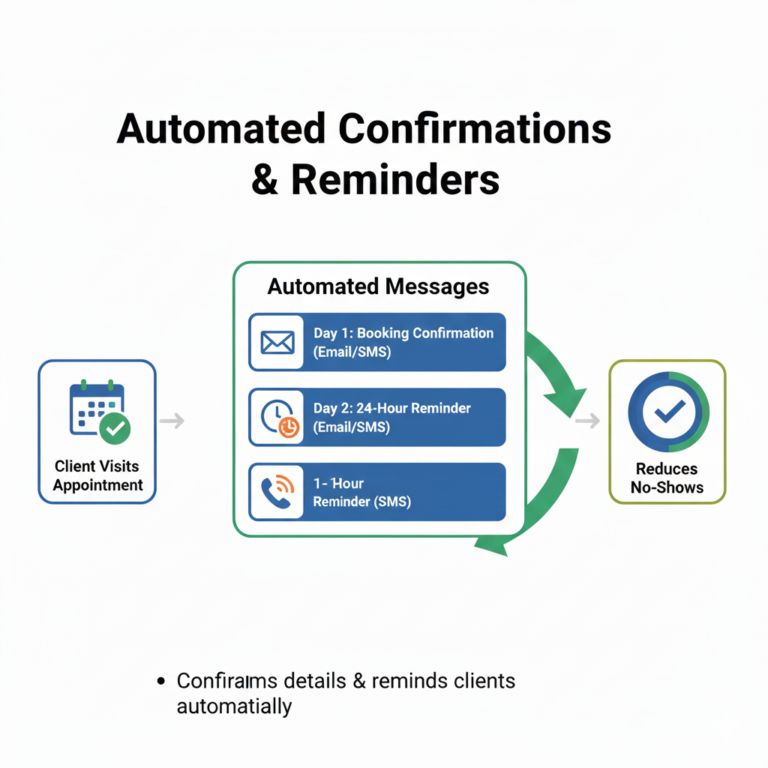
3. Automated Confirmations and Reminders
After the client books an appointment, they receive an automatic confirmation email or text message with the appointment details. As the appointment approaches, the system sends out automated reminders via email or SMS to reduce no-shows.
For example:
- Day 1 (Booking Confirmation): The Client gets a confirmation email with the details of their appointment.
- Day 2 (24-Hour Reminder): The client receives an email or SMS reminder 24 hours before their appointment.
- Day 3 (1-Hour Reminder): An SMS reminder is sent to the client an hour before their appointment to make sure they show up on time.
4. Easy Rescheduling and Cancellations
Clients can easily reschedule or cancel their appointments online. The system updates your calendar automatically, and both you and the client receive a notification.
For example, if a client needs to reschedule a site visit, they can click on a link in the confirmation email and choose a new time. The system updates your calendar, and you both receive a notification of the change.
5. Post-Appointment Follow-Up
After the appointment, automated systems can send follow-up emails asking for feedback or a review, keeping the client engaged and encouraging future business.
For example, after a consultation, the system might send an email asking the client to rate their experience or schedule the next step in their project.
The Benefits of Automated Appointment Scheduling for Construction Businesses
Reducing No-Shows
No-shows are a significant problem for construction business owners, leading to wasted time and frustration. Automated appointment scheduling systems reduce no-shows by sending clients timely reminders and confirmations. When clients know they have an appointment and receive multiple reminders, they are more likely to show up.
Saving Time and Reducing Errors
Manual scheduling can be time-consuming and prone to errors. With automated systems, the scheduling process is streamlined. Clients book their own appointments, and everything is synced automatically with your calendar. This frees up your time for more important tasks, such as managing projects and meeting with clients.
Improving Client Experience
Clients appreciate convenience. Automated scheduling allows them to book appointments at their convenience, without needing to call or email. It also provides them with instant confirmations and reminders, improving their overall experience with your business.
Enhancing Efficiency
With an automated system, there’s no need for back-and-forth communication to confirm or reschedule appointments. Everything happens automatically, reducing administrative workload and keeping your schedule organized. This efficiency leads to better time management and higher productivity.
Pricing for Automated Appointment Scheduling Tools
Several automated appointment scheduling tools are available, each with its own own pricing and features. Here’s a breakdown of some popular options for construction businesses:
1. GoHighLevel
Pricing: $97/month (Starter Plan), $297/month (Pro Plan), $497/month (Agency Plan)
Features: Appointment scheduling, CRM, automated reminders, client booking system, integrations with Google Calendar, email, and SMS reminders.
2. Calendly
Pricing: Free (Basic Plan), $8/month (Premium Plan), $12/month (Pro Plan)
Features: Client self-scheduling, Google Calendar integration, automated reminders, custom booking links, and team scheduling.
3. Acuity Scheduling
Pricing: Free (Basic Plan), $15/month (Emerging Plan), $25/month (Growing Plan)
Features: Customizable booking forms, automatic reminders, Google Calendar sync, and payment processing.
Each tool offers different features and pricing, so you’ll need to choose the one that best suits your construction business’s needs and budget.
Frequently Asked Questions
How does automated scheduling help reduce no-shows?
Can I customize the scheduling tool for my construction business?
Is it difficult to set up an automated scheduling system?
No, setting up automated scheduling is easy. Most tools offer simple, user-friendly setups and integrations with your website and calendar.
Can clients reschedule or cancel appointments?
Are there any hidden fees for using automated scheduling software?
No, the pricing for tools like Calendly and Acuity is transparent, and there are no hidden fees. However, premium features may be available at additional costs.
Conclusion
Automated appointment scheduling is an essential tool for construction business owners who want to save time, reduce no-shows, and improve client satisfaction. With easy-to-use tools like GoHighLevel, Calendly, and Acuity Scheduling, you can streamline your entire scheduling process, making it easier for clients to book appointments and for you to stay organized. By automating reminders, confirmations, and rescheduling, you can focus on what matters most—growing your business and serving your clients.
Start automating your appointments today and watch your construction business become more efficient, productive, and client-friendly!